
Best Membrane Keyboards in 2026: 15 Picks Compared on Specs
The Corsair K55 CORE TKL is the top pick in this guide. It has a tenkeyless layout, quiet membrane keys, spill resistance, 8-zone RGB and media keys, a combination the other 14 picks do not offer in one board. All picks were selected from listed specifications, including layout, connection, switch type and backlight. Prices are live and read from the store listing, so they change over time. These are spec-based choices, not test results.
13 picks from 188 keyboards that match this guide with a price we can quote today. Each price below is read live and stamped with the time it was read.
The short list
Who each pick suits
- For wireless flexibility: This tri-mode board lets you switch between Bluetooth, a 2.4GHz receiver and USB-C, which is useful when you move between a laptop and a desktop. See pick 3
- For games with many commands: Six dedicated macro keys and a media wheel make this board a strong fit for games that need repeated key bindings. See pick 4
- For quiet wireless office work: This rechargeable Bluetooth set pairs a keyboard and mouse with scissor-switch keys, which suits tidy, cable-free desks. See pick 13
The 13 picks, one by one
1 Best overall

Corsair K55 CORE TKL RGB Gaming Keyboard
- Size
- TKL (80%)
- Switches
- Membrane
$34.99 (as of 10/26/2026 23:30 PDT - Details)
The Corsair K55 CORE TKL has the strongest mix of useful extras in this pool: a tenkeyless layout, quiet membrane keys, spill resistance, 8-zone RGB and media keys. It keeps the desktop footprint small without giving up the function row, which the 60% picks here do. If you want one membrane board that covers gaming, typing and media, this is it.
Pros
- Tenkeyless layout with function row
- Quiet membrane keys stated in the model name
- Spill resistant
- Dedicated media keys
Cons
- 8-zone RGB rather than per-key RGB
- Connection type not stated by the seller
- No number pad for spreadsheet work
Good fit if
- Gamers who want a smaller desk footprint
- Users who need media keys on the keyboard
Skip if
- Users who must have a number pad
- Enthusiasts who want per-key RGB lighting
Verdict: The best overall membrane keyboard here for compact layouts and media extras.
2 Best 1800 form factor
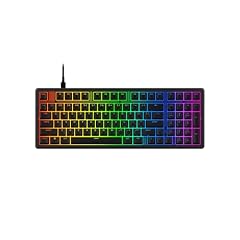
The HyperX Eve 1800 uses an 1800 form factor, keeping the navigation cluster and arrow keys in a shell that is shorter than a full-size board. Its 10-zone RGB and built-in media buttons give it a feature set similar to the Corsair K55 CORE TKL, but with more keys near the typing area. This is a middle ground for people who find TKL too small.
Pros
- 1800 form factor keeps navigation keys
- 10-zone customizable RGB
- Built-in media buttons
- Membrane switch type per the catalogue
Cons
- Connection type not stated by the seller
- No stated macro keys
Good fit if
- Users who need arrow and navigation keys regularly
- Gamers who want zone-level RGB without a full-size board
Skip if
- People who need a wireless option
- Users who want dedicated macro keys
Verdict: A space-saving alternative to full-size boards with the nav cluster intact.
3 Best wireless

Redragon K517 Pro Wireless Gaming Keyboard
- Size
- 96% to 98%
- Connection
- Wireless
- Switches
- Membrane
$34.01 (as of 10/26/2026 18:10 PDT - Details)
The Redragon K517 Pro is wireless with three connection paths: Bluetooth, 2.4GHz and USB-C. Its 96% to 98% layout keeps a number pad, which none of the TKL or compact wireless picks in this list offer. That makes it the flexible choice for people who switch between computers and still want a numpad.
Pros
- Tri-mode Bluetooth, 2.4GHz and USB-C
- 96% to 98% layout with number pad
- RGB backlit
- Mechanical feel in a membrane design
Cons
- Battery life not stated by the seller
- Mechanical feel is not a mechanical switch
Good fit if
- Users who move between multiple devices
- Typists who want a number pad in a wireless board
Skip if
- Users who want a full 104-key layout
- Users who prefer true mechanical switches
Verdict: A tri-mode wireless membrane board with the number pad intact.
4 Best for macro keys

Redragon K512 RGB Membrane Gaming Keyboard
- Size
- Full size
- Switches
- Membrane
$36.99 (as of 10/26/2026 18:10 PDT - Details)
The Redragon K512 is the only pick in this list that lists six dedicated macro keys, alongside a media wheel. For games that need repeated command bindings, that is more programmability than the media-button boards from Corsair and HyperX. It is a straight membrane keyboard with RGB backlighting.
Pros
- Six dedicated macro keys
- Media wheel
- RGB membrane backlighting
- Membrane switch type per the catalogue
Cons
- Layout not stated by the seller
- Connection type not stated by the seller
Good fit if
- MMO and MOBA players who bind many commands
- Users who want a media wheel on the keyboard
Skip if
- Users who need a compact or specific layout guarantee
- Users who want wireless operation
Verdict: The pick when you want dedicated macro keys on a membrane board.
5 Best full-size wired
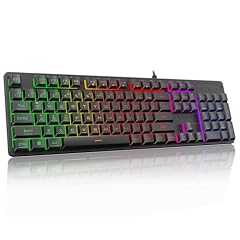
Redragon K521 Upgrade Rainbow LED Gaming Keyboard
- Size
- Full size
- Connection
- Wired
- Switches
- Membrane
$15.99 (as of 10/26/2026 18:10 PDT - Details)
The Redragon K521 is a full-size 104-key wired membrane keyboard with multimedia keys. Its layout gives you the number pad that the Corsair K55 CORE TKL and smaller picks omit. The rainbow LED backlight is more basic than the RGB on K512 or K517 Pro, but the full layout and wired connection are easy to rely on.
Pros
- Full 104-key layout
- Wired connection, no battery to charge
- Multimedia keys
- Membrane switch type per the catalogue
Cons
- Rainbow LED rather than per-key RGB
- No wireless mode
Good fit if
- Desktop users who need a number pad
- Office or home setups where the keyboard stays in place
Skip if
- Users who want per-key RGB lighting
- Users who want to switch to wireless
Verdict: A straightforward full-size wired membrane board for daily work and gaming.
6 Best wireless full size

Aula S99pro V2 Full Size Gaming Keyboard
- Size
- Full size
- Connection
- Wireless
- Switches
- Membrane
$36.89 (as of 10/26/2026 22:59 PDT - Details)
The Aula S99 Pro V2 is the only full-size wireless pick in this shortlist, combining a full-size layout with a cable-free desk. It is the answer if you want the comfort of a full-size keyboard and the convenience of wireless but do not need tri-mode switching. It lacks the connectivity flexibility of the Redragon K517 Pro.
Pros
- Full-size layout
- Wireless connection
- Membrane switch type per the catalogue
Cons
- No stated wired mode
- No stated backlight type
Good fit if
- Users who want a wireless full-size board
- People who prefer a simple one-connection setup
Skip if
- Users who want Bluetooth and 2.4GHz options
- Users who need a stated backlight type
Verdict: A simple wireless full-size membrane keyboard for cable-free typing.
7 Best 60% compact

MageGee Mini 60% Gaming Keyboard
- Size
- 60%
- Switches
- Membrane
$19.99 (as of 10/26/2026 17:05 PDT - Details)
The MageGee Mini is a 61-key 60% board with RGB backlighting and a stated waterproof design. It is the most portable layout in this list, trading the function row, arrow keys and number pad for a tiny footprint. Its compact size makes it a natural travel or small-desk pick.
Pros
- Compact 61-key 60% layout
- RGB backlit
- Waterproof stated in the listed name
- Membrane switch type per the catalogue
Cons
- Connection type not stated by the seller
- Listed name says 'mechanical' while the switch type field is membrane
- No number pad, function row or arrow keys
Good fit if
- Travelers who want a very small keyboard
- Minimalist desk setups
Skip if
- Users who need dedicated arrow keys
- Users who cannot confirm wired or wireless operation
Verdict: The smallest membrane pick here for ultra-compact RGB setups.
8 Best knob-equipped wireless

LexonElec M96 Wireless Gaming Keyboard
- Size
- 96% to 98%
- Connection
- Wireless
- Switches
- Membrane
$27.99 (as of 10/26/2026 16:09 PDT - Details)
The LexonElec M96 combines a wireless membrane board with a knob control, an unusual mix in this shortlist. Its 96% to 98% layout keeps a number pad, so you do not sacrifice data entry space for wireless freedom. RGB backlighting is listed, and the mechanical-feel name refers to the membrane key action.
Pros
- Wireless connection
- Knob control
- 96% to 98% layout with number pad
- RGB LED backlit
Cons
- No stated wired mode
- Mechanical feel is not a mechanical switch
Good fit if
- Users who want wireless plus a volume or control knob
- Number pad users who want a compact styling
Skip if
- Users who need tri-mode connectivity
- Users who want a full-size board
Verdict: A wireless membrane board with knob control and a number pad.
9 Best tri-mode with screen and knob

Tri-Mode Wireless Keyboard
- Size
- 96% to 98%
- Connection
- Wireless
- Switches
- Membrane
$23.99 (as of 10/26/2026 20:07 PDT - Details)
This ONIKUMA tri-mode board supports Bluetooth, 2.4GHz and wired USB, with a silent membrane feel, RGB backlighting, a display screen and a multimedia knob. It is the most connection-flexible pick alongside the Redragon K517 Pro, but adds the screen and knob that K517 Pro does not list. At 94 keys it keeps most of a full layout in a compact shell.
Pros
- Tri-mode Bluetooth, 2.4GHz and wired
- Display screen and multimedia knob
- Silent membrane keys stated in the listing name
- PBT keycaps stated in the listing name
Cons
- 94 keys rather than a full 104-key layout
- No stated battery life
Good fit if
- Users who switch between Bluetooth and 2.4GHz devices
- Users who want a display and knob in a wireless board
Skip if
- Users who need a full-size 104-key layout
- Users who want per-key RGB rather than RGB backlighting
Verdict: A tri-mode wireless membrane board with screen, knob and PBT keycaps.
10 Best ergonomic set

Perixx Periduo-614US
- Size
- Full size
- Connection
- Wireless
- Switches
- Membrane
- Mouse included
- Yes
$89.99 (as of 10/26/2026 18:07 PDT - Details)
The Perixx Periduo-614US is the only ergonomic pick in this list, combining a quiet wireless membrane keyboard with a vertical mouse and an adjustable palm rest. If typing comfort is the priority, this set addresses wrist posture directly. It trades RGB and macro features for a work-focused design.
Pros
- Ergonomic quiet keyboard and vertical mouse combo
- Adjustable palm rest
- Wireless connection
- Membrane switch type per the catalogue
Cons
- No backlight stated
- No stated layout size
Good fit if
- People who type for long sessions
- Users who want a vertical mouse with their keyboard
Skip if
- Gamers who want RGB backlighting
- Users who need a number pad guarantee
Verdict: A comfort-first wireless membrane set for desktop work.
11 Best keyboard-and-mouse combo

RedThunder K10 Wired Gaming Keyboard and Mouse and Wrist Rest Combo
- Size
- Full size
- Connection
- Wired
- Switches
- Membrane
- Mouse included
- Yes
$42.99 (as of 10/26/2026 19:05 PDT - Details)
The RedThunder K10 bundles a wired membrane keyboard, a mouse and a wrist rest, with RGB backlighting and anti-ghosting. Among the combo picks in this shortlist, it is the one with a stated wrist rest plus RGB. It is a single-box solution for a new gaming desk.
Pros
- Includes keyboard, mouse and wrist rest
- RGB backlit
- Wired connection
- Anti-ghosting listed
Cons
- Layout not stated by the seller
- Mechanical feel is not a mechanical switch
Good fit if
- First-time gaming setups that need mouse and keyboard together
- Users who want a wrist rest included
Skip if
- Users who already own a mouse
- Users who need a specific layout size
Verdict: A complete wired membrane desktop kit with mouse and wrist rest.
12 Best for Mac

Macally Small Wired Keyboard for Mac and Windows
- Connection
- Wired
- Switches
- Membrane
$29.99 (as of 10/26/2026 17:05 PDT - Details)
The Macally small wired keyboard is built for Mac and Windows with 78 scissor-switch keys and a compact USB design. Scissor-switch keys are a low-profile option within the membrane catalogue, and the stated size makes it an alternative to the gaming boards here. It is the pick when you want a familiar laptop-style feel on a desktop.
Pros
- 78 scissor-switch keys
- Works with Mac and Windows per the listing name
- Wired USB connection
- Compact size
Cons
- No backlight stated
- No number pad stated
Good fit if
- Mac users who want a small wired keyboard
- Users who prefer laptop-style scissor keys
Skip if
- Users who want RGB backlighting
- Users who need a number pad
Verdict: A compact scissor-switch membrane board for Mac and Windows.
13 Best wireless rechargeable combo

MEETION Rechargeable Bluetooth Keyboard and Mouse Combo
- Size
- Full size
- Connection
- Wireless
- Switches
- Membrane
- Mouse included
- Yes
$28.99 (as of 10/26/2026 17:06 PDT - Details)
The MEETION set pairs a rechargeable Bluetooth keyboard with a mouse, using scissor-switch keys. It is a quiet, cable-free option for mixed work, and the rechargeable battery is stated in the listing name. It does not have the tri-mode flexibility of the Redragon K517 Pro, but it includes a mouse in the box.
Pros
- Bluetooth wireless
- Rechargeable battery stated in the listing name
- Scissor-switch keys
- Includes a mouse
Cons
- No stated layout size
- No backlight stated
Good fit if
- Users who want a wireless keyboard and mouse combo
- Quiet office setups
Skip if
- Users who want a number pad guarantee
- Users who want RGB backlighting
Verdict: A rechargeable Bluetooth membrane combo for tidy wireless workspaces.
Comparison table
| # | Keyboard | Size | Connection | Switches | Mouse included | Hot-swappable |
|---|---|---|---|---|---|---|
| 1 | Corsair K55 CORE TKL RGB Gaming Keyboard | TKL (80%) | not stated | Membrane | not stated | not stated |
| 2 | HyperX Eve 1800 | 96% to 98% | not stated | Membrane | not stated | not stated |
| 3 | Redragon K517 Pro Wireless Gaming Keyboard | 96% to 98% | Wireless | Membrane | not stated | not stated |
| 4 | Redragon K512 RGB Membrane Gaming Keyboard | Full size | not stated | Membrane | not stated | not stated |
| 5 | Redragon K521 Upgrade Rainbow LED Gaming Keyboard | Full size | Wired | Membrane | not stated | not stated |
| 6 | Aula S99pro V2 Full Size Gaming Keyboard | Full size | Wireless | Membrane | not stated | not stated |
| 7 | MageGee Mini 60% Gaming Keyboard | 60% | not stated | Membrane | not stated | not stated |
| 8 | LexonElec M96 Wireless Gaming Keyboard | 96% to 98% | Wireless | Membrane | not stated | not stated |
| 9 | Tri-Mode Wireless Keyboard | 96% to 98% | Wireless | Membrane | not stated | not stated |
| 10 | Perixx Periduo-614US | Full size | Wireless | Membrane | Yes | not stated |
| 11 | RedThunder K10 Wired Gaming Keyboard and Mouse and Wrist Rest Combo | Full size | Wired | Membrane | Yes | not stated |
| 12 | Macally Small Wired Keyboard for Mac and Windows | not stated | Wired | Membrane | not stated | not stated |
| 13 | MEETION Rechargeable Bluetooth Keyboard and Mouse Combo | Full size | Wireless | Membrane | Yes | not stated |
How this list was made
The source data contains 26 membrane keyboards listed by the seller. From those, duplicates, reseller configurations without a stated brand, and entries with no stated layout or connection were removed when a comparable pick covered the same ground, leaving the 15 below. Each pick is matched to its listed specifications: switch type, layout, connection, backlight, extra keys, and included mouse. Prices shown beside each pick are read live from the store listing and change over time. No one at the site has used these keyboards, so all awards rely on the listed specifications and the makers' published information.
Choosing the right one
Membrane or mechanical feel: read the switch type
All 15 picks in this guide are listed as membrane keyboards. Several listing names include the phrase 'mechanical feel' or 'mechanical feeling.' That phrase refers to shaping the membrane key action to feel firmer or more tactile; it is not the same as a mechanical switch keyboard. When you compare models, check the switch type field the same way we did: membrane, not mechanical.
Layout: match the keyboard to your desk and work
Layout is the first filter. A 60% board such as the MageGee Mini drops the number pad, function row and arrow keys for the smallest footprint. A 65% board like the GEODMAER adds arrow keys while staying compact. TKL keeps the function row and drops the number pad. In this pool, 96% to 98% is the category used for compact full-size boards, with 94 or 98-key examples. Full-size 104-key boards give you everything but take the most space.
Connection: wired, wireless and tri-mode
Wired membrane keyboards need no battery and are ready when you plug them in. Wireless options use Bluetooth or a 2.4GHz receiver, and Bluetooth is one of the two radios defined by the Bluetooth standard: Bluetooth Classic and Bluetooth LE. Tri-mode boards such as the Redragon K517 Pro and the ONIKUMA pick add wired USB as a fallback, so you can switch between devices without changing keyboards. If you move between a laptop and a desktop, tri-mode is worth the extra flexibility.
Backlight: LED, RGB and zones
Backlighting is described differently across this pool. Some boards say only 'LED backlit' or 'rainbow LED'; those usually offer a fixed or preset color pattern. Others say 'RGB,' which means colors can be changed, and some specify zones: the Corsair K55 CORE TKL has 8-zone RGB, and the HyperX Eve 1800 has 10-zone RGB. If you want per-key effects, look for a listing that says per-key RGB, since zone-based boards do not offer that level of control.
Extra controls: macros, media keys, knobs and displays
Extra keys can change how a board feels in daily use. Dedicated macro keys, like the six on the Redragon K512, are useful for games with many commands. Media keys and a media wheel let you adjust audio without leaving the keyboard. A knob is a volume-style control on boards such as the LexonElec M96 and FURYCUBE, and a display screen adds a place for status information. Windows also documents its own keyboard shortcuts, so even boards without extra keys can cover common commands with key combinations.
Ergonomics and desk setup
OSHA's computer workstation guidance notes that keyboard height and placement matter as much as the keyboard itself. The keyboard should sit directly in front of you, with your shoulders relaxed, your elbows close to your body and your wrists straight. Adjustable feet, a palm rest and an ergonomic design like the Perixx Periduo set can help you reach that neutral posture. If your desk or chair cannot be adjusted, a keyboard tray with height and tilt control is one option.
Questions
Are membrane keyboards good for gaming?
Membrane keyboards can handle gaming well when they list anti-ghosting or no-conflict support, as several picks here do, because those features help multiple simultaneous key presses register. They are quiet and light. They do not offer the same switch feel as mechanical keyboards, but for many games a membrane board with media keys and RGB is enough.
What does 'mechanical feeling' mean on a membrane keyboard?
It is a marketing term used by some sellers to describe the tactile response of a membrane keyboard. The product name may say 'mechanical feeling' or 'mechanical' while the switch type in the catalogue is still membrane. A true mechanical keyboard uses individual mechanical switches under each key. If that distinction matters, check the switch type field and the maker's published spec page before buying.
Which layout should I choose?
Choose 60% if you want the smallest board and can live without the function row, arrow keys and number pad. Choose 65% if you want arrow keys in a compact body. Choose TKL if you want the function row but not the number pad. Choose 96% to 98% if you want a number pad in a tighter shell. Choose full size if you want the complete 104-key layout.
What is tri-mode wireless?
Tri-mode means the keyboard accepts three connection paths: Bluetooth, a 2.4GHz wireless receiver and a wired USB cable. It lets you switch between a phone, laptop and desktop without changing keyboards. In this guide, the Redragon K517 Pro and the ONIKUMA tri-mode pick are the clear examples. Check the listing for battery life details, because tri-mode boards run on internal batteries.
Do membrane keyboards need drivers or software?
Many membrane keyboards are plug-and-play and work without special software, especially simple wired models. The position of a key is still sent to the computer through standard HID, the USB interface class that defines keyboard communication. Boards with macros, RGB zones, displays or knobs may use maker software to program extra functions. Check the listing for software requirements if those features matter to you.
How should I position a keyboard to avoid wrist strain?
Place the keyboard directly in front of you, with your shoulders relaxed, your elbows close to your body and your wrists straight and level with your forearms. Raise or lower the chair or desk so the keyboard is about elbow height. Adjust the keyboard feet to achieve a neutral wrist posture. OSHA's workstation guidance covers these points in detail and is a good reference for setup changes.
What changed
- : First published.