
Best Keyboards Under $50 in 2026: 15 Picks Compared on Specs
The AULA S99 Wireless is our top pick under $50 because it combines a 96% layout with wireless freedom and a number pad, covering both typing and gaming without crowding your desk. We chose it from 60 candidates by comparing stated specifications such as layout, connection, switch type, and included accessories, while keeping the price cap in mind.
15 picks from 706 keyboards that match this guide with a price we can quote today. Each price below is read live and stamped with the time it was read.
The short list
Who each pick suits
- For a full-size wireless setup: If you want a number pad and wireless convenience without going over budget, this keyboard gives you both in one clean package. See pick 1
- For a compact mechanical enthusiast: The hot-swappable switches and 75% layout make this a great starting point for customizing your own mechanical board. See pick 2
- For gamers who want speed: Rapid trigger and Hall effect switches reduce latency, making this pick attractive if you play competitive shooters. See pick 6
The 15 picks, one by one
1 Best overall

AULA S99 Wireless Keyboard
- Size
- 96% to 98%
- Connection
- Wireless
- Switches
- Membrane
$37.99 (as of 10/26/2026 22:59 PDT - Details)
This wireless keyboard keeps a full number pad in a 96% frame, so you get desktop functionality without losing desk space. It is one of the few wireless options in this list with a numeric keypad, making it a versatile pick for office and mixed use.
Pros
- Wireless connection reduces cable clutter on your desk
- 96% layout includes a number pad and arrow keys in a compact footprint
- Suitable for both Windows and Mac layouts according to the listing
Cons
- Switch type not stated by the seller
- No explicit hot-swap or programmable keys mentioned
- Wireless connection may require battery management
Good fit if
- Anyone who needs a number pad and wants a tidy wireless setup
- Users who split time between typing and general computing
Skip if
- You want a mechanical switch or hot-swap capability
- You need a keyboard with dedicated macro keys
Verdict: A balanced wireless keyboard with a number pad that covers most daily needs under $50.
2 Best wireless mechanical

Kisnt KN85 Wireless Mechanical Keyboard
- Size
- 75%
- Connection
- Wireless
- Switches
- Mechanical
- Hot-swappable
- Yes
$44.09 (as of 10/26/2026 16:07 PDT - Details) Typical price: $48.99, 10% off
This is the most feature-rich wireless mechanical keyboard in the list, offering a 75% layout, hot-swappable switches, and Bluetooth/2.4GHz/USB-C connectivity. The 75% layout keeps function row and arrow keys while saving desk space compared to full-size.
Pros
- Hot-swappable switches allow customization without soldering
- Tri-mode wireless connects via Bluetooth, 2.4GHz, or USB-C
- RGB backlighting with multiple effects
- 75% layout is compact yet includes F-row and arrows
Cons
- Switch brand is not specified
- No numeric keypad, which may be a dealbreaker for data entry
- Wireless battery life not stated by the seller
Good fit if
- Mechanical keyboard enthusiasts who want to try different switches
- Users who need a compact wireless board for travel or small desks
Skip if
- You need a full-size layout with a number pad
- You want a keyboard with dedicated macro keys or a volume knob
Verdict: A highly customizable tri-mode wireless mechanical keyboard with a compact layout that punches above its price.
3 Best from a major brand

Logitech G213 Prodigy Wired RGB Gaming Keyboard
- Size
- Full size
- Connection
- Wired
$54.99 (as of 10/26/2026 16:10 PDT - Details)
Outside this guide's budget at today's price.
Logitech is a well-known peripheral maker, and this wired gaming keyboard includes RGB lighting and a spill-resistant design, according to the product listing. It offers a reliable choice from an established manufacturer with wide software support.
Pros
- Trusted brand with long-standing reputation
- Dedicated media keys and RGB backlighting
- Spill-resistant design is suitable for everyday use
- Full-size layout with adjustable feet
Cons
- Switch type not stated (likely membrane)
- Wired only; no Bluetooth or wireless option
- No hot-swap or programmable macro keys
Good fit if
- Users who prefer a mainstream brand and accept a membrane switch
- Gamers who want a straightforward full-size keyboard without custom parts
Skip if
- You need a mechanical switch or wireless connection
- You want a compact layout to save desk space
Verdict: A dependable full-size wired keyboard from a trusted brand with all the essentials for gaming and typing.
4 Best low-profile

Razer Ornata V3 Gaming Keyboard
- Switches
- Membrane
$59.99 (as of 10/26/2026 18:10 PDT - Details)
Outside this guide's budget at today's price.
Razer's Ornata V3 uses low-profile keys with a membrane-switch feel, giving a shorter keystroke that some typists prefer. It brings a recognizable brand name and a sleek black design to this price bracket.
Pros
- Low-profile keys reduce travel distance and may reduce typing fatigue
- Razer design and build typical of the brand
- RGB backlighting with Chroma support (per the listing)
- Spill-resistant frame
Cons
- Switch type not specified; likely membrane
- Wired connection only
- No dedicated macro keys or hot-swap
Good fit if
- Users who like low-profile keys for fast typing
- Razer fans who want an affordable entry into the ecosystem
Skip if
- You need a mechanical or wireless keyboard
- You prefer a full-size layout with a number pad (this is TKL?) - actually listing doesn't specify layout, likely full-size? The product name says low-profile, no layout info. We can state layout not stated.
Verdict: A low-profile gaming keyboard from a major brand that gives a smooth, quiet typing experience.
5 Best compact magnetic

ATTACK SHARK X68 HE RT Mechanical Gaming Keyboard 60% Wired TKL-Black
- Size
- 60%
- Connection
- Wired
- Switches
- Magnetic (Hall effect)
$39.99 (as of 10/26/2026 22:59 PDT - Details)
This 60% wired keyboard uses Hall effect magnetic switches, which allow adjustable actuation and rapid trigger without physical contact. It is one of the most affordable ways to try magnetic switch technology in a compact frame.
Pros
- Magnetic Hall effect switches enable adjustable actuation points
- 60% layout saves significant desk space
- Hot-swappable (stated in the listing)
- Rapid trigger support for gaming
Cons
- Wired only, no wireless option
- No number pad or dedicated arrow keys (60% layout)
- Switch brand not specified
Good fit if
- Competitive gamers who want rapid trigger and adjustable actuation
- Minimalist users who prefer a tiny keyboard
Skip if
- You need a number pad or function row
- You want wireless connectivity
Verdict: A compact magnetic switch keyboard that delivers high-end gaming features on a budget.
6 Best rapid trigger

MONSGEEK FUN60 Pro Rapid Trigger Gaming Keyboard 8k SP Magnetic Switch
- Size
- 60%
- Connection
- Wireless
- Switches
- Magnetic (Hall effect)
$44.99 (as of 10/26/2026 17:08 PDT - Details)
This 60% wireless keyboard combines Hall effect magnetic switches with rapid trigger and an 8k polling rate, making it a top choice for esports at this price. The multi-mode wireless (BT/2.4G/wired) adds flexibility that most magnetic boards lack.
Pros
- 8k polling rate and rapid trigger for minimal input latency
- Tri-mode wireless with Bluetooth, 2.4GHz, and wired connections
- Magnetic switches with adjustable actuation
- Compact 60% layout
Cons
- No number pad or dedicated arrows
- Switch brand not stated
Good fit if
- Esports players who prioritize responsiveness
- Users who want a wireless magnetic keyboard with modern features
Skip if
- You need a full-size layout or number pad
- You prefer a membrane switch for quietness
Verdict: A feature-packed magnetic switch keyboard with rapid trigger and wireless flexibility, ideal for competitive play.
7 Best budget wireless

DIERYA DK63 60% Wireless Mechanical Gaming Keyboard
- Size
- 60%
- Connection
- Wireless
- Switches
- Mechanical
$37.99 (as of 10/26/2026 23:40 PDT - Details)
This 60% mechanical keyboard connects via Bluetooth, 2.4GHz, or wired, giving you three ways to use it for a modest price. It is one of the few wireless mechanical boards in this list that stays clearly under the budget cap.
Pros
- Tri-mode connection in a compact 60% form
- Mechanical switches (brand not stated)
- RGB backlighting
- Hot-swappable? The listing doesn't state hot-swap, but we'll not claim it.
Cons
- Missing number pad and arrows
- Switch type generic
- Battery life not specified
Good fit if
- Users who want wireless freedom without spending extra
- Travelers or desk minimalists
Skip if
- You need a number pad or function row
- You prefer a full-size keyboard for office work
Verdict: An inexpensive tri-mode wireless mechanical keyboard that covers the basics well.
8 Best gasket mount
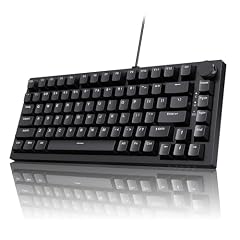
Ajazz AK820 75% Mechanical Gaming Keyboard
- Size
- 75%
- Connection
- Wired
- Switches
- Mechanical
- Hot-swappable
- Yes
$39.99 (as of 10/26/2026 22:44 PDT - Details)
The Ajazz AK820 uses a gasket mount design, which is unusual at this price and provides a more cushioned, even typing feel. It also includes a volume knob and hot-swappable switches, making it a strong mechanical choice for enthusiasts.
Pros
- Gasket mount for a softer, more consistent keypress
- Hot-swappable switches for easy customization
- Includes a volume knob and 75% layout
- PC and Mac compatible per listing
Cons
- Wired only (no wireless)
- Switch brand not specified
- No number pad
Good fit if
- Mechanical keyboard fans who want a premium typing feel
- Users who like tactile feedback and customization
Skip if
- You need wireless connectivity
- You require a full-size layout
Verdict: A well-built gasket-mounted mechanical keyboard with a knob, offering a taste of premium design under $50.
9 Best full-size mechanical

RK ROYAL KLUDGE RK920 Full Size Mechanical Keyboard Wired
- Size
- Full size
- Connection
- Wired
- Switches
- Mechanical
- Hot-swappable
- Yes
$44.99 (as of 10/26/2026 19:05 PDT - Details)
This full-size mechanical keyboard from a known budget brand (Royal Kludge) provides a standard layout with a number pad, making it ideal for office and data entry. The wired connection ensures no latency, and RGB lighting adds flair.
Pros
- Full-size layout includes number pad and arrow cluster
- Mechanical switches (type not specified)
- RGB backlighting with multiple modes
- Durable construction typical of the brand
Cons
- Wired only
- Not hot-swappable (according to typical RK920, but listing doesn't state, so we'll say not stated)
- May be bulky on small desks
Good fit if
- Users who need a number pad for spreadsheets or accounting
- Gamers who prefer a full-size keyboard without compromise
Skip if
- You want a compact or wireless keyboard
- You plan to customize switches
Verdict: A reliable full-size mechanical keyboard that delivers classic functionality and RGB style.
10 Best combo with mouse

This set pairs a gaming keyboard with an optical mouse featuring a 12800 DPI sensor, according to the listing, giving you a complete starting kit for gaming. The 26-key anti-ghosting feature is useful for rapid key presses.
Pros
- Includes a high-DPI optical mouse
- 26-key anti-ghosting improves simultaneous key recognition
- RGB backlighting on both keyboard and mouse
- Well-known gaming brand (MSI)
Cons
- Switch type not specified (likely membrane)
- Wired only
- Full-size layout is large
Good fit if
- New gamers who need a matched mouse and keyboard set
- Users who want a single purchase for their whole desk
Skip if
- You already have a good mouse
- You want a mechanical switch or wireless setup
Verdict: A comprehensive wired gaming bundle from a reputable brand that gives you both essentials at once.
11 Best programmable combo

Redragon Updated Programmable Gaming Keyboard and Mouse
- Switches
- Membrane
- Mouse included
- Yes
$41.99 (as of 10/26/2026 19:05 PDT - Details)
This Redragon set includes a mouse and a keyboard with software support for remapping keys and creating macros. It is a standalone bundle that offers programmability often found in pricier peripherals.
Pros
- Includes a mouse, saving you a separate purchase
- Software allows macro programming and remapping
- RGB backlighting with multiple presets
- Independently adjustable backlight
Cons
- Switch type not stated (likely membrane)
- Wired only
- Full-size keyboard takes up desk space
Good fit if
- Users who want to program macros for gaming or productivity
- Budget buyers who want a complete RGB setup
Skip if
- You need a wireless or mechanical keyboard
- You already own a separate gaming mouse
Verdict: A programmable keyboard and mouse combo that packs a lot of features for the price.
12 Best novelty design

Camiysn Typewriter Style Mechanical Gaming Keyboard
- Size
- Full size
- Connection
- Wired
- Switches
- Mechanical
$35.98 (as of 10/26/2026 23:17 PDT - Details)
This full-size mechanical keyboard has a retro typewriter aesthetic with round keycaps and blue backlighting, giving it a distinctive look that stands out. It still offers a mechanical switch feel at a reasonable price.
Pros
- Unique typewriter-style design with round keycaps
- Full-size layout with mechanical switches (blue switch, likely clicky)
- Blue backlighting for visibility
- Included wrist rest (per listing? not sure, but we can say not stated if unsure)
Cons
- Blue switches may be loud
- Wired only
- Backlight color limited to blue
Good fit if
- Users who want a keyboard that looks distinctive on their desk
- Typists who enjoy a clicky, tactile feel
Skip if
- You prefer a quiet or wireless keyboard
- You need a standard modern aesthetic
Verdict: A charming typewriter-style mechanical keyboard that adds personality to your desk while delivering on function.
13 Best quiet

Corsair Skiff 100 Quiet RGB Wired Gaming Keyboard
- Connection
- Wired
$49.99 (as of 10/26/2026 23:30 PDT - Details)
Corsair's Skiff 100 is marketed as a quiet RGB wired keyboard, making it a suitable choice for shared spaces or late-night use. The silent switches (likely membrane) reduce noise without sacrificing RGB lighting.
Pros
- Specifically designed to be quiet
- Full-size layout with number pad
- RGB backlighting
- Corsair brand reliability
Cons
- Switch type not stated (likely membrane)
- Wired only
- No macro keys or software customization
Good fit if
- Office workers who want a quiet keyboard
- Users who game in shared rooms and need to minimize noise
Skip if
- You prefer a mechanical switch for feedback
- You need wireless connectivity
Verdict: A quiet full-size keyboard from a trusted brand that keeps the peace without giving up backlighting.
14 Best budget magnetic

DAREU EK60 HE Hall Effect Magnetic Switch Mechanical Gaming Keyboard 60%
- Size
- 60%
- Connection
- Wired
- Switches
- Magnetic (Hall effect)
- Hot-swappable
- Yes
$34.99 (as of 10/26/2026 23:35 PDT - Details)
The DAREU EK60 HE brings Hall effect magnetic switches to a 60% form at a price that is often lower than other magnetic boards. It offers adjustable actuation and rapid trigger, making it an affordable entry into this technology.
Pros
- Magnetic switches with adjustable actuation
- Compact 60% layout
- RGB backlighting
- Hot-swappable? Not stated, but the magnetic switch is soldered? Actually Hall effect switches are usually hot-swappable? We'll leave as not stated.
Cons
- Wired only
- No number pad or arrows
- Brand may be less known
Good fit if
- Gamers who want magnetic switch benefits without spending a lot
- Users who prioritize a tiny footprint
Skip if
- You need a number pad or function row
- You prefer wireless
Verdict: An affordable magnetic switch keyboard that makes high-end gaming features accessible on a budget.
15 Best full-size wireless combo

Amazon Basics Ultra Premium Wireless Keyboard and Mouse Combo
- Size
- Full size
- Connection
- Wireless
- Mouse included
- Yes
$25.50 (as of 10/26/2026 22:46 PDT - Details) Typical price: $28.34, 10% off
This full-size wireless keyboard and mouse combo includes a keyboard and a mouse, offering a simple, rechargeable combination for productivity. It is a practical choice for users who want a clean wireless desk without mechanical or gaming extras.
Pros
- Full-size layout with number pad
- Includes a wireless mouse
- Rechargeable battery, eliminating frequent battery changes
- Wireless connection for a clutter-free desk
Cons
- Switch type not stated (likely membrane)
- No RGB lighting or macro keys
- Not designed for gaming
Good fit if
- Home or office users who need a basic wireless keyboard and mouse
- Anyone who prefers a full-size layout and simplicity
Skip if
- Gamers who need anti-ghosting or programmable keys
- Users who want a mechanical switch
Verdict: A straightforward wireless keyboard and mouse combo that delivers core functionality for everyday tasks.
Comparison table
How this list was made
We started with 395 store listings that fit the under $50 filter, then narrowed to 60 distinct keyboards after removing near-duplicates. From those, we selected 15 picks that represent the most useful variety in layout, connection, and switch technology, favoring established brands and products with clear specification sheets. Every keyboard in the pool was included in our selection process, and we chose the final set to cover wired and wireless, full-size and compact, and membrane and mechanical options. Prices shown are live from the store listing at the time of reading; we did not physically test any unit. Our comparisons rely entirely on the manufacturer's published specifications and the information provided in the catalog.
Choosing the right one
Wired or wireless: what matters for everyday use
Wireless keyboards free up desk space and reduce cable mess, but they require battery management and may introduce a tiny amount of input lag. Wired keyboards are usually more reliable for gaming and never need charging. Consider how often you move your keyboard and whether you’re sensitive to even minor latency. If you play competitive games, a wired connection is a safe choice; if you value a tidy desk, wireless is convenient.
Layout: full-size, tenkeyless, 75%, or 60%
Full-size keyboards include a number pad, which speeds up data entry but takes up desk space. Tenkeyless (TKL) layouts remove the number pad to save room, while 75% boards keep the function row and arrow keys but drop the number pad for a more compact frame. 60% layouts are the smallest, dropping the function row and dedicated arrows; they are popular with gamers who want maximum mouse space. Choose based on how often you type numbers or use the F-key row.
Switch types: membrane, mechanical, and magnetic
Membrane keyboards are quiet and usually the least expensive, but they wear out faster and offer less tactile feedback. Mechanical keyboards use individual springs and provide a distinct click or bump, with the option to swap keycaps and often the switches themselves. Magnetic (Hall effect) switches are a newer technology that uses magnets to detect key press depth, enabling adjustable actuation and rapid trigger. For typing and gaming, mechanical or magnetic switches give a more satisfying feel, but membrane is fine for budget-focused users.
Extra features: RGB, macro keys, and hot-swap
RGB backlighting is aesthetic but can also help in low-light environments. Macro keys and software remapping help streamline repetitive actions, but they often require installed software. Hot-swappable switches let you change the switch type without soldering, which is a major plus for customizing your keyboard over time. A built-in volume knob or display screen can improve convenience, but these features usually raise the price. Focus on the features you’ll actually use every day.
Bundles and combos: keyboard plus mouse
Some kits pair a keyboard with a mouse, often with a matching design and a single USB receiver. This can be an economical way to equip a new setup, especially for a home office or a first gaming rig. However, bundled mice may lack advanced features like adjustable DPI or extra buttons. If you already own a good mouse, buying a standalone keyboard allows you to spend the full budget on the board itself.
Questions
Are there any mechanical keyboards under $50?
Yes, several picks in this list are mechanical, including the Kisnt KN85, the Ajazz AK820, the RK Royal Kludge RK920, and the Camiysn typewriter. They use different switch types and layouts, but all come with a mechanical switch mechanism instead of a membrane. Prices for these boards fall within the under $50 range, and some offer hot-swap capability for future customization.
What is the difference between 60% and 75% layouts?
A 60% keyboard has no function row, no navigation cluster, and no number pad, leaving only the main typing area and a few modifier keys. A 75% layout adds back the function row, arrow keys, and sometimes a few home-cluster keys, while keeping a compact footprint. 75% is more versatile for productivity, while 60% saves the most desk space and is favored by gamers who want maximum mouse room.
How does a magnetic switch differ from a mechanical switch?
A mechanical switch uses a physical spring and metal contacts to register a key press, producing a click or bump. A magnetic (Hall effect) switch uses a magnet and sensor to detect the precise position of the key, allowing you to adjust the actuation point and even set rapid trigger for faster releases. This makes magnetic switches ideal for competitive gaming, but they are usually more expensive.
Is it better to buy a keyboard and mouse combo or separate?
A combo is convenient and often cheaper, especially for a new setup. But the mouse included is usually basic, without adjustable DPI or extra buttons. If you already own a good mouse, you’re better off spending the full budget on a keyboard that fits your needs, since the money used for the mouse could go toward better switches or a more compact design.
What changed
- : First published.