
Best TKL Keyboards in 2026: 15 Picks Compared on Specs
The Keychron V3 is the top pick for most buyers based on its tenkeyless layout, hot-swap switches, QMK/VIA programmability, and rotary knob. This list was compiled by comparing each keyboard's stated specifications, connectivity options, and switch technology from the seller's catalog; no unit was physically tested. Live prices from the store listing are shown for each product, so the order may change as prices move.
13 picks from 66 keyboards that match this guide with a price we can quote today. Each price below is read live and stamped with the time it was read.
The short list
Who each pick suits
- For esports on a budget: Need a reliable tenkeyless with fast wired performance and no frills? The Redragon K552P offers hot-swap mechanical switches at a low entry point. See pick 6
- For wireless desk setups: If you want to cut cables and keep programmability, the Keychron K8 Pro delivers Bluetooth and 2.4GHz wireless with hot-swap switches. See pick 2
- For competitive FPS: An 8KHz polling rate and analog actuation make the Razer Huntsman V3 Pro TKL a strong fit if every millisecond matters. See pick 3
The 13 picks, one by one
1 Best overall

Keychron V3 Wired Custom Mechanical Keyboard Knob Version
- Size
- TKL (80%)
- Connection
- Wired
- Switches
- Mechanical
- Hot-swappable
- Yes
$94.99 (as of 10/26/2026 16:06 PDT - Details)
This keyboard combines a full TKL layout with hot-swap switches, QMK/VIA programmability, and a rotary knob, which is rare among the picks. Its wired connection ensures no latency for gaming, while the customization options cover productivity users.
Pros
- Hot-swap switch sockets accept most mechanical switches
- QMK/VIA firmware for full key remapping and macro layers
- Rotary knob for volume or custom functions, unique in this list
- USB-C wired connection with no battery to manage
Cons
- Wired only, so not for wireless desktop setups
- No wireless or Bluetooth connectivity
Good fit if
- Users who want deep customization without software bloat
- Gamers and typists who like to swap switches later
Skip if
- You need a cable-free desk
- You prefer prebuilt switch choices over DIY customization
Verdict: The Keychron V3 is the most feature-complete wired TKL in this list for those who value programmability and switch flexibility.
2 Best wireless for customization

Keychron K8 Pro Wireless Bluetooth/USB Wired Mechanical Keyboard
- Size
- TKL (80%)
- Connection
- Wireless
- Switches
- Mechanical
- Hot-swappable
- Yes
$209.20 (as of 10/26/2026 16:06 PDT - Details)
It brings the same hot-swap and QMK/VIA DNA as the V3 but adds Bluetooth and a USB wired mode, making it the most versatile wireless pick for those who want to remap keys on multiple devices.
Pros
- Bluetooth 5.1 and USB-C wired modes
- Hot-swap sockets for switch swapping
- QMK/VIA support for key remapping and macros
- Tenkeyless layout keeps desk footprint small
Cons
- No 2.4GHz wireless receiver included
- Battery life not stated by the seller
Good fit if
- Users who switch between laptop and desktop
- Wireless fans who still want a programmable board
Skip if
- You need a dedicated low-latency 2.4GHz dongle for gaming
- You want a pre-assembled board without any DIY
Verdict: The K8 Pro is the best choice if you need wireless and programmability in a TKL.
3 Best esports performance

Razer Huntsman V3 Pro TKL 8KHz Esports Gaming Keyboard
- Size
- TKL (80%)
- Switches
- Magnetic (Hall effect)
$249.99 (as of 10/26/2026 18:10 PDT - Details)
Razer's 8KHz polling rate and analog actuation give it a technical edge for competitive play, and the TKL form factor frees up desk space for mouse movement.
Pros
- 8KHz polling rate, the highest in this list
- Analog actuation lets you adjust trigger point per key
- Wired connection for maximum stability
- Dedicated esports edition aesthetic
Cons
- No wireless mode
- No hot-swap sockets
Good fit if
- Esports players who want the fastest response
- Users who prefer a fixed, high-performance switch implementation
Skip if
- You need wireless connectivity
- You plan to customize switches later
Verdict: For pure competitive performance, the Huntsman V3 Pro TKL is the most feature-rich option in this list.
4 Best optical switches
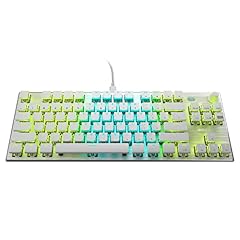
ROCCAT Vulcan TKL Pro PC USB-C Gaming Keyboard
- Size
- TKL (80%)
- Connection
- Wired
- Switches
- Optical
$169.74 (as of 10/26/2026 19:05 PDT - Details)
ROCCAT's Titan optical switches offer fast actuation with low latency, and the AIMO RGB lighting is a distinctive feature in this list.
Pros
- Optical switches for fast response
- AIMO RGB lighting with per-key customization
- USB-C wired connection
- Anodized aluminum top plate (per maker specs)
Cons
- No hot-swap sockets
- No wireless option
Good fit if
- Gamers who want optical speed in a tenkeyless
- Users who like a durable aluminum deck
Skip if
- You want wireless or Bluetooth
- You need to swap switches yourself
Verdict: A solid wired optical switch TKL that stands out for its RGB and build materials.
5 Best budget wireless mechanical

TECWARE Phantom+ Elite 87 Key RGB Mechanical Gaming Keyboard
- Size
- TKL (80%)
- Connection
- Wireless
- Switches
- Mechanical
- Hot-swappable
- Yes
$52.24 (as of 10/26/2026 20:05 PDT - Details) Typical price: $62.99, 17% off
It offers Bluetooth 5.0, 2.4GHz, and USB-C wired modes with hot-swap switches at a price that undercuts most wireless mechanical boards.
Pros
- Tri-mode connectivity: Bluetooth, 2.4GHz, USB-C
- Hot-swap switch sockets
- Tenkeyless 87-key layout
- RGB backlighting
Cons
- Switch type not stated by the seller
- Build materials not detailed
Good fit if
- Budget-conscious users who want wireless freedom
- Gamers who want a low-cost board with switch options
Skip if
- You require a specific switch type like linear or tactile
- You want a premium metal chassis
Verdict: The TECWARE Phantom+ Elite delivers wireless flexibility and hot-swap support at a very approachable price.
6 Best budget mechanical hot-swap

Redragon K552P Mechanical Gaming Keyboard TKL with 18 Backlight Modes
- Size
- TKL (80%)
- Switches
- Mechanical
- Hot-swappable
- Yes
$36.99 (as of 10/26/2026 18:10 PDT - Details)
This Redragon offers hot-swappable mechanical switches and 18 backlight modes in an 87-key layout, making it the most affordable way to get into switch swapping.
Pros
- Hot-swap switch sockets
- Mechanical red switches (linear)
- 18 backlight modes
- Compact 87-key design
Cons
- Only red switches included, no options at this price
- Wired only
Good fit if
- First-time mechanical keyboard buyers
- Users who want to experiment with switches
Skip if
- You need wireless connectivity
- You prefer a silent or tactile switch right out of the box
Verdict: It gives you the essential hot-swap feature without stretching your budget.
7 Best membrane keys

Corsair K55 CORE TKL RGB Gaming Keyboard
- Size
- TKL (80%)
- Switches
- Membrane
$34.99 (as of 10/26/2026 23:30 PDT - Details)
This Corsair uses quiet membrane keys instead of mechanical switches, making it a good option for shared spaces where noise matters.
Pros
- Quiet membrane keys
- 8-zone RGB backlighting
- Spill resistant design
- Dedicated media keys
Cons
- No hot-swap or switch customization
- Membrane key feel is different from mechanical
Good fit if
- Users who need a quiet keyboard
- Office or dorm environments
Skip if
- You want mechanical switch feedback
- You plan to swap switches later
Verdict: The K55 CORE is the best membrane TKL in this list for quiet operation and basic gaming features.
8 Best wired mechanical from HyperX

HyperX Alloy Origins Core
- Size
- TKL (80%)
- Switches
- Mechanical
$79.99 (as of 10/26/2026 15:10 PDT - Details)
HyperX's tenkeyless mechanical keyboard is a straightforward, reliable wired option with software-controlled lighting and macros, no extra frills.
Pros
- Mechanical switches (type not stated by seller)
- Software-controlled lighting and macros
- Compact TKL form factor
- USB wired connection
Cons
- No hot-swap sockets
- No wireless mode
Good fit if
- Gamers who want a simple wired mechanical board
- Users who prefer minimal design
Skip if
- You want to customize switches
- You need wireless or Bluetooth
Verdict: A clean, no-nonsense mechanical TKL that does the basics well.
9 Best Topre wireless typing

Realforce Topre R4 TKL Wireless Keyboard
- Size
- TKL (80%)
- Connection
- Wireless
- Switches
- Capacitive (Topre)
$270.00 (as of 10/26/2026 18:10 PDT - Details)
This Realforce uses Topre capacitive switches with 30g silent force, giving a unique typing feel that no other switch type in this list matches.
Pros
- Topre Silent 30g capacitive switches
- Wireless connectivity
- TKL layout
- Quiet operation
Cons
- Switch type not standard mechanical, so no hot-swap
- Premium price, no backlighting mentioned
Good fit if
- Typists who love Topre feel
- Users who want a quiet, high-quality board
Skip if
- You want RGB lighting
- You need hot-swap capability
Verdict: For those who prefer Topre switches, this is the only wireless TKL option in the pool.
10 Best for PC and Android

8Bitdo 87 Keys Mechanical Keyboard for PC and Android
- Size
- TKL (80%)
- Switches
- Mechanical
$119.99 (as of 10/26/2026 22:37 PDT - Details)
The 8Bitdo keyboard advertises compatibility with both PC and Android, and its mechanical switches make it versatile across platforms.
Pros
- Mechanical switches (type not stated by seller)
- Compatibility with PC and Android
- TKL 87-key layout
- Stylish colorway
Cons
- No hot-swap sockets
- No wireless mode mentioned
Good fit if
- Users who share a keyboard between PC and Android devices
- Fans of retro-styled design
Skip if
- You need wireless or Bluetooth
- You want to swap switches
Verdict: A niche pick that pairs a classic look with multi-platform support.
11 Best premium wireless combo with mouse

Logitech G Pro X Superlight 2 Lightspeed Wireless Gaming Mouse + G Pro X
- Size
- TKL (80%)
- Connection
- Wireless
- Mouse included
- Yes
$569.97 (as of 10/26/2026 16:10 PDT - Details)
This bundle pairs Logitech's G Pro X TKL Lightspeed wireless keyboard with the Superlight 2 mouse, giving a complete low-latency wireless setup.
Pros
- Lightspeed wireless keyboard and Superlight 2 mouse included
- TKL layout saves desk space
- Wireless connection removes cables
- Premium Logitech G design
Cons
- Bundle includes a mouse, so keyboard alone may be overkill
- No hot-swap switch support
Good fit if
- Esports players who want a proven wireless combo
- Users upgrading both peripherals at once
Skip if
- You already own a good gaming mouse
- You want a wired-only keyboard
Verdict: If you need both a top-tier wireless keyboard and mouse, this bundle streamlines your setup.
12 Best hot-swap with RGB from Acer

Acer Predator Aethon 550 TKL Gaming Keyboard
- Size
- TKL (80%)
- Connection
- Wireless
- Switches
- Mechanical
- Hot-swappable
- Yes
$164.60 (as of 10/26/2026 22:39 PDT - Details)
Acer's Predator Aethon 550 brings hot-swappable switches and RGB to a TKL design, appealing to gamers who want both customization and a recognizable brand.
Pros
- Hot-swap switch sockets
- RGB backlighting
- TKL layout
- Acer Predator brand reliability
Cons
- Switch type not stated by seller
- No wireless mode
Good fit if
- Acer fans who want a customizable TKL
- Gamers who like to tune their switches
Skip if
- You need Bluetooth or 2.4GHz
- You prefer a specific switch feel from the factory
Verdict: A solid hot-swap TKL from a major brand, though switch details are left open.
13 Best wireless with themed keycaps

YUNZII B87 TKL Wireless Mechanical Keyboard
- Size
- TKL (80%)
- Connection
- Wireless
- Switches
- Mechanical
- Hot-swappable
- Yes
$71.99 (as of 10/26/2026 21:06 PDT - Details)
This YUNZII keyboard includes a unique Matcha Heart colorway and Cocoa V2 mechanical switches, combining wireless freedom with a distinctive look.
Pros
- Wireless mechanical switches
- Themed keycap set (Matcha Heart)
- TKL 87-key layout
- Mechanical switch type included
Cons
- No hot-swap sockets
- No wired mode mentioned
Good fit if
- Users who want a stylish, ready-to-use wireless board
- Those who prefer visual personality over bare black keys
Skip if
- You need hot-swap capability
- You dislike themed aesthetics
Verdict: A fun wireless TKL that adds character without sacrificing mechanical input.
Comparison table
How this list was made
We pulled 30 TKL (80%) keyboards that matched the layout filter from the product catalog. We shortlisted 15 that cover a range of switch types, connectivity options, and feature sets, aiming for at least one pick per major category: wired and wireless, mechanical and membrane, budget and premium, and specialty switches like optical, magnetic, and Topre. We removed near-duplicate bundle configurations and reseller listings where they overlapped. Prices displayed are the live store price at the time the catalog was captured; we did not test any unit, and all specifications come from the seller's product listing or the maker's published pages.
Choosing the right one
Switch type: mechanical, optical, magnetic, or membrane
The switch type defines the feel, sound, and response. Most picks use mechanical switches, which give tactile or linear feedback and are often hot-swappable. Optical switches, as in the ROCCAT Vulcan TKL Pro, use light to register actuation, potentially faster, and are rated for longer lifespan. Magnetic Hall-effect switches, like those on the SteelSeries Apex Pro TKL, allow actuation point adjustment per key. Topre capacitive switches, found on the Realforce R4, provide a distinct, quieter feel. Membrane switches, such as on the Corsair K55 CORE, are the quietest but lack the precise feedback of mechanical designs.
Wired, wireless, or both
Wired keyboards like the Keychron V3 plug in with USB-C and have no battery to manage. Wireless options can use Bluetooth, a 2.4GHz receiver, or both. The TECWARE Phantom+ Elite offers Bluetooth 5.0, 2.4GHz, and USB-C in one board. Bluetooth is convenient for pairing with laptops and tablets, though a 2.4GHz dongle may offer lower latency for gaming. Some wireless keyboards, like the Keychron K8 Pro, also support USB-C wired mode, giving you flexibility when the battery runs low. Check whether the keyboard includes a receiver or relies on Bluetooth only.
Hot-swap sockets vs fixed switches
Hot-swappable keyboards let you remove and replace switches with a keycap puller, no soldering required. The Keychron V3, Keychron K8 Pro, TECWARE Phantom+ Elite, Redragon K552P, and Acer Aethon 550 all have hot-swap sockets. This is valuable if you want to try different switch types like linear, tactile, or clicky. Fixed-switch keyboards, such as the Razer Huntsman V3 Pro and SteelSeries Apex 7, lock you into the switch that ships with the board. If you are comfortable with the included switch and don't plan to experiment, fixed switches save money.
Programmability and software support
Some keyboards allow full key remapping and macro creation. Keychron's V3 and K8 Pro use QMK/VIA, an open-source firmware that runs in your browser and lets you remap every key, create layers, and set macros. Other boards use proprietary software, like HyperX's NGENUITY or Logitech G HUB, which also provide lighting and macro control. If you rely on custom layouts or need to assign shortcuts, check whether the software is available for your operating system and whether it supports the keys you want to change.
Layout and desk space
TKL (tenkeyless) keyboards remove the numeric keypad, saving roughly 20% of desk width compared to full-size boards. This gives your mouse more room for low-sensitivity aiming. The 87-key layout keeps arrow keys and navigation keys, which many users still need. If you regularly enter numbers, you may miss the numpad, but you can buy a separate numeric pad if needed. Consider what you use daily: if the numpad is essential, TKL might not be the right fit.
Special features and build details
Depending on your needs, you might want a rotary knob, OLED display, media keys, or USB passthrough. The Keychron V3 includes a knob, while the SteelSeries Apex 7 has an OLED display and dedicated media controls. Backlighting varies: some boards have per-key RGB, others have zone lighting. Materials can include aluminum top plates, but the seller often does not state them. If build material matters, look for a maker's specification page or confirm before buying.
Questions
What does TKL stand for?
TKL stands for tenkeyless, meaning the keyboard has no numeric keypad. It retains the main typing area, arrow keys, and navigation cluster, typically with 87 keys. The '80%' label refers to the approximate size compared to a full-size 104-key board. A TKL saves desk space and lets you bring the mouse closer to your body, which is why many gamers prefer it.
Are hot-swappable keyboards worth it?
Hot-swappable keyboards use sockets that let you pull out a switch and push in a new one without soldering. This is worth it if you want to try different switch types (linear, tactile, clicky) or replace a faulty switch easily. If you are happy with the stock switch and never see yourself experimenting, you can skip the feature and save money. In this list, Keychron and TECWARE models offer hot-swap support.
Can I use a TKL keyboard with a Mac or Android device?
Many TKL keyboards work with multiple operating systems, but compatibility varies. The Keychron K8 Pro, for example, supports Windows, macOS, iOS, and Android. The 8Bitdo keyboard advertises PC and Android compatibility. Always check the product listing for supported platforms. Bluetooth-enabled boards are more likely to pair with tablets and phones, while wired boards usually work wherever USB HID is supported, per the USB-IF HID standards.
What is the difference between Bluetooth and 2.4GHz wireless for gaming?
Bluetooth uses the 2.4GHz ISM band and is designed for low power, making it convenient for general use and multiple devices. A 2.4GHz wireless receiver typically provides a dedicated low-latency connection, which some gamers prefer. Keyboards with both options, like the TECWARE Phantom+ Elite, let you choose. For competitive play, a wired connection or a dedicated receiver may offer the lowest latency, though modern Bluetooth can be adequate for many users.
Do wireless keyboards need batteries replaced?
Most wireless mechanical keyboards have a built-in rechargeable battery. The seller listing may not state the battery capacity or estimated life. When the battery runs out, you can often plug in the USB cable and use it as a wired keyboard while it charges. Some boards, like the Keychron K8 Pro, support USB-C wired mode. If you never want to deal with batteries, a wired keyboard is simpler.
What changed
- : First published.