
Best Keyboards Under $100 in 2026: 15 Picks Compared on Specs
The EPOMAKER x Aula F75 stands out as the best all-around keyboard under $100: a 75% wireless mechanical with gasket mount and hot-swap switches, blending typing comfort and gaming features in a compact frame. We chose it and the other picks from a pool of 60 keyboards using only the stated specifications, connectivity options, switch type, and layout. Prices shown are live from the listing, and no unit was tested in person.
15 picks from 1031 keyboards that match this guide with a price we can quote today. Each price below is read live and stamped with the time it was read.
The short list
Who each pick suits
- For esports on a budget: You want magnetic switches with adjustable actuation and rapid trigger for fast reaction, without paying a premium. See pick 6
- For all-day typing: You need a full-size mechanical with comfortable brown switches and a standard layout for office or writing work. See pick 3
- For a compact wireless setup: You want a 75% or 60% wireless mechanical with hot-swap switches to keep your desk clean without losing function keys. See pick 1
- For a complete desktop bundle: You need a keyboard and mouse out of the box, with anti-ghosting and a wrist rest included. See pick 14
The 15 picks, one by one
1 Best overall

EPOMAKER x Aula F75 Gasket Mechanical Keyboard
- Size
- 75%
- Connection
- Wireless
- Switches
- Mechanical
- Hot-swappable
- Yes
$65.99 (as of 10/26/2026 14:05 PDT - Details)
This 75% wireless mechanical combines a gasket mount, hot-swap switches, and five-layer sound dampening, making it the most feature-complete board in this list. The compact layout saves desk space while retaining arrow keys and the top row. It also supports wired, Bluetooth, and 2.4GHz connections.
Pros
- Gasket mount and five-layer sound dampening
- Hot-swap mechanical switches
- Wireless with three modes: Bluetooth, 2.4GHz, USB-C
- 75% layout with arrow keys
Cons
- No dedicated status screen or knob
- Switch type not specified as linear or tactile
Good fit if
- Users who want a wireless mechanical with hot-swap for customization
- Those seeking a compact board that still has function keys
Skip if
- You need a full-size number pad
- You prefer a wired-only keyboard for lower latency
Verdict: The EPOMAKER x Aula F75 offers the best balance of features, build, and connectivity under $100.
2 Best wireless with display

RK ROYAL KLUDGE S98 Wireless Mechanical Keyboard w/Smart Display & Knob
- Size
- 96% to 98%
- Connection
- Wireless
- Switches
- Mechanical
- Hot-swappable
- Yes
$74.99 (as of 10/26/2026 19:05 PDT - Details)
This wireless mechanical includes a smart display and a knob, letting you see system status and control volume without extra software. The 98-key layout keeps a number pad in a slightly shorter footprint. It is hot-swappable, though the pool entry does not state the layout percentage.
Pros
- Integrated smart display and control knob
- Wireless with multiple connection modes
- Hot-swappable mechanical switches
- Number pad included
Cons
- Layout size not stated
- Switch type not specified
Good fit if
- Users who want a visual feedback screen and a knob for media control
- Those who need a number pad but want a more compact option
Skip if
- You prefer a standard full-size layout
- You want a low-profile keyboard
Verdict: The RK Royal Kludge S98 stands out for its useful display and knob, rare at this price tier.
3 Best full-size mechanical
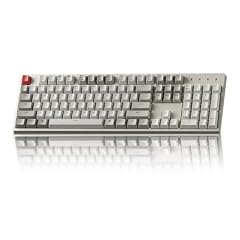
Keychron C2 Full Size Wired Mechanical Keyboard
- Size
- Full size
- Connection
- Wired
- Switches
- Mechanical
$56.99 (as of 10/26/2026 16:06 PDT - Details)
With a full-size layout and brown switches, the Keychron C2 offers a classic typing experience without a wireless premium. The wired connection keeps latency low and avoids battery concerns. It is marketed as a retro-styled board that works with both Mac and Windows.
Pros
- Full-size layout with number pad
- Brown mechanical switches for tactile feedback
- Wired connection for low latency
- Retro design with Mac and Windows compatibility
Cons
- Wired only, no Bluetooth
- Not hot-swappable per the pool entry
Good fit if
- Typists who want a full-size board with tactile switches
- Users who prefer a simple, reliable wired connection
Skip if
- You need wireless freedom
- You want to swap switches without soldering
Verdict: The Keychron C2 delivers a clean full-size typing experience with brown switches for well under $100.
4 Best tenkeyless

HyperX Alloy Origins Core
- Size
- TKL (80%)
- Switches
- Mechanical
$79.99 (as of 10/26/2026 15:10 PDT - Details)
This tenkeyless mechanical keyboard from HyperX uses a compact 80% layout, removing the number pad to free up desk space. It comes with mechanical switches and software-controlled lighting and macros. The smaller footprint makes it easy to center with your mouse.
Pros
- Compact TKL layout saves desk space
- Mechanical switches for responsive typing
- Software customization for lighting and macros
- Travel-friendly size
Cons
- No wireless option
- Switch type not specified in the listing
Good fit if
- Gamers who want mouse room and don't need a number pad
- Users who want software-driven macros and lighting
Skip if
- You require a number pad for data entry
- You want a wireless keyboard
Verdict: The HyperX Alloy Origins Core is a solid, no-nonsense TKL with good build and customization for its price.
5 Best wireless magnetic

MONSGEEK FUN60 Pro Rapid Trigger Gaming Keyboard 8k SP Magnetic Switch
- Size
- 60%
- Connection
- Wireless
- Switches
- Magnetic (Hall effect)
$44.99 (as of 10/26/2026 17:08 PDT - Details)
Using magnetic Hall effect switches, this 60% keyboard offers adjustable actuation points and rapid trigger for gaming. It supports multi-mode wireless: Bluetooth, 2.4GHz, and USB-C. The compact form hides advanced features that traditionally cost much more.
Pros
- Magnetic switches with adjustable actuation
- Rapid trigger for faster key resets
- Multi-mode wireless (BT/2.4G/Wired)
- 60% compact layout
Cons
- No number pad or navigation cluster
- Wireless battery life not stated
Good fit if
- Competitive gamers who want rapid trigger without wires
- Minimalists who prefer a tiny keyboard
Skip if
- You need arrow keys or F-keys
- You prefer traditional mechanical switch feel
Verdict: The MONSGEEK FUN60 Pro brings magnetic switch technology and wireless freedom to a very low price.
6 Best wired magnetic

Aula WIN60 HE
- Size
- 60%
- Connection
- Wired
- Switches
- Magnetic (Hall effect)
- Hot-swappable
- Yes
$39.99 (as of 10/26/2026 22:59 PDT - Details)
This 60% wired keyboard also uses magnetic switches with adjustable actuation and rapid trigger, making it a great wired alternative to the FUN60 Pro. It supports hot-swapping, so you can replace switches without soldering. The magnetic design offers precise control for gaming.
Pros
- Magnetic Hall effect switches
- Adjustable actuation and rapid trigger
- Hot-swappable switch sockets
- Wired connection for stable low latency
Cons
- Only 60% layout, no separate arrow keys
- No wireless support
Good fit if
- Players who want esports features on a budget
- Users who prefer a cable over wireless for reliability
Skip if
- You need a number pad
- You want a keyboard you can use wirelessly
Verdict: The AULA WIN60 HE is the wired choice if you want magnetic switches and quick response without extras.
7 Best hot-swap 75%
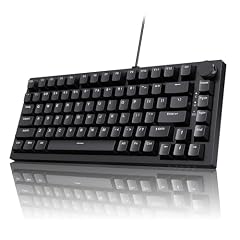
Ajazz AK820 75% Mechanical Gaming Keyboard
- Size
- 75%
- Connection
- Wired
- Switches
- Mechanical
- Hot-swappable
- Yes
$39.99 (as of 10/26/2026 22:44 PDT - Details)
With a 75% layout, gasket mount, a volume knob, and hot-swap sockets, the Ajazz AK820 packs enthusiast features into a wired board under $100. The five-layer sound dampening is another high-end touch. It keeps arrow keys and a compact form.
Pros
- Hot-swappable mechanical switches
- Gasket mount and five-layer sound dampening
- Volume knob included
- 75% size with arrow keys
Cons
- Wired only
- Number pad not included
Good fit if
- Keyboard enthusiasts who like to customize switches
- Users who want a knob for quick volume adjustments
Skip if
- You need wireless functionality
- You require a full-size layout
Verdict: The Ajazz AK820 gives you a gasket-mounted, hot-swap 75% with a knob at a price that's hard to beat.
8 Best low-profile wireless

NSYCA Air75 Low Profile Mechanical Keyboard Wireless
- Size
- 75%
- Connection
- Wireless
- Switches
- Mechanical
- Hot-swappable
- Yes
$69.99 (as of 10/26/2026 18:05 PDT - Details)
The NSYCA Air75 is a 75% low-profile mechanical keyboard with hot-swap switches, wireless connectivity, and an aluminum frame. Low-profile keys reduce finger travel, which can speed up typing. The PBT keycaps and shine-through RGB are also listed.
Pros
- Low-profile design for reduced key travel
- Aluminum frame adds rigidity
- Hot-swappable switches
- Wireless with PBT keycaps and RGB
Cons
- Low-profile switches may feel too shallow for some
- No number pad
Good fit if
- Typists who appreciate low-profile keys and modern aesthetics
- Users who want a wireless, compact board with premium materials
Skip if
- You prefer standard height mechanical switches
- You need a full-size layout
Verdict: The NSYCA Air75 stands out for its low-profile comfort and robust wireless build in a small footprint.
9 Best with knob and wireless

DAREU EK75PRO Sakura Pink 75% Wireless Mechanical Gaming Keyboard
- Size
- 75%
- Connection
- Wireless
- Switches
- Mechanical
- Hot-swappable
- Yes
$65.99 (as of 10/26/2026 13:08 PDT - Details)
The DAREU EK75PRO is a 75% wireless mechanical with a knob and a playful Sakura Pink colorway. It offers multiple connection modes and hot-swap switches, combining style with functionality. The knob provides quick volume or media control.
Pros
- 75% layout with knob
- Wireless: Bluetooth, 2.4GHz, USB-C
- Hot-swappable mechanical switches
- Unique Sakura Pink design
Cons
- Color may not suit all setups
- Not specifically marketed for low-latency gaming
Good fit if
- Users who want a stylish wireless keyboard with a knob
- Those who like to swap switches and customize
Skip if
- You need a professional or neutral look
- You prefer a wired-only keyboard for max stability
Verdict: The DAREU EK75PRO delivers a fun, functional 75% wireless board with a knob and hot-swap flexibility.
10 Best split spacebar

KINESIS Gaming TKO Mechanical Keyboard
- Size
- 60%
- Switches
- Mechanical
- Hot-swappable
- Yes
$65.00 (as of 10/26/2026 16:06 PDT - Details)
This 60% mechanical keyboard from KINESIS features a split spacebar, a rarity at this price, and hot-swap switches. It uses clicky white switches for audible feedback. The compact layout and PBT keycaps make it a niche choice for enthusiasts.
Pros
- Split spacebar layout for thumb customization
- Hot-swappable switches
- Clicky white switches for tactile feedback
- PBT keycaps included
Cons
- Clicky switches may be loud
- No wireless option
Good fit if
- Typists who want a unique split spacebar for macros or gaming
- Mechanical keyboard hobbyists who like to modify
Skip if
- You prefer quiet switches
- You need a full-size or tenkeyless layout
Verdict: The KINESIS TKO offers an unusual split spacebar and hot-swap capability for those who want a personalized 60% board.
11 Best with screen and knob

MechLands Aula F75 MAX Wireless Gaming Keyboard with Screen & Knob
- Size
- 75%
- Connection
- Wireless
- Switches
- Mechanical
- Hot-swappable
- Yes
$70.54 (as of 10/26/2026 17:06 PDT - Details)
This 75% wireless mechanical adds a screen and knob on top of the gasket mount and hot-swap switches. The screen can show system info or custom images. It uses creamy switches for a smooth feel, as described by the seller.
Pros
- Built-in screen and knob
- 75% layout with hot-swap switches
- Wireless with multiple modes
- Gasket mount for softer typing
Cons
- Switch type may be too light for some
- Screen size not specified
Good fit if
- Users who want a feature-packed keyboard with a screen and knob
- Those who like a creamy, smooth mechanical switch feel
Skip if
- You need a number pad
- You prefer a more traditional switch feel
Verdict: The MechLands Aula F75 MAX is the most feature-dense 75% wireless under $100, with screen and knob on top of gasket build.
12 Best with LCD screen

SOLAKAKA A99 Pro Mechanical Keyboard with LCD Screen & Metal Knob
- Size
- 96% to 98%
- Connection
- Wireless
- Switches
- Mechanical
- Hot-swappable
- Yes
$73.99 (as of 10/26/2026 19:08 PDT - Details)
The SOLAKAKA A99 Pro includes an LCD screen and a metal knob, alongside hot-swap switches and wireless connectivity. The full-size layout (likely 99 keys) provides a number pad. It is a full-featured board for users who want a screen and knob without losing the numpad.
Pros
- LCD screen and metal knob
- Hot-swappable mechanical switches
- Wireless with Bluetooth, 2.4GHz, USB-C
- Number pad included
Cons
- Layout size not explicitly stated (likely 99%)
- Switch type not specified
Good fit if
- Users who want a screen and knob with a number pad
- Those who prefer a wireless full-size keyboard
Skip if
- You need a compact board
- You don't want a screen that adds complexity
Verdict: The SOLAKAKA A99 Pro stands out for its LCD screen and knob in a full-size wireless mechanical, rare under $100.
13 Best quiet wired

Corsair Skiff 100 Quiet RGB Wired Gaming Keyboard
- Connection
- Wired
$49.99 (as of 10/26/2026 13:07 PDT - Details)
The Corsair Skiff 100 is a quiet membrane keyboard with RGB lighting, designed for office or home use where noise matters. It lacks mechanical switches but offers a low-key, reliable typing experience. The wired connection ensures zero latency.
Pros
- Quiet membrane switches
- RGB backlighting
- Wired connection for reliability
- Trusted Corsair brand
Cons
- Membrane switch feel may not suit gamers
- No hot-swap or mechanical options
Good fit if
- Users who type in shared spaces and want minimal noise
- Those who prefer a traditional rubber dome feel
Skip if
- You want mechanical switches
- You need wireless functionality
Verdict: The Corsair Skiff 100 is a reputable quiet wired keyboard with RGB, ideal for quiet environments.
14 Best keyboard and mouse combo

RedThunder K10 Wired Gaming Keyboard and Mouse and Wrist Rest Combo
- Size
- Full size
- Connection
- Wired
- Switches
- Membrane
- Mouse included
- Yes
$42.99 (as of 10/26/2026 19:05 PDT - Details)
The RedThunder K10 bundles a wired keyboard, mouse, and wrist rest in one package. The keyboard features mechanical-feel anti-ghosting switches and RGB backlighting. It is a complete setup for users starting fresh without needing to pick peripherals separately.
Pros
- Includes keyboard, mouse, and wrist rest
- Anti-ghosting for gaming
- RGB backlighting
- Wired connection for low latency
Cons
- Membrane switches (mechanical feel, not true mechanical)
- Limited upgrade options
Good fit if
- Users who want a ready-to-go desktop setup under $100
- Gamers on a tight budget needing both keyboard and mouse
Skip if
- You already have a mouse you prefer
- You want a mechanical switch keyboard
Verdict: The RedThunder K10 is a practical all-in-one bundle for a full desktop setup without separate purchases.
15 Best numpad add-on

8Bitdo 18 Keys Retro Mechanical Numpad for Windows & Android
- Connection
- Wireless
- Switches
- Mechanical
- Hot-swappable
- Yes
$44.99 (as of 10/26/2026 22:37 PDT - Details)
The 8BitDo Retro Mechanical Numpad is a standalone 18-key mechanical numpad, perfect for laptops or TKL keyboards that lack a number pad. It features mechanical switches and retro styling. It connects wirelessly and adds convenience for data entry.
Pros
- 18-key mechanical numpad
- Wireless connection (likely Bluetooth or 2.4G)
- Retro aesthetic
- Adds number pad to any setup
Cons
- Not a full keyboard
- May have limited software support
Good fit if
- Users who miss a numpad on their laptop or TKL keyboard
- Fans of retro design and mechanical switches
Skip if
- You don't need a numpad
- You expect a full-size keyboard
Verdict: The 8BitDo Retro Mechanical Numpad is a charming standalone numpad for those who want extra keys without a full board.
Comparison table
How this list was made
We reviewed 60 keyboards priced under $100 from the store catalogue and shortlisted 15 based on build specifications, switch type, hot-swap capability, layout, and wireless connectivity. We prioritized models from established brands and excluded near-duplicates. Awards reflect objective features: a keyboard with adjustable magnetic switches gets the esports nod, a split spacebar earns its own category, and a bundle with a mouse is judged separately. Prices and product details are pulled live from the store listing; we did not physically test any unit. All specs come from the seller's product page, and the analysis is based on those numbers alone.
Choosing the right one
Switch type: membrane vs. mechanical
The biggest decision is between membrane and mechanical switches. Membrane keyboards are quieter and cheaper, but they lack the tactile feedback and durability of mechanical switches. Mechanical keyboards use individual switches per key, offering a crisper feel and longer lifespan. In this list, several picks like the Keychron C2 and HyperX use mechanical switches, while the Corsair Skiff 100 and some budget options use membrane. If you type long hours, a mechanical switch may reduce finger fatigue over time.
Mechanical switches come in linear, tactile, and clicky variants. Linear switches are smooth, tactile ones have a bump, and clicky ones add an audible click. Brands like Keychron offer brown switches (tactile) which are a good middle ground. If you are unsure, start with tactile brown or linear red switches.
Layout: full-size, TKL, 75%, or 60%
Layout determines how many keys you get and how much desk space you need. Full-size (100%) keyboards include a number pad, which is useful for spreadsheets and data entry. Tenkeyless (TKL) layouts drop the numpad to save space. 75% layouts remove the numpad and condense the navigation cluster, but keep arrow keys. 60% layouts are the smallest, dropping function rows and arrow keys entirely.
Choose a layout based on your usage. If you need a numpad for accounting, stick with full-size or 96% options like the SOLAKAKA A99 Pro. If you game and want extra mouse space, a 75% or TKL is a good trade-off. For maximum portability, a 60% like the AULA WIN60 HE works.
Connectivity: wired, wireless, or both
Wired keyboards guarantee a stable connection with no input latency and never need charging. Many budget mechanicals are wired, like the Keychron C2 and HyperX. Wireless keyboards offer convenience and a cleaner desk, but you need to manage battery life. Some models, like the EPOMAKER x Aula F75 and DAREU EK75PRO, support both wired and wireless modes (tri-mode: USB-C, Bluetooth, 2.4GHz).
If you play competitive games, a wired connection or a good 2.4GHz dongle is recommended to avoid interference. Bluetooth is fine for office work and casual use. Always check battery claims; many wireless keyboards advertise months of use with RGB off.
Extra features: hot-swap, RGB, and knobs
Hot-swap sockets let you change switches without soldering, allowing you to customize the feel without buying a new keyboard. Many picks here offer hot-swap, including the Ajazz AK820 and NSYCA Air75. RGB backlighting is common, but it can drain battery on wireless boards. Some keyboards include a knob for volume or media control, which boosts productivity. A few, like the RK Royal Kludge S98 and MechLands Aula F75 MAX, feature a small display for system info or custom images.
Consider which extras matter to you. If you like tinkering, pick a hot-swap board. If you want a quieter office, skip the loud clicky switches. A knob is handy for quick volume adjustments, especially if you don't have one on your monitor.
Ergonomics and positioning
No matter which keyboard you choose, proper desk setup is important for comfort. The Occupational Safety and Health Administration (OSHA) recommends keeping your keyboard directly in front of you, with your elbows at about the same height as the keyboard and your wrists straight. Some keyboards have adjustable tilt legs or a wrist rest, which can help. If you type extensively, consider a board with a wrist rest or an ergonomic design.
If you are building a new setup, test the height and angle. You can use keyboard feet to tilt the board to a neutral wrist position. If your desk is too high, a keyboard tray might be needed. Always keep your shoulders relaxed and elbows close to your body.
Questions
What is the difference between a mechanical and a membrane keyboard?
Mechanical keyboards use an individual mechanical switch under each key, providing tactile feedback, faster response, and a longer lifespan (often rated for 50 million keystrokes). Membrane keyboards use a rubber dome sheet, offering a softer, quieter feel but less precision and durability. Mechanical boards are usually heavier and more expensive, but many budget options exist. For typing and gaming, mechanical switches generally feel better. If you prioritize quietness and minimal cost, a membrane keyboard like the Corsair Skiff 100 may suffice.
Do wireless keyboards have input latency issues for gaming?
Some do, but modern wireless keyboards using a 2.4GHz dongle or proprietary low-latency protocols can be as fast as wired ones. Bluetooth is generally less reliable for competitive gaming due to possible connection drops. Look for keyboards that offer a wired mode or a 2.4GHz option, like the EPOMAKER x Aula F75 or the DAREU EK75PRO. These give you the flexibility to use a cable when latency matters most. Always check the battery life and charging method, as a dead battery can interrupt a session.
What are hot-swappable switches and why do I want them?
Hot-swappable switches mean you can remove and replace the mechanical switches without soldering. This allows you to change the switch type (linear, tactile, clicky) or replace a broken switch easily. Brands like Ajazz, NSYCA, and Aula often include hot-swap sockets on budget boards. This feature adds long-term value, as you can customize the feel or fix a faulty key without buying a whole new keyboard. If you're a hobbyist or just want more flexibility, hot-swap is worth seeking out.
Is a 60% keyboard good for everyday use?
A 60% keyboard omits the function row, arrow keys, and navigation cluster, which can slow you down if you frequently use those keys. However, you can access them via layered functions (e.g., Fn key). For minimalists and gamers who want maximum mouse space, 60% is popular. But for office work involving spreadsheets or coding, a 65% or 75% layout with arrow keys is more efficient. If you're unsure, a 75% like the NSYCA Air75 gives you arrows without the numpad.
How much should I spend on a keyboard under $100?
You can find excellent mechanical keyboards at various price points within this budget. Basic wired models tend to be more affordable, while features like hot-swap, wireless, and displays appear in the higher range of this list. Focus on the switch type, layout, and connectivity that match your needs rather than the exact price. The picks in this guide span a wide spectrum, so you can choose based on features and brand preference.
What changed
- : First published.