
Best AULA Keyboards in 2026: 11 Picks Compared on Specs
AULA offers a wide range of wired and wireless mechanical keyboards, from compact 60% boards to full-size workhorses with media knobs and screens. In this guide, we compared 11 current AULA models on the specs that matter: layout, connection type, switch technology, hot-swap support, battery capacity, and whether a mouse is included. Our top pick is the F87 Pro, a 75% wireless mechanical keyboard with tri-mode connectivity and hot-swap sockets, which covers most needs without taking over your desk.
11 picks from 56 keyboards that match this guide with a price we can quote today. Each price below is read live and stamped with the time it was read.
The short list
Who each pick suits
- For competitive gamers: You need fast, adjustable actuation and a compact layout. The WIN68 HE with magnetic switches and rapid trigger mode is built for that. See pick 3
- For full-size fans: You want a complete layout with a numpad, media controls, and extra features. The F108 Pro packs a screen, knob, and a large battery. See pick 2
- For compact desk setups: You want to save space but keep mechanical quality. The F87 Pro or F87 delivers 75% layouts with wireless freedom. See pick 1
The 11 picks, one by one
1 Best overall

AULA F87 Pro Wireless Mechanical Keyboard
- Size
- 75%
- Connection
- Wireless
- Switches
- Mechanical
- Hot-swappable
- Yes
$69.99 (as of 10/26/2026 22:59 PDT - Details)
The F87 Pro hits the sweet spot between size and functionality: a 75% layout with dedicated arrow keys, tri-mode wireless (Bluetooth 5.0, 2.4GHz, USB-C), and hot-swap sockets for switch customization. It is pre-lubed, which should reduce scratchiness out of the box, and its compact footprint fits most desks.
Pros
- 75% layout keeps a compact footprint while retaining arrow keys
- Tri-mode connection: Bluetooth 5.0, 2.4GHz, and USB-C
- Hot-swappable switches for easy customization
- Pre-lubed switches as stated in the listing
Cons
- Battery capacity not stated by the seller
- Keycap material not specified
- No dedicated media keys (knob not mentioned)
Good fit if
- Users who want a versatile wireless mechanical keyboard without a numpad
- Hobbyists who plan to swap switches later
Skip if
- You need a full-size layout with a numpad
- You prefer magnetic switches with adjustable actuation
Verdict: The F87 Pro is the most balanced AULA keyboard for most users.
2 Best full-size feature-rich

AULA F108 PRO
- Size
- Full size
- Connection
- Wireless
- Switches
- Mechanical
- Hot-swappable
- Yes
$89.99 (as of 10/26/2026 22:59 PDT - Details)
The F108 Pro is a full-size wireless mechanical board that goes beyond basics: it includes a built-in screen and a control knob, plus a large 8000mAh battery. Hot-swap support and pre-lubed switches add to its appeal for users who want a customizable, feature-packed workhorse.
Pros
- Full-size layout with integrated numpad
- Built-in screen and media knob for quick controls
- 8000mAh battery, the largest stated in this list
- Hot-swappable switches
Cons
- Largest and possibly heaviest board here, but weight not specified
- Screen functionality details not provided
- Wireless standard not detailed (likely 2.4GHz/Bluetooth)
Good fit if
- Users who want a full-size keyboard with display and rotary controls
- Those who prioritize minimum recharging thanks to the large battery
Skip if
- You prefer a compact or space-saving layout
- You need a keyboard with a built-in mouse trackpad
Verdict: For a full-size AULA keyboard, the F108 Pro is the most feature-dense option.
3 Best for competitive gaming

AULA WIN68 HE Mechanical Gaming Keyboard 60%
- Size
- 60%
- Connection
- Wired
- Switches
- Magnetic (Hall effect)
$46.99 (as of 10/26/2026 22:59 PDT - Details)
The WIN68 HE uses magnetic Hall effect switches instead of mechanical ones, enabling adjustable actuation and a rapid trigger mode. This allows you to set the point where a key registers and reset it faster, which can be crucial for esports titles. Its 60% layout frees up desk space for mouse movement.
Pros
- Hall effect magnetic switches with adjustable actuation
- Fast trigger mode for quicker repeated keypresses
- Compact 60% layout maximizes mouse room
- Wired connection eliminates latency concerns
Cons
- Wired only, no wireless option
- No numpad or dedicated arrow cluster
- Switch type is not hot-swappable (magnetic, per listing)
Good fit if
- Esports players who want rapid-trigger and adjustable actuation
- Users who prefer a minimal keyboard and play on a small desk
Skip if
- You need a wireless keyboard for a clean setup
- You rely on a numpad for data entry
Verdict: The WIN68 HE is the most competitive-focused AULA keyboard we compared.
4 Best hot-swappable wireless

AULA F99 Wireless Mechanical Keyboard
- Size
- 96% to 98%
- Connection
- Wireless
- Switches
- Mechanical
- Hot-swappable
- Yes
$69.99 (as of 10/26/2026 22:59 PDT - Details)
The F99 brings tri-mode wireless and hot-swap sockets in a single board, with pre-lubed linear switches as stated. It offers the flexibility to swap switches without soldering, while the dual wireless modes (Bluetooth 5.0 and 2.4GHz, plus USB-C) let you connect to multiple devices.
Pros
- Hot-swappable switches for custom feel
- Tri-mode wireless: Bluetooth 5.0, 2.4GHz, USB-C
- Pre-lubed linear switches noted in listing
- Compact footprint (layout not specified, but listed as wireless mechanical)
Cons
- Layout and key count not stated by the seller
- Battery capacity not provided
- No mention of a detachable cable or media controls
Good fit if
- Users who want wireless freedom and the ability to change switches easily
- People who switch between desktop, laptop, and tablet
Skip if
- You need a full-size keyboard with a numpad (layout unknown)
- You prefer magnetic switches for gaming
Verdict: If hot-swap and wireless are your priorities, the F99 is a solid AULA choice.
5 Best compact with numpad

AULA S99 Wireless Keyboard
- Size
- 96% to 98%
- Connection
- Wireless
- Switches
- Membrane
$37.99 (as of 10/26/2026 22:59 PDT - Details)
The S99 offers a 96% to 98% layout, which keeps a small footprint while retaining the dedicated number pad. It's wireless, so you can place it anywhere, and the compact width leaves room for mouse movement. This is a good middle ground for users who need a numpad but dislike full-size widths.
Pros
- Compact 96-98% layout retains numpad
- Wireless connection
- Lighter footprint compared to full-size boards
Cons
- Switch type not stated (mechanical or membrane)
- No hot-swap support mentioned
- Battery life not specified
Good fit if
- Users who need a numpad but want to save desk space
- Those who prefer wireless for a cleaner setup
Skip if
- You want a mechanical switch and tactile feedback (switch type unknown)
- You need a full-size keyboard with extra macro keys
Verdict: The S99 is a compact wireless board that keeps your numpad without the bulk.
6 Best full-size wireless with media knob

AULA S99 Gaming Keyboard Wireless Creamy Computer Full Size
- Size
- 96% to 98%
- Connection
- Wireless
- Switches
- Membrane
$37.99 (as of 10/26/2026 22:59 PDT - Details)
This S99 variant is a full-size wireless keyboard with a media knob, letting you control volume or other functions directly. Its full layout includes a numpad, and the wireless connection reduces cable clutter. The 'creamy' in the name suggests a particular switch feel, but the listing does not specify switch type.
Pros
- Full-size layout with dedicated numpad
- Media knob for quick volume or track control
- Wireless connection
Cons
- Switch type not stated by the seller
- No hot-swap or extra macro keys mentioned
- Battery capacity not provided
Good fit if
- Users who want a full-size wireless board and prefer physical media controls
- People who type extensively and want the numpad
Skip if
- You prefer a compact 75% or smaller layout
- You need programmable RGB per-key lighting (not mentioned)
Verdict: A reliable full-size wireless option with media controls.
7 Best compact wireless TKL

AULA F87 Wireless Mechanical Keyboard
- Size
- 75%
- Connection
- Wireless
- Switches
- Mechanical
- Hot-swappable
- Yes
$59.99 (as of 10/26/2026 22:59 PDT - Details)
The F87 is a 75% wireless mechanical keyboard with 87 keys, a layout that drops the numpad but keeps function and arrow keys. It's a straightforward wireless board for users who want mechanical switches without the complexity of hot-swap or extra features. Its footprint is smaller than full-size, making it easy to travel with.
Pros
- 75% TKL layout with arrow keys
- Wireless mechanical with 87 keys
- Lighter and more portable than full-size boards
Cons
- No hot-swap support (not mentioned)
- Battery capacity not stated
- No media keys or knob included
Good fit if
- Users who want a compact wireless mechanical board for daily work or gaming
- Travelers who need a smaller keyboard
Skip if
- You need a numpad for data entry
- You want to swap switches later
Verdict: A clean, no-frills wireless TKL that hits a good balance.
8 Best wireless with numpad and knob
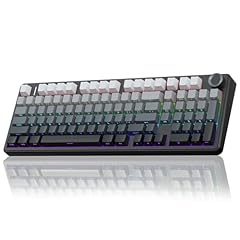
AULA F99 Pro Wireless Mechanical Keyboard with Number Pad
- Size
- 96% to 98%
- Connection
- Wireless
- Switches
- Mechanical
- Hot-swappable
- Yes
$75.89 (as of 10/26/2026 22:59 PDT - Details)
The F99 Pro combines a 96-98% layout with a wireless connection and a control knob, giving you both a numpad and a rotary encoder for media or other actions. Its mechanical switches are stated, making it a step up from the non-mechanical S99 variants. The layout is slightly more compact than full size, which is a compromise many appreciate.
Pros
- Compact 96-98% layout includes numpad
- Wireless mechanical switches (type not specified)
- Control knob for quick adjustments
- Pre-lubed? Not stated, but mechanical
Cons
- Hot-swap not mentioned
- Battery capacity not provided
- Switch type (linear, tactile) not specified
Good fit if
- Users who want a numpad and a knob without a full-size footprint
- Those who are comfortable with mechanical switches and want wireless
Skip if
- You need a full-size keyboard with dedicated F-row spacing (96-98% is slightly condensed)
- You want hot-swappable switches
Verdict: The F99 Pro is a well-rounded wireless mechanical board with a numpad and knob.
9 Best typewriter style
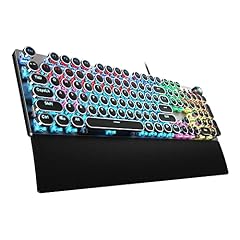
AULA F2088 Typewriter Style Mechanical Gaming Keyboard Wired
- Size
- Full size
- Connection
- Wired
- Switches
- Mechanical
$44.99 (as of 10/26/2026 22:59 PDT - Details)
The F2088 stands out with its vintage typewriter aesthetic: round, high-profile keycaps that sit on a full-size wired mechanical board. It's a statement piece for your desk, and the mechanical switches provide the tactile response that typists often enjoy. The wired connection eliminates battery concerns.
Pros
- Vintage typewriter keycaps add a distinctive look
- Full-size 104-key layout with mechanical switches
- Wired connection for zero latency and no battery worries
Cons
- Wired only, no wireless option
- No hot-swap or programmable macros mentioned
- Keycap compatibility might be limited due to shape
Good fit if
- Users who want a retro aesthetic for their home or office
- Typists who like mechanical switches and don't mind a cable
Skip if
- You prefer a wireless keyboard
- You need a compact or space-saving design
Verdict: A stylish typewriter-style mechanical board that's all about looks and feel.
10 Best keyboard and mouse combo

AULA Gaming Keyboard
- Size
- Full size
- Connection
- Wired
- Mouse included
- Yes
$28.87 (as of 10/26/2026 22:59 PDT - Details) Typical price: $30.39, 5% off
The T102 bundles a full-size wired keyboard with a mouse in one package, making it an easy pick for a new build or a spare setup. The keyboard features an all-metal panel and anti-ghosting, which is useful for gaming. It's a one-stop solution if you're starting from scratch.
Pros
- Includes both keyboard and mouse
- Full-size 104-key layout with all-metal panel
- Anti-ghosting for simultaneous key presses
Cons
- Wired connection limits placement flexibility
- Switch type not stated (likely membrane, but not confirmed)
- Only one combo option, no separate choice of mouse
Good fit if
- First-time builders or those who need a reliable set without researching separately
- Users who want a robust wired keyboard and mouse for office or games
Skip if
- You already own a good mouse and want a standalone keyboard
- You prefer wireless peripherals
Verdict: A practical combo that gets you a solid keyboard and mouse in one purchase.
11 Best white themed combo

AULA White Gaming Keyboard and Mouse Combo
- Size
- Full size
- Connection
- Wireless
- Switches
- Mechanical
- Mouse included
- Yes
$54.58 (as of 10/26/2026 22:59 PDT - Details)
This combo pairs a white F2088 typewriter-style mechanical keyboard with a wireless gaming mouse, offering a cohesive white setup. The keyboard's vintage look and mechanical switches contrast nicely with the modern wireless mouse. It's a stylish choice for users who care about aesthetics.
Pros
- White color scheme matches peripherals
- Includes wireless mouse
- Mechanical switches with typewriter-style keycaps
Cons
- Connection type listed as wireless, but keyboard appears wired in the name (may be mixed)
- No layout details for the keyboard
- Battery for the mouse not specified
Good fit if
- Users building a white-themed battlestation
- Those who want a mechanical keyboard and a wireless mouse in one box
Skip if
- You need a dedicated numpad (layout unknown)
- You want everything wireless (keyboard might be wired)
Verdict: A visually striking combo that blends retro keys with a modern wireless mouse.
Comparison table
| # | Keyboard | Size | Connection | Switches | Mouse included | Hot-swappable |
|---|---|---|---|---|---|---|
| 1 | AULA F87 Pro Wireless Mechanical Keyboard | 75% | Wireless | Mechanical | not stated | Yes |
| 2 | AULA F108 PRO | Full size | Wireless | Mechanical | not stated | Yes |
| 3 | AULA WIN68 HE Mechanical Gaming Keyboard 60% | 60% | Wired | Magnetic (Hall effect) | not stated | not stated |
| 4 | AULA F99 Wireless Mechanical Keyboard | 96% to 98% | Wireless | Mechanical | not stated | Yes |
| 5 | AULA S99 Wireless Keyboard | 96% to 98% | Wireless | Membrane | not stated | not stated |
| 6 | AULA S99 Gaming Keyboard Wireless Creamy Computer Full Size | 96% to 98% | Wireless | Membrane | not stated | not stated |
| 7 | AULA F87 Wireless Mechanical Keyboard | 75% | Wireless | Mechanical | not stated | Yes |
| 8 | AULA F99 Pro Wireless Mechanical Keyboard with Number Pad | 96% to 98% | Wireless | Mechanical | not stated | Yes |
| 9 | AULA F2088 Typewriter Style Mechanical Gaming Keyboard Wired | Full size | Wired | Mechanical | not stated | not stated |
| 10 | AULA Gaming Keyboard | Full size | Wired | not stated | Yes | not stated |
| 11 | AULA White Gaming Keyboard and Mouse Combo | Full size | Wireless | Mechanical | Yes | not stated |
How this list was made
We started from a pool of 11 AULA keyboards listed on the store (the catalogue snapshot may change). We shortlisted based on: layout options (full size, 75%, 60%, 96-98%), connection (wireless, wired, tri-mode including Bluetooth and 2.4GHz), switch type (mechanical, magnetic Hall effect), hot-swap support, battery capacity where given, and whether a mouse is included. Prices shown are live from the listing; no unit was tested. All specifications come from the seller's listed data or the maker's public descriptions.
Choosing the right one
Layout size: full size vs. compact
Full-size keyboards include a numpad, which is essential for data entry and many games, but they take up more desk space. Compact layouts like 75% (87 keys) drop the numpad and sometimes the F row, bringing the mouse closer. A 96-98% layout keeps the numpad but condenses the spacing, saving a few inches. Think about your desk width and whether you regularly use the number pad.
Connection: wired or wireless
Wired keyboards are simple, have no battery concerns, and typically have the lowest latency. Wireless options use Bluetooth or a 2.4GHz USB receiver; 2.4GHz is usually more responsive than Bluetooth but requires a dongle, while Bluetooth saves a port and can connect to multiple devices. Some AULA models offer tri-mode (Bluetooth, 2.4GHz, USB-C wired), giving you flexibility. Battery life varies widely, so check the listed capacity when present.
Switch type: mechanical vs. magnetic
Mechanical switches use physical springs and contacts, with different tactile feels (clicky, tactile, linear). Magnetic (Hall effect) switches detect the position of the magnet, allowing adjustable actuation points and rapid-trigger modes that can be beneficial for gaming. If you plan to customize, look for hot-swap sockets, which let you change switches without soldering. The type of switch affects both feel and performance in demanding titles.
Extra features: media knobs, screens, and batteries
Some AULA boards add a media knob for volume or track control, a small LCD screen to show status or custom graphics, or 8000mAh batteries for multi-week recharge. These extras can improve workflow but also increase weight and complexity. Consider what you need daily: a knob is handy if you adjust volume often; a screen is more for aesthetics; a larger battery means less frequent charging, especially if you use wireless at 2.4GHz.
Combos: keyboard and mouse together
If you are building a setup from scratch, a combo that includes a keyboard and mouse can save you the effort of matching separate products. AULA offers both wired and wireless combos, sometimes with a typewriter-style keyboard and a modern wireless mouse. Check whether you prefer the specific mouse included, as it may have a different shape or sensor quality than a standalone mouse you would choose otherwise.
Questions
Do AULA wireless keyboards support Bluetooth?
Many AULA wireless keyboards, such as the F87 Pro and F99, support Bluetooth 5.0 alongside 2.4GHz and a USB-C wired connection. This tri-mode design lets you connect to a laptop, phone, or desktop and switch between them. Check the product listing to confirm which wireless modes are included, as some models may only offer 2.4GHz or a single connection type.
What are the benefits of hot-swappable switches?
Hot-swappable switches allow you to remove and replace the physical switch on each key without soldering. This is useful for customizing the feel, such as switching from linear to tactile, or fixing a faulty switch easily. In AULA keyboards, models like the F87 Pro and F99 list hot-swap support, giving you flexibility to tailor the board to your preference later.
What is a magnetic switch (Hall effect) keyboard?
A magnetic switch uses a Hall effect sensor to detect the position of a magnet attached to the key stem, rather than completing an electrical contact. This allows for adjustable actuation points, meaning you can set the key to register at different depths. Some also have a rapid-trigger mode that reduces the travel reset distance, which can speed up repeated keystrokes in games. The AULA WIN68 HE is an example.
How long does the battery last on AULA wireless keyboards?
Battery life depends on the model and usage. The AULA F108 Pro lists an 8000mAh battery, which is large enough for weeks of typical use without backlighting at maximum intensity. Other models like the F87 Pro do not state a capacity in the listing, so it is safer to assume regular charging every few days. Wireless peripheral batteries are also affected by backlight brightness and connection type.
Are AULA keyboards with typewriter-style keycaps ergonomic?
Typewriter-style keycaps have a round, concave shape that can feel different from standard flat keycaps. While they add a vintage aesthetic, they are not designed specifically for ergonomics. The OSHA ergonomics guidance emphasizes neutral wrist posture and keyboard placement; the keycap shape is less critical than the overall board height and whether you use a wrist rest. If you type for long periods, consider a board with adjustable legs or a separate palm support.
What changed
- : First published.