
Best Wired Keyboards in 2026: 15 Picks Compared on Specs
The best wired keyboard is the RK ROYAL KLUDGE R98 Pro because it combines a 96% layout, hot-swap mechanical switches, and a dedicated volume knob in one package. To build this list, we compared 263 wired listings and filtered by stated specifications only, without testing any unit. Every price shown is live and read from the store listing.
15 picks from 423 keyboards that match this guide with a price we can quote today. Each price below is read live and stamped with the time it was read.
The short list
Who each pick suits
- For compact magnetic switches: You want rapid trigger and adjustable actuation without a full-size footprint. The AULA WIN68 HE and Razer Huntsman V3 HE both use hall-effect switches. See pick 4
- For full-size typing comfort: You need a dedicated numpad and straightforward mechanical switches. The Keychron C2 keeps a traditional layout and requires no software for basic use. See pick 5
- For hot-swap customization: You like changing switches without soldering. The Glorious GMMK 60 is a barebone kit that accepts many 3-pin and 5-pin switches. See pick 8
- For retro style on a budget: You want a round typewriter keycap set and a full layout. The YSCP typewriter-style keyboard offers blue switches and RGB backlighting. See pick 10
The 15 picks, one by one
1 Best overall

RK ROYAL KLUDGE R98 Pro Wired Mechanical Keyboard
- Size
- 96% to 98%
- Connection
- Wired
- Switches
- Mechanical
- Hot-swappable
- Yes
$69.99 (as of 10/26/2026 19:05 PDT - Details)
The RK R98 Pro packs a full numpad into a 96% frame, adds hot-swap mechanical switches, and includes a volume knob. It covers work and gaming without forcing a trade-off between layout and features.
Pros
- Hot-swappable mechanical switches allow easy customization
- 96% layout includes a numpad in a space-saving footprint
- Dedicated volume knob
- RGB backlighting is listed in the product name
Cons
- No keycap material is stated by the seller
- Limited software information in the listing
Good fit if
- Desk users who want a full numpad but less width than a full-size board
- Mechanical keyboard owners who like replacing switches
Skip if
- You prefer a 60% board with no function row
- You require a wired keyboard with a detachable cable, which is not stated
Verdict: A versatile wired keyboard that balances layout size, switch flexibility, and convenience.
2 Best full-size hot-swap

ASUS ROG Strix Scope II X Wired USB Mechanical Gaming Keyboard
- Size
- Full size
- Connection
- Wired
- Switches
- Mechanical
- Hot-swappable
- Yes
$109.99 (as of 10/26/2026 22:57 PDT - Details)
The ASUS ROG Strix Scope II X is a full-size board with hot-swap capability and pre-lubed ROG NX Snow V2 switches. It keeps a standard key arrangement for easy replacement of keycaps.
Pros
- Full 100% layout with dedicated arrows and numpad
- Hot-swap sockets for switch replacement
- Listed as pre-lubed ROG NX Snow V2 switches
- Wired USB connection for direct input
Cons
- No backlighting color or style is detailed in the listing
- Wrist rest not mentioned
Good fit if
- Anyone who needs a durable full-size keyboard for office and gaming
- Enthusiasts who want to experiment with different switches in a standard layout
Skip if
- You want a compact 60% board
- You prefer linear switches without pre-lube
Verdict: A reliable full-size option for people who value layout and switch flexibility.
3 Best for esports

Razer Huntsman V3 HE Magnetic Mini 65% 8KHz Wired Gaming Keyboard
- Size
- 65%
- Connection
- Wired
- Switches
- Magnetic (Hall effect)
$119.99 (as of 10/26/2026 18:10 PDT - Details)
The Razer Huntsman V3 HE Magnetic Mini uses an 8,000 Hz polling rate and hall-effect magnetic switches, both stated in the listing. The 65% size keeps your mouse hand close.
Pros
- Listed 8,000 Hz polling rate
- Magnetic hall-effect switches for rapid trigger
- Compact 65% layout
- Wired connection reduces setup latency
Cons
- No keycap material specified
- Requires Razer software for advanced actuation settings, not stated but common
Good fit if
- Competitive gamers who need fast response and a small footprint
- Players who use a low mouse sensitivity and need extra desk space
Skip if
- You want a numpad or function keys
- You prefer a membrane switch for quiet typing
Verdict: A high-end esports keyboard that focuses on actuation control and a stable USB link.
4 Best compact hall effect

AULA WIN68 HE Mechanical Gaming Keyboard 60%
- Size
- 60%
- Connection
- Wired
- Switches
- Magnetic (Hall effect)
$46.99 (as of 10/26/2026 22:59 PDT - Details)
The AULA WIN68 HE fits hall-effect switches and a rapid-trigger mode into a 60% frame. The magnetic switch type allows adjustable actuation, which is listed in the title.
Pros
- Hall-effect magnetic switch with adjustable actuation
- 60% layout saves desk space
- Hot-swap sockets are noted in the title
- Wired connection for reliable input
Cons
- No dedicated arrow keys (60% layout)
- No polling rate mentioned
Good fit if
- Gamers who want magnetic switches without paying flagship prices
- Travelers who need a compact board that fits in a backpack
Skip if
- You need a function row or numpad
- You prefer tactile or clicky mechanical switches
Verdict: A practical way to get hall-effect performance in a minimal footprint.
5 Best full-size for typing
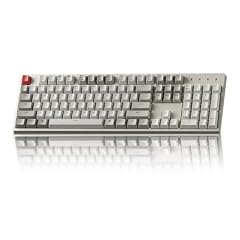
Keychron C2 Full Size Wired Mechanical Keyboard
- Size
- Full size
- Connection
- Wired
- Switches
- Mechanical
$56.99 (as of 10/26/2026 16:06 PDT - Details)
The Keychron C2 offers a plain full-size layout with brown mechanical switches, often associated with a tactile bump. It avoids extra software and focuses on a conventional typing experience.
Pros
- Full 104-key layout
- Brown switches provide tactile feedback
- Wired USB connection, no battery to manage
- Classic mechanical design
Cons
- No backlighting is mentioned
- No hot-swap sockets listed
Good fit if
- Writers and office workers who want a familiar full-size board
- Programmers who use the numpad for numeric entry
Skip if
- You need gaming-focused features like RGB per-key lighting
- You want a compact layout
Verdict: A straightforward full-size mechanical keyboard for essential typing.
6 Best with display

CORSAIR Vanguard 96 Wired Mechanical Gaming Keyboard
- Size
- 96% to 98%
- Connection
- Wired
- Switches
- Mechanical
$139.99 (as of 10/26/2026 23:30 PDT - Details)
The Corsair Vanguard 96 includes an LCD display, a 96% layout, and 8,000 Hz polling as noted in the listing. It pairs a compact footprint with status readouts.
Pros
- LCD display for status or media information
- 96% layout keeps a numpad
- 8,000 Hz polling rate stated
- Wired for stable data transfer
Cons
- No hot-swap support listed
- Heavier feature set may need companion software
Good fit if
- Users who want a compact board with a display and fast polling
- Streamers who like to monitor system stats on the keyboard
Skip if
- You prefer minimal design without an LCD
- You want a 60% keyboard to save maximum space
Verdict: A feature-dense wired keyboard that combines a display with a racing-style compact layout.
7 Best cheap hall effect entry

ATTACK SHARK X68 HE RT Mechanical Gaming Keyboard 60% Wired TKL-Black
- Size
- 60%
- Connection
- Wired
- Switches
- Magnetic (Hall effect)
$39.99 (as of 10/26/2026 22:59 PDT - Details)
The ATTACK SHARK X68 HE RT brings hall-effect switches to a 60% wired board with a "RT" (rapid trigger) tag in the listing. It is a straightforward magnetic switch option for tighter desks.
Pros
- Hall-effect magnetic switches
- 60% layout for portability
- Wired USB connection
- Rapid trigger capability is suggested in the name
Cons
- No stated polling rate
- Keycap type not listed
Good fit if
- Budget-conscious gamers who want quick actuation
- Students who need a small keyboard for a dorm room
Skip if
- You need a full numpad
- You prefer mechanical switches with a fixed tactile bump
Verdict: An inexpensive hall-effect board that covers essential e-sports needs.
8 Best for customization

GLORIOUS Custom Gaming Keyboard
- Size
- 60%
- Connection
- Wired
- Switches
- Mechanical
- Hot-swappable
- Yes
$19.99 (as of 10/26/2026 14:10 PDT - Details)
The Glorious GMMK 60 is sold as a barebone kit, meaning it has no keycaps or switches. The listing highlights hot-swap sockets and RGB backlighting, giving you full control.
Pros
- Hot-swap sockets for 3-pin and 5-pin switches
- Barebone kit allows complete switch and keycap choice
- Wired USB-C connection
- RGB backlighting included
Cons
- No switches or keycaps are included
- Requires separate purchase to make it functional
Good fit if
- Modders and enthusiasts who already own switches and keycaps
- People who want to learn keyboard assembly from scratch
Skip if
- You want a ready-to-type board out of the box
- You prefer membrane keys for quiet pressing
Verdict: A blank canvas for building your own wired mechanical keyboard.
9 Best 75% with knob
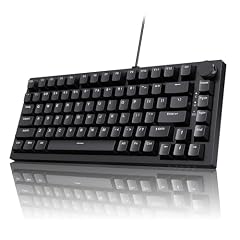
Ajazz AK820 75% Mechanical Gaming Keyboard
- Size
- 75%
- Connection
- Wired
- Switches
- Mechanical
- Hot-swappable
- Yes
$39.99 (as of 10/26/2026 22:44 PDT - Details)
The Ajazz AK820 75% uses a gasket mount and includes a volume knob, both listed in the title. The 75% layout keeps the function row while trimming the numpad.
Pros
- 75% layout preserves function and arrow keys
- Gasket mount and hot-swap sockets are stated
- Dedicated volume knob
- Wired USB connection
Cons
- No specific switch type is listed
- Keycap material not mentioned
Good fit if
- Desk users who want a compact board with media control
- Gamers who need quick access to volume without reaching for a mouse
Skip if
- You need a numpad
- You want a barebone DIY kit
Verdict: A sensible 75% wired keyboard with tactile feedback options.
10 Best retro style

YSCP Typewriter Style Mechanical Gaming Keyboard RGB Backlit Wired
- Size
- Full size
- Connection
- Wired
- Switches
- Mechanical
$39.99 (as of 10/26/2026 21:05 PDT - Details)
The YSCP typewriter keyboard uses round retro keycaps, blue mechanical switches, and RGB backlighting. It stands out visually while keeping a full 104-key layout.
Pros
- Full-size 104-key layout
- Round typewriter keycaps for a unique look
- Blue mechanical switches are listed
- RGB backlighting included
Cons
- Blue switches may not suit people who prefer a quiet feel
- Not hot-swappable according to the listing
Good fit if
- Anyone who wants a statement keyboard for a home office or a creative setup
- Typists who enjoy a clicky sound and a vintage look
Skip if
- You need silent switches for a shared room
- You prefer a low-profile or membrane keyboard
Verdict: A full-size mechanical keyboard that prioritizes aesthetics without losing the numpad.
11 Best full-size membrane
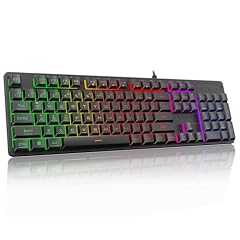
Redragon K521 Upgrade Rainbow LED Gaming Keyboard
- Size
- Full size
- Connection
- Wired
- Switches
- Membrane
$15.99 (as of 10/26/2026 18:10 PDT - Details)
The Redragon K521 offers a 104-key layout with a membrane switch and multimedia keys. It is a low-cost entry point for those who want a full-size keyboard without mechanical costs.
Pros
- Full 104-key layout
- Membrane switches are quiet and familiar
- Rainbow LED backlighting
- Wired USB connection
Cons
- Not hot-swappable
- No mechanical switch feel
Good fit if
- Students or office workers on a strict budget
- Users who need a basic full-size keyboard for spreadsheets and typing
Skip if
- You want mechanical switches
- You need per-key RGB lighting
Verdict: A dependable budget friendly full-size membrane keyboard.
12 Most portable 60%

MageGee Portable 60% Mechanical Gaming Keyboard
- Size
- 60%
- Connection
- Wired
- Switches
- Mechanical
$26.99 (as of 10/26/2026 17:05 PDT - Details) Typical price: $29.99, 10% off
The MageGee MK-Box is a 60% mechanical keyboard with red switches and LED backlighting. Its compact size makes it easy to carry between desks, though the product name does not specify a travel weight.
Pros
- 60% layout is small and travel friendly
- Mechanical switches, likely linear red based on the listing
- Wired USB connection
- LED backlighting
Cons
- No carrying case or travel lock is stated
- No hot-swap sockets listed
Good fit if
- Frequent laptop users who want a mechanical board on the go
- Minimalist users who want only essential keys
Skip if
- You need arrow keys
- You prefer a full-size layout
Verdict: A compact mechanical keyboard that fits in a backpack without adding bulk.
13 Best 60% with brown switches

DIERYA T68SE 60% Gaming Mechanical Keyboard
- Size
- 60%
- Connection
- Wired
- Switches
- Mechanical
$27.99 (as of 10/26/2026 23:40 PDT - Details) Typical price: $29.99, 7% off
The DIERYA T68SE uses brown mechanical switches, offering a tactile bump without a loud click. The 68-key layout gives extra navigation keys compared with standard 60% boards.
Pros
- Brown switches provide tactile feedback
- 68-key layout includes arrow keys
- Wired connection
- Anti-ghosting is mentioned in the listing
Cons
- No hot-swap support stated
- No RGB, only a backlit design
Good fit if
- Typists who want arrow keys and a tactile switch
- Gamers who prefer a low-profile but still want a mechanical feel
Skip if
- You want a larger numpad
- You prefer linear switches
Verdict: A compact wired mechanical keyboard with a practical 68-key arrangement.
14 Best adjustable actuation

SteelSeries Apex Pro Mini HyperMagnetic Gaming Keyboard
- Size
- 60%
- Connection
- Wired
- Switches
- Magnetic (Hall effect)
$179.99 (as of 10/26/2026 19:09 PDT - Details)
The SteelSeries Apex Pro Mini uses HyperMagnetic switches with adjustable actuation, as stated in the listing. The 60% frame is paired with PBT keycaps for durability.
Pros
- Adjustable actuation via hall-effect switches
- 60% layout with a small footprint
- PBT keycaps are listed
- Wired RGB backlighting
Cons
- No numpad or function row
- Premium price in the wired category
Good fit if
- Gamers who want per-key actuation control
- Esports players who need consistent key response in fast games
Skip if
- You need a budget keyboard
- You prefer a full-size board
Verdict: A high-end compact keyboard that lets you fine tune switch sensitivity.
15 Best for anime styling

Womier 60% Percent Keyboard Gaming
- Size
- 60%
- Connection
- Wired
- Switches
- Mechanical
$35.09 (as of 10/26/2026 20:10 PDT - Details) Typical price: $38.99, 10% off
The Womier 60% keyboard is described as "creamy" and includes RGB backlighting, targeting fans of custom aesthetic builds. The 60% layout is standard for compact mechanical boards.
Pros
- 60% mechanical layout
- RGB backlighting
- Creamy sound or feel is described in the listing
- Wired USB connection
Cons
- No hot-swap sockets listed
- Limited keycap coverage without a numpad
Good fit if
- Custom keyboard fans who want a pastel or anime inspired build
- Users who like to coordinate their desktop setup with colorful lighting
Skip if
- You need a numpad
- You prefer a neutral black design
Verdict: A colorful 60% mechanical keyboard for those who value expression.
Comparison table
How this list was made
We started with a pool of 263 wired keyboards listed by the seller. From those, we removed near-duplicate listings and applied a shortlist based on stated specs: switch type, layout size, hot-swap support, and notable features like polling rate or backlighting. We also favored products from brands with established product pages and avoided listing multiple colors of the same model. The final 15 picks represent a range of form factors and switch technologies. Prices are shown live from each listing and can change at any time. Nobody at this site touched or tested the units; all conclusions are drawn from the maker's published information and the catalogue details.
Choosing the right one
Layout size: full size, TKL, 60%, or 75%
Full-size keyboards keep a numpad, making them efficient for data entry or spreadsheet work. Tenkeyless (TKL) models drop the numpad to bring the mouse hand closer. 60% boards remove the function row and navigation cluster, saving desk space at the cost of missing keys. 75% boards keep the function row while trimming the numpad, and 96% models squeeze a numpad into a compact shell. Your choice depends on how often you type numbers and how much desk space you need. A separate numpad can exist as a second device, but only some keyboards support that.
Switch types: membrane, mechanical, and hall-effect
Membrane keyboards use a rubber dome underneath the keys and are often quiet and inexpensive. Mechanical keyboards use individual switches for each key, which can be linear, tactile, or clicky. Hall-effect or magnetic switches detect the position of a magnet, allowing adjustable actuation points. In a wired keyboard, the switch type determines the feel and response; hall-effect boards often add rapid trigger for gaming. If you need a specific click sound or a quiet office, mechanical switches are the usual choice, but the actual sound is not guaranteed by the switch type alone.
Hot-swappable sockets vs fixed switches
A keyboard with hot-swap sockets lets you remove a switch and place another one without soldering. This is valuable if you want to try different switch weights or replace a broken switch. A barebone board like the Glorious GMMK 60 comes without switches and keycaps, giving you the freedom to install any compatible set. Non-hot-swap boards are fixed at the factory, and changing switches means soldering or replacement of the whole keyboard. Hot-swap is not necessary for everyone, but it extends the lifespan of a keyboard by allowing you to revive a worn switch.
Wired connection benefits
A wired keyboard connects to the computer over USB and uses the HID protocol to communicate, as standardized by the USB-IF. This avoids the need for a battery, reduces the chance of wireless interference, and provides a constant power source for backlighting. Wired keyboards are also a simple way to cut down on setup latency because the signal goes directly to the USB port. In contrast, wireless keyboards must rely on radio frequencies such as Bluetooth, which can experience interference or require charging. Choosing a wired model is often the most straightforward path to a stable typing experience.
Backlighting and keycap quality
Backlighting ranges from single-color LEDs to per-key RGB, but it is not a performance specification. Keycap material affects long-term durability: PBT keycaps tend to resist wear and shine, while ABS keycaps are lighter and often less expensive. In this list, only the SteelSeries Apex Pro Mini and a few others list PBT keycaps. If you type heavily, look for a keyboard that specifies PBT, or plan to replace keycaps. A keyboard with an OLED display, like the Corsair Vanguard 96, can show system status, but that is a bonus feature rather than a core input quality.
Ergonomics and wrist placement
OSHA recommends placing the keyboard directly in front of you and adjusting the height so that your wrists remain straight while your elbows stay close to your body. A compact 60% board might require a shorter reach to the mouse, but you may need to use shortcuts for arrow keys. Full-size keyboards let you keep a traditional hand position but take up more desk area. Some models include tilt feet or optional wrist rests, but these details are not always listed in the catalogue. Consider the height of your desk and whether your chair arms interfere with your typing posture before choosing a size.
Questions
Why choose a wired keyboard instead of a wireless one?
A wired keyboard communicates over a standard USB HID connection, which is supported by the USB-IF and requires no pairing. It draws power from the cable, so you never need to charge it. This is a simple way to avoid wireless interference from 2.4 GHz radios or Bluetooth, and it can reduce the number of potential stability issues in a busy environment. For competitive gaming or high-speed typing, a wired model is often preferred because the connection is direct and does not depend on radio frequency conditions.
What does hot-swap mean on a wired keyboard?
Hot-swap means the keyboard has sockets that let you remove a mechanical switch and insert a different one without soldering. You can change between linear, tactile, or clicky switches as your preference changes. This is useful if a switch fails or if you want to adjust the feel of your board. For example, the Glorious GMMK 60 is a barebone hot-swap board, meaning it does not include switches or keycaps, so you must buy them separately. Hot-swap is not available on all wired keyboards, especially membrane models.
Are hall-effect switches different from mechanical switches?
Hall-effect switches use a magnet and a sensor to detect the position of the switch stem, rather than relying on a physical metal contact. This allows adjustable actuation, meaning you can set the point where a keystroke registers. Mechanical switches require the stem to travel a fixed distance to close a circuit. Hall-effect boards often include a rapid trigger mode that can reset the switch before full release, which can help in games where rapid tapping matters. However, they typically require software to adjust the actuation, and not all wired keyboards support that configuration.
Is a 60% keyboard good for everyday typing?
A 60% keyboard removes the function row, arrow keys, and navigation cluster, so you need to use key combinations to perform some actions. If you rarely use arrow keys and rely on shortcuts, it can be efficient because you do not have to move your hands far. However, for someone who frequently enters numbers or uses cursor keys for spreadsheets, a 75% or full-size layout is more convenient. The choice depends on your usage habits and desk space. Many 60% boards are still designed for gaming, not primarily for long-form typing.
Do wired keyboards work with Mac and Windows?
Most wired keyboards that use a standard USB HID interface work with both Windows and macOS, but some hardware-specific features such as per-key RGB or macro keys may require software that is not available on both operating systems. The product listing on each model will state the compatible operating systems and any software requirements. For example, gaming keyboards from Corsair or Razer often need proprietary software for advanced functionality, which may be Windows only. Always check the manufacturer's support page for the latest compatibility before buying.
What changed
- : First published.