
Best Wireless Keyboards in 2026: 15 Picks Compared on Specs
The Keychron K3 Version 2 is our top pick for a wireless keyboard: its low-profile 75% layout, QMK support, and triple-mode connectivity make it a versatile choice for both work and play. To select the rest, we compared 60 wireless keyboards from our catalog, focusing on stated specifications like layout, switch type, and extra features. Prices shown are live from the listing and may change.
14 picks from 796 keyboards that match this guide with a price we can quote today. Each price below is read live and stamped with the time it was read.
The short list
Who each pick suits
- For compact setups: If you're short on desk space, a 60% or 75% wireless keyboard keeps your mouse closer. The DIERYA DK63 is a portable 60% option. See pick 5
- For gamers who want rapid trigger: Magnetic Hall effect switches with rapid trigger can offer faster key resets for competitive play. The MONSGEEK FUN60 Pro is a 60% magnetic option. See pick 4
- For full-size numpad fans: If you need a numpad for data entry or spreadsheets, a full-size or 96% wireless keyboard is essential. The AULA S99 includes a number pad. See pick 8
- For a premium typing experience: If you want a high-end wireless mechanical keyboard, the ASUS ROG Azoth Extreme offers a premium build with ROG NX Snow linear switches and PBT keycaps. See pick 2
The 14 picks, one by one
1 Best overall

Keychron K3 Version 2 QMK 75% Wireless Low-Profile Mechanical Keyboard
- Size
- 75%
- Connection
- Wireless
- Switches
- Mechanical
$84.00 (as of 10/26/2026 16:06 PDT - Details)
The Keychron K3 Version 2 combines a compact 75% layout with low-profile mechanical switches and QMK firmware support, making it a strong all-around wireless keyboard for typing and gaming. Its low-profile design is a standout in this list, where most other picks are standard-height. It also offers a rare level of customization for a wireless model.
Pros
- Compact 75% layout
- Low-profile mechanical switches
- QMK support for custom layouts
- Wireless connection
Cons
- No stated hot-swap capability
- No stated battery capacity
- Lacks a numpad
Good fit if
- Users who want a compact, portable wireless keyboard
- Typists who prefer low-profile mechanical switches
Skip if
- You need a numpad for data entry
- You want hot-swappable switches for easy replacement
Verdict: The Keychron K3 Version 2 is a versatile 75% wireless keyboard that balances portability and customization.
2 Best premium

ASUS ROG Azoth Extreme Wireless Mechanical Gaming Keyboard
- Size
- 75%
- Connection
- Wireless
- Switches
- Mechanical
$399.99 (as of 10/26/2026 22:57 PDT - Details)
The ASUS ROG Azoth Extreme sits at the top of the price spectrum in this list, but its specs justify the premium position. It offers a 75% TKL layout with ASUS ROG NX Snow linear switches and PBT keycaps, materials not commonly found together in wireless keyboards. For those who want a high-end build without compromising on wireless freedom, this is the pick.
Pros
- 75% TKL layout
- ROG NX Snow linear switches
- PBT keycaps
- Premium construction implied by the brand
Cons
- No stated hot-swap capability
- No stated battery capacity
- No stated connectivity modes
Good fit if
- Enthusiasts who want a top-tier wireless board
- Gamers who prefer linear mechanical switches
Skip if
- You're on a tight budget
- You need a numpad
Verdict: The ASUS ROG Azoth Extreme is a premium 75% wireless keyboard with high-end specs, suited for those who demand the best.
3 Best hot-swap 75%

EPOMAKER x Aula F75 Gasket Mechanical Keyboard
- Size
- 75%
- Connection
- Wireless
- Switches
- Mechanical
- Hot-swappable
- Yes
$65.99 (as of 10/26/2026 23:52 PDT - Details)
The EPOMAKER x Aula F75 stands out for its gasket mounting and hot-swappable switches, a combination rarely seen at this point in the list. Its 75% layout keeps it compact, and the gasket structure may offer a softer typing feel (though we can't verify without testing). This makes it a strong option for users who like to customize their switch feel.
Pros
- 75% layout
- Hot-swappable switches
- Gasket mounting
- Mechanical switches
Cons
- No stated battery capacity
- No stated connectivity modes
- Not a full-size or numpad layout
Good fit if
- Users who want to experiment with different switch types
- Those who prefer a gasket-mounted typing experience
Skip if
- You need a numpad
- You prefer a standard-height keyboard
Verdict: The EPOMAKER x Aula F75 is a hot-swappable 75% wireless board that offers customization and a gasket structure.
4 Best for rapid trigger

MONSGEEK FUN60 Pro Rapid Trigger Gaming Keyboard 8k SP Magnetic Switch
- Size
- 60%
- Connection
- Wireless
- Switches
- Magnetic (Hall effect)
$44.99 (as of 10/26/2026 17:08 PDT - Details)
The MONSGEEK FUN60 Pro uses magnetic Hall effect switches with rapid trigger support, a feature aimed at competitive gamers who want faster key resets. Its 60% layout removes the numpad and function row, making it ultra-portable. The 8K polling rate mentioned in the name suggests high-performance wireless, though we can't test that claim.
Pros
- 60% layout
- Magnetic (Hall effect) switches
- Rapid trigger support
- Wireless and wired modes
Cons
- No numpad or function row
- No stated battery capacity
- Not hot-swappable (not stated)
Good fit if
- Competitive gamers who need rapid trigger functionality
- Travelers who want a tiny wireless board
Skip if
- You rely heavily on the number pad
- You want a full-size layout
Verdict: The MONSGEEK FUN60 Pro is a 60% magnetic wireless keyboard built for fast-paced gaming.
5 Best compact 60%

DIERYA DK63 60% Wireless Mechanical Gaming Keyboard
- Size
- 60%
- Connection
- Wireless
- Switches
- Mechanical
$37.99 (as of 10/26/2026 23:40 PDT - Details)
The DIERYA DK63 is a 60% mechanical keyboard that fits in a backpack and leaves plenty of desk space. Its compact layout is ideal for minimal setups, and the mechanical switches provide tactile feedback. It's a straightforward choice for those who want a small wireless board without extra frills.
Pros
- 60% layout
- Mechanical switches
- Bluetooth/2.4G/wired modes (from name)
- RGB backlit
Cons
- No numpad
- No hot-swap capability stated
- No battery capacity stated
Good fit if
- Minimalists who want a small, light keyboard
- Users who often move between desks
Skip if
- You need a numpad
- You require arrow keys (not all 60% have them)
Verdict: The DIERYA DK63 is a practical 60% wireless mechanical keyboard for compact workspaces.
6 Best full-size

Redragon K745 PRO Wireless 108-Key Gasket RGB Gaming Keyboard
- Size
- Full size
- Connection
- Wireless
$64.99 (as of 10/26/2026 18:11 PDT - Details)
The Redragon K745 Pro is a full-size wireless keyboard with 108 keys, including a numpad. It's one of the few full-size options in this list, catering to users who need the entire key set. The 'gasket RGB' in the name suggests a gasket structure, though the exact design is not detailed.
Pros
- Full-size layout with numpad
- Wireless connection
- Gasket RGB (implied)
- 4 hotkeys for shortcuts
Cons
- No switch type stated (mechanical not confirmed in name)
- No battery capacity stated
- No hot-swap capability stated
Good fit if
- Users who want a numpad for data entry
- Those who prefer a traditional full-size layout
Skip if
- You need a compact keyboard to save desk space
- You want hot-swappable switches
Verdict: The Redragon K745 Pro is a full-size wireless keyboard that brings a numpad and extra hotkeys to the table.
7 Best retro design
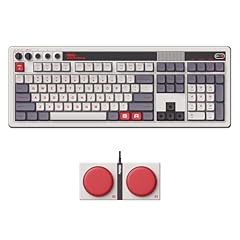
8Bitdo Retro 108 Mechanical Wireless Keyboard for PC & Android
- Size
- Full size
- Connection
- Wireless
- Switches
- Mechanical
- Hot-swappable
- Yes
$119.99 (as of 10/26/2026 22:37 PDT - Details)
The 8BitDo Retro 108 combines a full-size layout with a classic retro aesthetic that stands out among the mechanical picks. It includes a numpad and is hot-swappable, making it practical for users who want to change switches. The retro styling is a unique selling point in this list.
Pros
- Full-size layout with numpad
- Hot-swappable switches
- Mechanical switches
- Bluetooth/2.4G/USB-C connectivity (from name)
Cons
- No battery capacity stated
- Retro design may not suit modern setups
- No gasket or other dampening features stated
Good fit if
- Retro enthusiasts who like a touch of nostalgia
- Users who want a full-size hot-swappable board
Skip if
- You prefer a minimalist or stealthy look
- You need a compact keyboard
Verdict: The 8BitDo Retro 108 is a full-size mechanical keyboard with a distinctive retro look and hot-swap flexibility.
8 Best with numpad

AULA S99 Wireless Keyboard
- Size
- 96% to 98%
- Connection
- Wireless
- Switches
- Membrane
$37.99 (as of 10/26/2026 22:59 PDT - Details)
The AULA S99 gives you a 96% to 98% layout that includes a numpad while taking up less width than a full-size board. It's a good compromise for users who need number entry but want to save space. The gaming orientation in the name suggests it's aimed at gamers who also need a numpad.
Pros
- 96% to 98% layout with numpad
- Wireless connection
- Compact width compared to full-size
- 99 keys
Cons
- No switch type stated
- No battery capacity stated
- No hot-swap capability stated
Good fit if
- Users who need a numpad but don't want a full-size board
- Gamers who want a compact layout with number keys
Skip if
- You want a full-size keyboard with dedicated space
- You prefer a mechanical switch (if not stated)
Verdict: The AULA S99 offers a compact 96% layout with a numpad, balancing functionality and desk space.
9 Best 60% magnetic

Aula MINI60 HE MAX Wireless Gaming Keyboard 60% Magnetic Switch Keyboard
- Size
- 60%
- Connection
- Wireless
- Switches
- Magnetic (Hall effect)
- Hot-swappable
- Yes
$54.99 (as of 10/26/2026 22:59 PDT - Details)
The Aula MINI60 HE MAX is another 60% magnetic option, but it's tailored for wireless gaming with its compact size and Hall effect switches. It's a strong alternative to the MONSGEEK if you want a similar feature set but prefer a different brand. Its inclusion highlights the growing availability of magnetic switches in compact wireless keyboards.
Pros
- 60% layout
- Magnetic (Hall effect) switches
- Wireless connectivity
- Caters to gaming
Cons
- No rapid trigger explicitly stated
- No battery capacity stated
- No numpad
Good fit if
- Gamers who want a compact magnetic switch keyboard
- Users who want a small wireless board for travel
Skip if
- You need a numpad
- You prefer a standard mechanical switch
Verdict: The Aula MINI60 HE MAX is a compact magnetic wireless keyboard for gamers who value speed and portability.
10 Best with mouse bundle

Logitech G502 X Plus Lightspeed Wireless Gaming Mouse + G515 TKL
- Size
- TKL (80%)
- Connection
- Wireless
- Switches
- Mechanical
- Mouse included
- Yes
$259.98 (as of 10/26/2026 16:10 PDT - Details)
This Logitech G bundle pairs the G502 X Plus Lightspeed wireless mouse with a G515 TKL wireless keyboard, offering a complete wireless setup for gamers. The TKL layout saves desk space while retaining the essential keys. It's a practical bundle for those starting fresh or upgrading both peripherals at once.
Pros
- Includes wireless keyboard and mouse
- TKL layout
- Logitech Lightspeed wireless technology
- Tactile switches (from name)
Cons
- Bundle may not suit those who already have a mouse
- No numpad
- No battery capacity stated
Good fit if
- Gamers who need a new keyboard and mouse
- Users who want a cohesive wireless setup
Skip if
- You already have a preferred mouse
- You need a full-size keyboard
Verdict: The Logitech G bundle is a convenient wireless combo for gamers upgrading their entire setup.
11 Best from a major brand
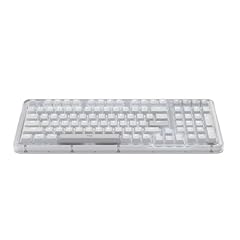
Logitech Alto Keys K98M Wireless Mechanical Gasket Keyboard
- Size
- 96% to 98%
- Connection
- Wireless
- Switches
- Mechanical
$99.99 (as of 10/26/2026 16:10 PDT - Details)
The Logitech Alto Keys K98M offers a wireless mechanical keyboard from a well-established brand, with a gasket structure mentioned in the name. It's a safe choice for users who trust Logitech's build quality. This 100% layout (though not specified) likely includes a full set of keys, making it suitable for a wide range of tasks.
Pros
- Logitech brand reliability
- Wireless mechanical keyboard
- Gasket structure (from name)
- Likely full-size layout (not stated)
Cons
- Exact layout not stated in pool
- No hot-swap capability stated
- No battery capacity stated
Good fit if
- Users who prefer Logitech's ecosystem
- Those who want a wireless mechanical keyboard without extra RGB
Skip if
- You need a compact layout
- You want hot-swappable switches
Verdict: The Logitech Alto Keys K98M is a dependable wireless mechanical keyboard from a top brand, likely with a full-size layout.
12 Best low-profile with knob

nuphy Air100 V3 Wireless Mechanical Keyboard
- Size
- 96% to 98%
- Connection
- Wireless
- Switches
- Mechanical
$149.95 (as of 10/26/2026 18:05 PDT - Details)
The nuphy Air100 V3 is a low-profile wireless mechanical keyboard that includes a multifunctional knob, a feature that adds convenience for volume or media control. Its low-profile design makes it portable and comfortable for typing. The knob is a rare addition among the picks, setting it apart from other compact boards.
Pros
- Low-profile design
- Multifunctional knob
- Mechanical switches
- Wireless connectivity
Cons
- Layout not specified (likely 100% or TKL?)
- No hot-swap capability stated
- No battery capacity stated
Good fit if
- Users who want a slim keyboard with a knob for quick controls
- Travelers who prefer low-profile switches
Skip if
- You need a numpad (if not included)
- You want a standard-height keyboard
Verdict: The nuphy Air100 V3 is a low-profile wireless mechanical keyboard with a handy knob for media control.
13 Best with multimedia screen

Womier 75% Wireless Mechanical Keyboard
- Size
- 75%
- Connection
- Wireless
- Switches
- Mechanical
- Hot-swappable
- Yes
$69.99 (as of 10/26/2026 20:10 PDT - Details)
The Womier 75% wireless mechanical keyboard features a color multimedia screen, which can show animations, system stats, or notifications. This adds a unique visual element not found in most picks. Its 75% layout is compact yet still includes arrow keys and a function row.
Pros
- 75% layout
- Color multimedia screen
- Mechanical switches
- Wireless connectivity
Cons
- Screen may be distracting for some
- No hot-swap capability stated
- No battery capacity stated
Good fit if
- Users who want a visually striking keyboard
- Those who appreciate customizable screen displays
Skip if
- You prefer a minimalist design
- You need a numpad
Verdict: The Womier 75% wireless keyboard stands out with its color multimedia screen and compact layout.
14 Best battery life

The TECKNET wireless gaming keyboard has a 4000mAh rechargeable battery, which is stated in its name, making it the pick with the largest known battery capacity in this list. Other picks often omit this spec, so this is a standout for long wireless use. It's a practical choice for users who dislike frequent charging.
Pros
- 4000mAh battery (stated)
- Rechargeable
- Wireless connection
- Gaming-oriented
Cons
- Layout not specified
- No switch type stated
- No hot-swap capability
Good fit if
- Users who need long battery life between charges
- Gamers who want a wireless board that lasts
Skip if
- You need a specific layout (e.g., full-size)
- You prefer mechanical switches
Verdict: The TECKNET wireless keyboard excels with its large 4000mAh battery, ideal for extended use.
Comparison table
How this list was made
We started with 60 wireless keyboards from our catalog. We shortlisted 15 by prioritizing layout variety (full-size, TKL, 75%, 60%), switch types (mechanical, membrane, magnetic), and features such as hot-swap, gasket mounting, and low-profile design. We excluded bundles that were not primarily keyboards unless they added a unique feature. Prices are read live from the store listing; we did not test any of these units. All specifications come from the product names and stated specs.
Choosing the right one
Wireless connectivity: 2.4GHz, Bluetooth, or both?
Most wireless keyboards offer multiple connection modes: a 2.4GHz USB receiver for low-latency (often favored by gamers), Bluetooth for pairing with many devices like laptops, tablets, or phones, and sometimes a wired USB-C option for charging and use. The Bluetooth Special Interest Group (SIG) defines the Bluetooth standards, including low energy for lower power consumption. If you plan to switch between a desktop, laptop, and mobile device, look for multi-device Bluetooth pairing or a keyboard with both 2.4GHz and Bluetooth. For gaming, a 2.4GHz connection typically provides lower latency than standard Bluetooth, but check the manufacturer's specifications for exact numbers.
Layout: from full-size to 60%
Keyboards come in various physical layouts. Full-size (100%) includes the number pad, arrow keys, function row, and navigation cluster. Tenkeyless (TKL, 80%) removes the numpad to save space. 75% compresses the layout, dropping some keys but retaining arrows and a function row. 60% removes the function row and arrow keys entirely, resulting in a very compact board. Consider what keys you use daily. A numpad is essential for data entry or spreadsheet work; if you rarely use it, a TKL or 75% may be a better fit. For portability, a 60% is the easiest to carry. Our picks include all these sizes, so choose based on your workflow.
Switch types: mechanical, membrane, and magnetic
Mechanical switches are known for their tactile feedback and durability, and they come in many variants. Membrane keyboards are often quieter and cheaper, but may feel less crisp. Magnetic switches (Hall effect) use magnets to detect key presses, allowing for adjustable actuation points and rapid trigger, which can be beneficial for gaming. Our picks include all types. If you prefer a specific sound or feel, look for the switch type in the product name. Hot-swappable keyboards let you replace switches without soldering, offering customization options. Consider whether you want this feature when making your choice.
Battery and charging
Wireless keyboards rely on batteries. Some use AA/AAA batteries, others have internal rechargeable batteries. Rechargeable keyboards typically charge via USB-C and offer a range of battery lives, but many manufacturers do not state the exact capacity. Look for a keyboard with a long battery life if you dislike frequent charging. Some keyboards have an on/off switch to save power. Our pick with the largest stated battery is the TECKNET at 4000mAh, but others may also offer good battery life without specifying it. Remember that backlighting and wireless mode can affect battery duration.
Extra features: RGB, macros, and software support
Many wireless keyboards include RGB backlighting, which can be customized via software or on-board controls. Some have dedicated macro keys, media knobs, or even small screens. QMK and VIA support allows deep customization of layouts and macros, which is valuable for power users. For example, the Keychron K3 V2 supports QMK, letting you remap keys and create macros. Consider what features you need for work or play. A multimedia knob is convenient for volume control, while a screen can show system stats. However, these extras often add cost, so weigh their value.
Questions
What is the difference between Bluetooth and 2.4GHz wireless keyboards?
Bluetooth is a standard wireless technology that pairs with many devices like laptops, tablets, and phones, and can switch between multiple devices easily. A 2.4GHz connection uses a USB receiver, often providing lower latency and a more stable connection, which is preferred by gamers. Many keyboards offer both modes. Bluetooth is convenient for mobile devices, while 2.4GHz is often faster for desktop use. Check the keyboard's specs to see which modes it supports.
Are wireless keyboards good for gaming?
Yes, modern wireless keyboards are suitable for gaming. 2.4GHz connections usually have low latency, comparable to wired, and many gaming keyboards use this mode. Some even support higher polling rates, like the MONSGEEK FUN60 Pro with 8K. However, battery life and interference can be concerns, though they are manageable. Look for a keyboard with a dedicated 2.4GHz mode and consider your router placement to minimize interference.
Can I use a wireless keyboard with multiple devices?
Many wireless keyboards support multi-device pairing, especially those with Bluetooth. You can pair the keyboard with a desktop, laptop, tablet, and phone, and switch between them using dedicated keys or software. For example, Bluetooth allows easy switching between devices. Some keyboards also remember multiple 2.4GHz connections, but that's less common. If you need to switch frequently, check for this feature in the specifications.
What does hot-swappable mean and do I need it?
Hot-swappable means you can replace the switches without soldering, typically using a puller. This allows you to change the feel of the keyboard (e.g., from linear to tactile) or replace a broken switch easily. It's a valued feature for customization and longevity. If you enjoy tinkering with your keyboard, hot-swap is worth having. Many of our picks, like the EPOMAKER F75 and 8BitDo Retro 108, are hot-swappable.
How do I clean a wireless keyboard?
To clean a wireless keyboard, first, turn it off and disconnect it. Use compressed air to blow out debris between keys. For deeper cleaning, you can remove keycaps with a keycap puller if they are removable, then wipe the base with a slightly damp cloth. Avoid using harsh chemicals. If the keyboard is not hot-swappable, do not remove switches. Allow it to dry completely before using.
What changed
- : First published.