
Best Compact Wireless Keyboards in 2026: 15 Picks Compared
The AULA F87 Pro is our top pick for a compact wireless keyboard, thanks to its well-rounded 75% layout, hot-swappable switches, and tri-mode wireless connectivity. It strikes a balance between portability and everyday usability. This guide compares 15 compact wireless keyboards selected from a pool of 101, examining their layout, switch type, and wireless options. Prices on this page are live and update automatically, so you can compare current costs without delay.
15 picks from 106 keyboards that match this guide with a price we can quote today. Each price below is read live and stamped with the time it was read.
The short list
Who each pick suits
- For esports on a budget: A 60% layout with magnetic Hall effect switches and rapid trigger, like the MONSGEEK FUN60 Pro, gives you fast actuation without a full-size footprint. See pick 15
- For travel and small desks: A low-profile 75% board like the Keychron K3 Version 2 saves space and is slim enough to slip into a bag. See pick 10
- For a premium typing feel: If you want a quiet, refined typing experience, the Realforce Topre R4 TKL with Topre Silent 30g switches is a top choice. See pick 14
The 15 picks, one by one
1 Best overall

AULA F87 Pro Wireless Mechanical Keyboard
- Size
- 75%
- Connection
- Wireless
- Switches
- Mechanical
- Hot-swappable
- Yes
$69.99 (as of 10/26/2026 22:59 PDT - Details)
The AULA F87 Pro combines a space-saving 75% layout with hot-swappable mechanical switches and tri-mode wireless (Bluetooth, 2.4GHz, USB-C). It is a versatile choice for work and gaming, with no separate number pad taking up desk space.
Pros
- 75% layout with hot-swappable switches
- Tri-mode wireless: Bluetooth, 2.4GHz, USB-C
- Pre-lubed switches as stated by seller
Cons
- Brand is less established than mainstream competitors
- No dedicated arrow keys (included in 75% layout but compact)
Good fit if
- Anyone who wants a compact mechanical keyboard for both office and gaming
- People who like customizing switches later
Skip if
- You need a full number pad
- You prefer low-profile keys
Verdict: A balanced 75% wireless mechanical keyboard with hot-swap flexibility.
2 Best with mouse

Logitech G502 X Plus Lightspeed Wireless Gaming Mouse + G515 TKL
- Size
- TKL (80%)
- Connection
- Wireless
- Switches
- Mechanical
- Mouse included
- Yes
$259.98 (as of 10/26/2026 16:10 PDT - Details)
This bundle pairs the Logitech G515 TKL wireless keyboard (tactile switches) with the G502 X Plus Lightspeed mouse. It is a complete compact wireless setup from a trusted brand.
Pros
- Includes both keyboard and mouse
- TKL layout (80%) with tactile switches
- Trusted Logitech brand
Cons
- Bundle costs more than standalone keyboards
- No Bluetooth, relies on Lightspeed wireless or wired
Good fit if
- Gamers who want a matched keyboard and mouse set
- People who prefer TKL layout over 75% or 60%
Skip if
- You only need a keyboard
- You want Bluetooth as a connection option
Verdict: A complete compact wireless combo from a leading peripheral maker.
3 Best gasket mount

EPOMAKER x Aula F75 Gasket Mechanical Keyboard
- Size
- 75%
- Connection
- Wireless
- Switches
- Mechanical
- Hot-swappable
- Yes
$65.99 (as of 10/26/2026 23:52 PDT - Details)
The EPOMAKER x Aula F75 features a five-layer gasket structure, which is stated to provide a softer, more cushioned typing feel compared to rigid tray-mounted boards.
Pros
- Five-layer gasket structure as stated by seller
- 75% layout with hot-swap
- Coming from EPOMAKER, a known brand in custom keyboards
Cons
- Only wireless modes are Bluetooth and 2.4GHz
- No dedicated function row (on 75% layout it is present but compact)
Good fit if
- Those who type for long hours and want a softer landing
- Custom keyboard enthusiasts who like gasket-mounted boards
Skip if
- You need a built-in wrist rest
- You prefer a stiff, clicky typing feel
Verdict: A well-cushioned 75% wireless keyboard from a respected custom keyboard maker.
4 Best industrial design

GravaStar Mercury K1 75% Wireless Mechanical Gaming Keyboard RGB Backlit
- Size
- 75%
- Connection
- Wireless
- Switches
- Mechanical
- Hot-swappable
- Yes
$139.95 (as of 10/26/2026 15:05 PDT - Details)
The GravaStar Mercury K1 stands out with a sci-fi-inspired design common to GravaStar products. It is a 75% mechanical with RGB backlighting, for those who want their keyboard to make a statement.
Pros
- Distinctive, aggressive aesthetic
- 75% mechanical with RGB
- Wireless connectivity
Cons
- No stated hot-swap support
- Heavier and bulkier than minimal 60% boards
Good fit if
- Gamers who want a unique desktop centerpiece
- Fans of GravaStar's design language
Skip if
- You prefer a minimalist, low-profile look
- You want a keyboard that's easy to carry
Verdict: A visually striking 75% mechanical wireless keyboard for those who value design.
5 Best with screen and knob

Redragon K724 PRO Wireless 81-Key Gasket Gaming Keyboard
- Size
- TKL (80%)
- Connection
- Wireless
$64.99 (as of 10/26/2026 18:10 PDT - Details)
The Redragon K724 Pro packs a TFT screen and a rotary knob into a 75% wireless board, giving you quick access to media and system controls without extra keys.
Pros
- TFT screen and knob for media control
- 75% layout with wireless
- Affordable for the feature set
Cons
- Smaller brand with less community support
- Screen adds to power consumption
Good fit if
- Those who like media controls on the keyboard itself
- Gamers who want a lot of features for little money
Skip if
- You never use media keys
- You prefer a clean, uncluttered keycap area
Verdict: A feature-packed 75% wireless keyboard with screen and knob for under $100.
6 Best for customization

Kisnt KN85 Wireless Mechanical Keyboard
- Size
- 75%
- Connection
- Wireless
- Switches
- Mechanical
- Hot-swappable
- Yes
$49.49 (as of 10/26/2026 16:07 PDT - Details) Typical price: $54.99, 10% off
The Kisnt KN85 offers a 75% layout with hot-swappable switches and side-printed PBT keycaps, a combination that appeals to keyboard modders.
Pros
- Hot-swappable switches
- Side-printed PBT keycaps
- Tri-mode wireless (Bluetooth, 2.4GHz, USB-C)
Cons
- Less known brand
- No dedicated media keys on the main layout
Good fit if
- Modders who want to swap switches
- Users who like the look of side-printed keycaps
Skip if
- You need a number pad
- You prefer a low-profile design
Verdict: A flexible 75% wireless keyboard for those who like to tinker.
7 Best 60% on a budget

DIERYA DK63 60% Wireless Mechanical Gaming Keyboard
- Size
- 60%
- Connection
- Wireless
- Switches
- Mechanical
$37.99 (as of 10/26/2026 23:40 PDT - Details)
The DIERYA DK63 gives you a 60% layout with Bluetooth, 2.4GHz, and wired modes at a very accessible price point. It is one of the smallest and least expensive options in this list.
Pros
- 60% layout, extremely compact
- Bluetooth, 2.4GHz, and wired modes
- Budget price
Cons
- No arrow keys (on a 60% layout they are hidden under a layer)
- Basic ABS keycaps likely (not stated)
Good fit if
- Travelers who want the smallest possible keyboard
- Budget shoppers who don't need a number pad or arrow keys
Skip if
- You need arrow keys for spreadsheet work
- You want a hot-swappable board
Verdict: The most affordable tiny wireless mechanical keyboard in this list.
8 Best aesthetic variety
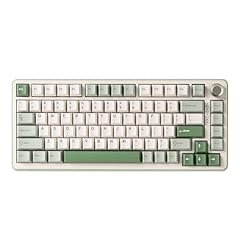
YUNZII B75 PRO 75% Wireless Mechanical Keyboard(Matcha Green
- Size
- 75%
- Connection
- Wireless
- Switches
- Mechanical
- Hot-swappable
- Yes
$63.99 (as of 10/26/2026 21:06 PDT - Details)
The YUNZII B75 PRO is a 75% wireless mechanical keyboard available in unique colorways like Matcha Green, offering style choices beyond black or white.
Pros
- Multiple color options (Matcha Green shown)
- 75% layout with wireless
- Mechanical switches with gasket mount (as stated)
Cons
- No hot-swap for switches (not stated)
- Medium price for a non-hot-swap board
Good fit if
- Users who want a keyboard that matches their setup
- Those who like pastel or vibrant keycap colors
Skip if
- You prefer a standard black or white minimal look
- You need a hot-swappable board
Verdict: A colorful 75% wireless mechanical that stands out on any desk.
9 Best with volume knob

SOLAKAKA A75 Wireless Gaming Keyboard with Multifunction Knob
- Size
- 75%
- Connection
- Wireless
- Switches
- Mechanical
- Hot-swappable
- Yes
$65.99 (as of 10/26/2026 19:08 PDT - Details)
The SOLAKAKA A75 adds a multifunction knob to a 75% layout with hot-swap capability, giving you tactile volume or scrolling control without extra keys.
Pros
- Multifunction knob for quick control
- 75% layout with hot-swap
- Tri-mode wireless (Bluetooth, 2.4GHz, USB-C)
Cons
- Brand not well known
- No dedicated media keys
Good fit if
- People who adjust volume often
- Gamers who want a knob for in-game controls
Skip if
- You dislike knobs
- You want a low-profile keyboard
Verdict: A practical 75% wireless keyboard with a handy knob for controls.
10 Best low-profile

Keychron K3 Version 2 QMK 75% Wireless Low-Profile Mechanical Keyboard
- Size
- 75%
- Connection
- Wireless
- Switches
- Mechanical
$84.00 (as of 10/26/2026 16:06 PDT - Details)
The Keychron K3 V2 is a low-profile 75% mechanical keyboard with QMK firmware support, making it a strong choice for Mac and Windows users who want a slim wireless board.
Pros
- Low-profile mechanical switches
- QMK firmware for customization
- Wireless (Bluetooth) and wired modes
Cons
- No 2.4GHz option (Bluetooth only)
- Low-profile switches are not as common to replace
Good fit if
- Mac users who prefer a slim keyboard
- Those who want QMK programmability
Skip if
- You want a standard-height mechanical switch
- You need a 2.4GHz dongle for low-latency gaming
Verdict: A sleek, low-profile 75% wireless keyboard with deep customization.
11 Best premium gaming

ASUS ROG Azoth Extreme Wireless Mechanical Gaming Keyboard
- Size
- 75%
- Connection
- Wireless
- Switches
- Mechanical
$399.99 (as of 10/26/2026 22:57 PDT - Details)
The ASUS ROG Azoth Extreme is a 75% wireless mechanical keyboard with ROG NX Snow linear switches and PBT keycaps. It is built for gaming performance with a premium price tag.
Pros
- ROG NX Snow linear switches
- PBT keycaps for durability
- 75% layout with wireless and wired modes
Cons
- Highest price in this list
- No hot-swappable switches (not stated)
Good fit if
- Competitive gamers who want a top-tier wireless mechanical
- ASUS ROG ecosystem fans
Skip if
- You are on a budget
- You want hot-swap flexibility
Verdict: A premium 75% wireless mechanical for serious gaming setups.
12 Best magnetic switch for gaming

Aula MINI60 HE MAX Wireless Gaming Keyboard 60% Magnetic Switch Keyboard
- Size
- 60%
- Connection
- Wireless
- Switches
- Magnetic (Hall effect)
- Hot-swappable
- Yes
$54.99 (as of 10/26/2026 22:59 PDT - Details)
The Aula MINI60 HE MAX uses magnetic (Hall effect) switches, which allow for customizable actuation points and rapid trigger, appealing to competitive gamers who want speed.
Pros
- Magnetic Hall effect switches with adjustable actuation
- 60% ultra-compact layout
- Wireless connectivity
Cons
- 60% layout lacks arrow keys and function row
- Magnetic switches require specific keycaps (not standard)
Good fit if
- Esports players who want rapid trigger
- Users who want a tiny keyboard with magnetic switches
Skip if
- You prefer a traditional mechanical feel
- You need arrow keys for work
Verdict: A compact wireless magnetic switch keyboard for competitive play.
13 Best budget combo

RedThunder K84 Wireless Keyboard and Mouse Combo
- Size
- 75%
- Connection
- Wireless
- Mouse included
- Yes
$42.99 (as of 10/26/2026 19:05 PDT - Details)
The RedThunder K84 bundles a 75% wireless keyboard with a mouse, replacing both peripherals for less than the cost of a single premium keyboard. It is a practical all-in-one.
Pros
- Includes keyboard and mouse
- 75% layout with wireless
- Rechargeable battery as stated
Cons
- No mechanical switches (likely membrane)
- Limited customization
Good fit if
- Budget users who need a whole setup
- Home or office use where a mechanical feel is not required
Skip if
- You want mechanical switches
- You already have a good mouse
Verdict: A cheap, complete compact wireless keyboard and mouse set.
14 Best typing feel

Realforce Topre R4 TKL Wireless Keyboard
- Size
- TKL (80%)
- Connection
- Wireless
- Switches
- Capacitive (Topre)
$270.00 (as of 10/26/2026 18:10 PDT - Details)
The Realforce R4 TKL uses Topre capacitive switches with a silent 30g weight, offering a unique, quiet, and refined typing experience sought after by enthusiasts.
Pros
- Topre capacitive switches (30g, silent)
- TKL layout with wireless
- Trusted Realforce brand
Cons
- Expensive
- No RGB backlighting
Good fit if
- Typing purists who prefer Topre feel
- Office workers who want a silent, high-quality board
Skip if
- You want RGB lighting
- You prefer a clicky switch
Verdict: A luxury TKL wireless keyboard for those who value typing feel above all.
15 Best budget magnetic

MONSGEEK FUN60 Pro Rapid Trigger Gaming Keyboard 8k SP Magnetic Switch
- Size
- 60%
- Connection
- Wireless
- Switches
- Magnetic (Hall effect)
$44.99 (as of 10/26/2026 17:08 PDT - Details)
The MONSGEEK FUN60 Pro brings magnetic Hall effect switches with rapid trigger support to a 60% wireless board at a low price, making advanced features accessible.
Pros
- Magnetic Hall effect switches with rapid trigger
- 8K polling rate (as stated)
- Wireless and wired modes
Cons
- 60% layout (no arrows, no F-row)
- Only white color option
Good fit if
- Competitive gamers on a budget
- Those who want to try magnetic switches
Skip if
- You need a full layout
- You prefer a standard mechanical switch
Verdict: A low-cost entry into magnetic switch gaming.
Comparison table
How this list was made
The selection process began with a pool of 101 compact wireless keyboards listed by the seller. From these, 15 were shortlisted to cover a spread of layouts (60%, 65%, 75%, and TKL), switch types (mechanical, magnetic Hall effect, low-profile, and Topre capacitive), and wireless modes (Bluetooth, 2.4GHz, and multi-mode). Near-duplicates (same model in different colors) were eliminated, and keyboards from established brands were favored. Prices shown on this page are live, read directly from the store listing, and are updated each time the page loads. No keyboards were tested; picks are based on stated specifications and the manufacturer's published information.
Choosing the right one
Layout: 60%, 65%, 75%, or TKL?
Compact wireless keyboards come in four main layouts. 60% boards (like the DIERYA DK63) drop the function row, arrow keys, and navigation cluster; they are the smallest but require layer key combos for arrows (check Microsoft's Windows keyboard shortcuts to see how often you use those keys). 65% adds arrow keys (like the LOFREE Flow2). 75% (like the AULA F87 Pro) keeps the function row and arrows, losing only the number pad. TKL (like the Logitech G Pro X) is the largest compact option, with all keys except the numpad. Choose based on how much you rely on arrow keys and function shortcuts.
Switch type: mechanical, magnetic, low-profile, or Topre
Mechanical switches are the most common, offering tactile or linear feedback and hot-swap potential. Magnetic (Hall effect) switches allow adjustable actuation points and rapid trigger, favored in gaming (see ASUS and Keychron options). Low-profile mechanical switches, like in the Keychron K3, reduce typing fatigue and make the board thinner. Topre capacitive switches (Realforce R4) are quieter and smoother but more expensive. On a compact wireless board, switch type matters because you can't rely on the numpad for data entry; pick a switch that suits your typing style and noise tolerance.
Wireless connectivity: Bluetooth vs. 2.4GHz dongle
Bluetooth is convenient for multi-device setups (phone, tablet, laptop) and works without occupying a USB port. 2.4GHz via a USB dongle offers lower latency, which is why most gaming keyboards in this list include it. Many compact wireless keyboards are tri-mode: Bluetooth, 2.4GHz, and USB-C wired, like the SOLAKAKA A75. If you game, prefer a 2.4GHz connection or a wired fallback; if you type across devices, Bluetooth is more flexible. Bluetooth LE radios are designed for low power, which helps battery life, as the Bluetooth SIG notes.
Battery life and charging
Compact keyboards often have internal rechargeable batteries, with capacities varying by model. For example, the FINEDAY M80 states a 5000mAh battery, while others may not list capacity at all. A longer battery life means less frequent charging, but it also adds weight. If you travel a lot, consider a board with a lower capacity but lighter weight, or one with a wired mode for backup. The seller does not always state battery life, so if it is missing, it is not stated by the seller; check the product page for details.
Hot-swap and keycap compatibility
Hot-swappable keyboards let you change switches without soldering, which is useful if you want to try different feels (linear, tactile, clicky) later. Keyboards like the EPOMAKER F75 and AULA F87 Pro have hot-swap sockets. Also consider keycap material: PBT keycaps are more durable and resistant to shine than ABS, as seen on the Kisnt KN85. If you plan to modify, look for a standard layout (e.g., 75% with standard bottom row) to ensure compatibility with aftermarket keycaps.
Price and features trade-offs
Compact wireless keyboards are available at various price points, from basic membrane combos to premium mechanical flagships. Low-priced options may sacrifice mechanical switches or Bluetooth, while mid-range models often provide mechanical switches, hot-swap, and tri-mode wireless. High-end boards may add brand cachet, better build materials, or unique switch types. Decide what matters most: switch feel, wireless modes, or media controls, and allocate your spending accordingly.
Questions
What is the best layout for a compact wireless keyboard?
It depends on your need for arrow keys and function keys. 75% is the most popular: it keeps the function row and arrows while dropping the number pad, saving desk space without losing much functionality. 60% is the smallest but requires memorizing layers for arrows and F-keys, which can slow down work in spreadsheets or design software. TKL (80%) is the largest compact option, keeping all navigation keys. For most users, a 75% layout is the best balance.
Is Bluetooth or a 2.4GHz dongle better for gaming?
2.4GHz is generally better for gaming because it often provides lower latency and a more stable connection, especially in crowded wireless environments. Most gaming keyboards in this list offer both, allowing you to switch to 2.4GHz for gaming and Bluetooth for productivity. If latency is critical, prefer a keyboard with a 2.4GHz mode; for casual typing, Bluetooth is more convenient because it works with multiple devices.
What is the difference between mechanical and magnetic (Hall effect) switches?
Mechanical switches use a physical spring and metal contact to register a keypress, with a fixed actuation point. Magnetic Hall effect switches use magnets to measure the key's position, allowing you to adjust the actuation point (even to 0.1mm) and enabling rapid trigger, which is popular for gaming. Magnetic switches are often smoother and can be faster, but they require compatible keycaps and are less common. Some compact wireless keyboards like the MONSGEEK FUN60 Pro offer magnetic switches at a low price.
Can I use a compact wireless keyboard with a Mac?
Yes, most compact wireless keyboards with Bluetooth or a USB dongle work with Mac. Look for keyboards that support macOS layout (Option and Command keys) or that have a Mac/Windows toggle switch. Some, like the Keychron K3, are well known for Mac compatibility, but many others will work without issues. Check the product description for macOS support, as it is not always stated.
What should I look for in a budget compact wireless keyboard?
When cost is a primary concern, prioritize a mechanical switch (or a good membrane) and at least one wireless mode. Look for a layout that fits your needs (75% offers a good balance of size and function). Hot-swap is nice to have, but it can increase the price. Some affordable options, like the DIERYA DK63 or RedThunder K84 combo, offer Bluetooth or 2.4GHz connectivity. Be prepared to give up premium features like RGB backlighting, a volume knob, or a metal case.
What changed
- : First published.