
Best Keyboards Under $150 in 2026: 15 Picks Compared on Specs
The best keyboard in this budget is the EPOMAKER x Aula F75, a 75% wireless hot-swappable board with a gasket mount. It balances compact size, connectivity, and customization without stretching your budget. To build this guide, we examined the stated specifications of each keyboard in our pool and selected the ones that offer the most useful features for the money.
15 picks from 422 keyboards that match this guide with a price we can quote today. Each price below is read live and stamped with the time it was read.
The short list
Who each pick suits
- For esports on a budget: If you need a fast, wired tenkeyless board for competitive play, the HyperX Alloy Origins Core or Logitech G413 TKL SE offer solid builds without extra features that inflate cost. See pick 5
- For wireless flexibility: When you want to switch between your PC, tablet, and phone, the Keychron K2 HE or NuPhy Air100 V3 provide multiple wireless modes and long battery life. See pick 2
- For ergonomic comfort: If you spend hours typing and want to reduce wrist strain, the ProtoArc EK01 Plus or RAGNOK split keyboard put your hands in a more natural position. See pick 13
The 15 picks, one by one
1 Best overall

EPOMAKER x Aula F75 Gasket Mechanical Keyboard
- Size
- 75%
- Connection
- Wireless
- Switches
- Mechanical
- Hot-swappable
- Yes
$65.99 (as of 10/26/2026 23:52 PDT - Details)
The EPOMAKER x Aula F75 combines a compact 75% layout with wireless connectivity, hot-swappable switches, and a gasket mount for a comfortable typing feel. It offers more features per dollar than any other board here.
Pros
- 75% layout saves desk space while keeping arrow keys and function row
- Wireless connection for clutter-free setup
- Hot-swappable switches allow easy customization
- Gasket mount design is listed by the seller
Cons
- Not a full-size layout; numpad users need an external keypad
- Brand may be less familiar than Logitech or Razer
Good fit if
- Casual gamers who want a wireless mechanical board
- Typists who prefer a compact layout and hot-swap flexibility
Skip if
- You need a dedicated numeric keypad
- You prefer a low-profile or scissor-switch keyboard
Verdict: The EPOMAKER x Aula F75 is the most balanced pick for most people in this price range.
2 Best for gaming

Keychron K2 HE Wireless Magnetic Hall Effect Custom Keyboard 75% Layout
- Size
- 75%
- Connection
- Wireless
- Switches
- Magnetic (Hall effect)
$139.99 (as of 10/26/2026 16:06 PDT - Details)
The Keychron K2 HE uses Hall effect magnetic switches, which offer faster response and adjustable actuation points compared to traditional mechanical switches. Its 75% wireless design is ideal for gamers who want low latency and portability.
Pros
- Hall effect switches provide rapid trigger support (per product listing)
- 75% layout with wireless connectivity
- Widely compatible with Windows, macOS, and Android platforms
Cons
- No wired mode listed; requires battery recharge
- Magnetic switches may feel lighter than standard mechanical ones
Good fit if
- Competitive gamers who want adjustable actuation
- Users who need a compact wireless board for multiple devices
Skip if
- You prefer the tactile feel of traditional mechanical switches
- You need a numpad for data entry
Verdict: If you're looking for cutting-edge switch technology within this budget, the Keychron K2 HE is a strong gaming choice.
3 Best TKL for gaming

Logitech G413 TKL SE Mechanical Gaming Keyboard
- Size
- TKL (80%)
- Switches
- Mechanical
$56.99 (as of 10/26/2026 16:10 PDT - Details)
Logitech's G413 TKL SE is a no-frills tenkeyless mechanical board with a reliable wired connection and a compact footprint. It's a straightforward pick for gamers who want a recognizable brand and solid build.
Pros
- TKL layout frees up mouse space
- Wired connection ensures zero latency
- Backlit keys (seller notes RGB or white backlight)
Cons
- No wireless option
- No hot-swap capability
Good fit if
- Gamers who prefer a wired board for reliability
- People with limited desk space
Skip if
- You need a numpad or wireless freedom
- You want switch customization without soldering
Verdict: The G413 TKL SE delivers a dependable wired gaming experience at a reasonable price point.
4 Best for full-size gaming

Razer BlackWidow V4 X Mechanical Gaming Keyboard
- Switches
- Mechanical
$99.99 (as of 10/26/2026 18:10 PDT - Details)
The Razer BlackWidow V4 X includes Razer's yellow switches, which are marketed as quiet and fast linear switches. It's a full-featured gaming board from a major brand, though the exact layout isn't specified in the listing.
Pros
- Razer yellow switches are linear and quiet (per Razer's description)
- Per-key RGB lighting for personalization
- Dedicated media keys and volume wheel (from the listing name)
Cons
- Layout not stated by the seller, so numpad availability is uncertain
- No wireless option
Good fit if
- Gamers who want a full-size board with media controls
- Fans of Razer's ecosystem
Skip if
- You need a compact layout
- You're looking for a wireless mechanical keyboard
Verdict: A solid wired gaming keyboard from Razer, but check the layout if you need a numpad.
5 Best for esports

HyperX Alloy Origins Core
- Size
- TKL (80%)
- Switches
- Mechanical
$79.99 (as of 10/26/2026 15:10 PDT - Details)
The HyperX Alloy Origins Core is a compact tenkeyless board with optical or mechanical switches (listing says mechanical). Its simple design and wired connection are ideal for tournament play where space and reliability matter.
Pros
- Compact TKL design
- Aircraft-grade aluminum top plate (per HyperX's spec)
- Wired USB-C connection for fast response
Cons
- No wireless mode
- No hot-swap socket for switch replacement
Good fit if
- Competitive gamers who travel to LAN events
- Users who want a sturdy, no-nonsense typing board
Skip if
- You need wireless connectivity
- You want to customize the switch feel
Verdict: A reliable, compact wired keyboard that performs well in fast-paced games.
6 Best for productivity with 8K polling

CORSAIR Vanguard 96 Wired Mechanical Gaming Keyboard
- Size
- 96% to 98%
- Connection
- Wired
- Switches
- Mechanical
$139.99 (as of 10/26/2026 23:30 PDT - Details)
The Corsair Vanguard 96 packs a 96% layout (numpad without the wasted space) and offers an 8000Hz polling rate for extremely low latency. That makes it a standout for both gaming and productivity tasks that rely on fast key registration.
Pros
- 96% layout includes a numpad in a smaller footprint
- 8000Hz polling rate is among the fastest on the market
- LCD display and knob (per listing) for quick controls
Cons
- Wired only, no wireless option
- Hot-swap functionality not stated by the seller
Good fit if
- Data entry users who need a numpad but want to save desk space
- Gamers who want the lowest input lag possible
Skip if
- You prefer a wireless setup
- You want a more affordable board with similar features
Verdict: The Vanguard 96 offers flagship-level polling and a space-efficient layout, making it great for power users.
7 Best low profile

nuphy Air100 V3 Wireless Mechanical Keyboard
- Size
- 96% to 98%
- Connection
- Wireless
- Switches
- Mechanical
$149.95 (as of 10/26/2026 18:05 PDT - Details)
The NuPhy Air100 V3 is a low-profile wireless mechanical keyboard with a multifunctional knob, making it a compact and slim choice for minimalist setups. Its low height may reduce wrist strain for some users.
Pros
- Low-profile design reduces hand elevation
- Wireless triple-mode connectivity (per listing)
- Multifunctional knob for volume or scrolling
Cons
- The exact layout is not specified; it may lack a numpad
- Low-profile switches may feel less tactile for heavy typists
Good fit if
- Users who want a thin keyboard for a clean desk
- Mobile professionals who connect to multiple devices
Skip if
- You prefer a standard-height mechanical board
- You need a full-size layout
Verdict: A sleek, portable wireless keyboard that prioritizes comfort and style.
8 Best with smart display

RK ROYAL KLUDGE S98 Wireless Mechanical Keyboard w/Smart Display & Knob
- Size
- 96% to 98%
- Connection
- Wireless
- Switches
- Mechanical
- Hot-swappable
- Yes
$74.99 (as of 10/26/2026 19:05 PDT - Details)
The RK Royal Kludge S98 includes a smart display and knob, letting you see system info or adjust settings without software. It's a wireless mechanical board with a full-size (98) layout.
Pros
- Smart display provides at-a-glance info
- Wireless connection and knob for quick adjust
- Full-size 98% layout includes numpad
Cons
- No hot-swap sockets (not specified in listing)
- Display may drain battery quickly
Good fit if
- Users who like having system stats on the keyboard
- People who want a numpad and wireless convenience
Skip if
- You want a more minimalist design
- You don't need a display
Verdict: A feature-rich wireless board for those who appreciate extra information at the fingertips.
9 Best with touch screen
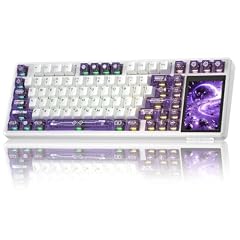
Aula L99 Wireless Mechanical Gaming Creamy Keyboard
- Size
- 75%
- Connection
- Wireless
- Switches
- Mechanical
- Hot-swappable
- Yes
$109.99 (as of 10/26/2026 22:59 PDT - Details)
The Aula L99 stands out with a smart touch screen built into the board, offering a unique way to interact with shortcuts or system indicators. It's a wireless mechanical keyboard with a creamy switch type (per listing).
Pros
- Touch screen adds a layer of customization
- Wireless connectivity with multiple modes
- Smooth linear or creamy switches (per name)
Cons
- Full layout not specified, may lack numpad
- Touch screen might be a gimmick for some users
Good fit if
- Tech enthusiasts who want a keyboard with a mini display
- Users who want a wireless board with a distinct aesthetic
Skip if
- You prefer a simple, reliable board
- You need a dedicated numpad
Verdict: An innovative wireless keyboard that brings a touch of the future to your desk.
10 Best for VIA customization

KiiBoom Phantom98 Lite 96% Wireless Mechanical Gaming Keyboard
- Size
- 96% to 98%
- Connection
- Wireless
- Switches
- Mechanical
- Hot-swappable
- Yes
$98.99 (as of 10/26/2026 16:06 PDT - Details) Typical price: $109.99, 10% off
The KiiBoom Phantom98 Lite supports VIA, an open-source remapping tool, giving you full control over key assignments and macros. It's a 96% wireless mechanical board that appeals to power users.
Pros
- VIA support for deep customization without proprietary software
- 96% layout includes numpad
- Wireless mode and USB-C wired connection
Cons
- Some users may find VIA setup intimidating
- No hot-swap sockets mentioned in the listing
Good fit if
- Keyboard enthusiasts who want to program layers and macros
- Professionals who need a numpad and wireless freedom
Skip if
- You prefer out-of-the-box functionality
- You don't need VIA's advanced features
Verdict: A flexible 96% wireless keyboard for users who love to tinker.
11 Best compact wired magnetic

MelGeek REAL67 Wired Hall Effect Magnetic Gaming Keyboard
- Size
- 65%
- Connection
- Wired
- Switches
- Magnetic (Hall effect)
- Hot-swappable
- Yes
$119.00 (as of 10/26/2026 17:06 PDT - Details)
The MelGeek REAL67 is a 65% wired Hall effect keyboard, offering magnetic switches and a tiny footprint. It's ideal for minimalists who want the latest switch tech without wireless complexity.
Pros
- Compact 65% layout saves space
- Hall effect switches provide smooth, reliable operation
- Wired USB-C connection for low latency
Cons
- No arrow keys? 65% usually has arrows, but not certain
- No wireless option
Good fit if
- Gamers who want a tiny board for a clean setup
- Users who prefer wired reliability
Skip if
- You need a numpad
- You want to go wireless
Verdict: A great choice for a compact wired board with next-gen switches.
12 Best 98% Hall effect

ATTACK SHARK R98 HE 8KHz Wired Hall Effect Gaming Keyboard
- Size
- 96% to 98%
- Connection
- Wired
- Switches
- Magnetic (Hall effect)
- Hot-swappable
- Yes
$67.49 (as of 10/26/2026 22:58 PDT - Details)
The Attack Shark R98 HE offers a 98% layout with Hall effect switches and 8000Hz polling, making it a high-performance wired board for gamers who want a numpad.
Pros
- 98% layout includes numpad in a condensed form
- 8000Hz polling reduces input lag
- Magnetic switches for fast actuation
Cons
- Wired only
- Brand may be less established than others
Good fit if
- Gamers who want numpad and top-tier response
- Users who don't mind a wired cable
Skip if
- You need wireless connectivity
- You prefer a standard full-size layout
Verdict: A high-polling 98% board that combines Hall effect switches with a practical layout.
13 Best ergonomic wireless
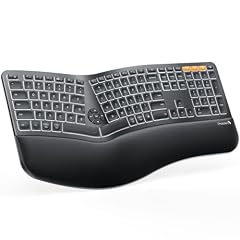
ProtoArc EK01 Plus Backlit Ergonomic Bluetooth Keyboard
- Size
- Full size
- Connection
- Wireless
$74.98 (as of 10/26/2026 18:09 PDT - Details)
The ProtoArc EK01 Plus is a split ergonomic wireless keyboard with a curved design that encourages a more natural wrist position. It's designed for comfort during long typing sessions.
Pros
- Split ergonomic layout promotes neutral wrist posture
- Wireless Bluetooth connection
- Backlit keys for visibility
Cons
- Not mechanical; uses membrane or scissor switches (not specified)
- Learning curve for those new to ergonomic boards
Good fit if
- Office workers with wrist discomfort
- Users who want a wireless ergonomic solution
Skip if
- You prefer a mechanical typing feel
- You need a compact or full-size layout
Verdict: A comfortable wireless ergonomic keyboard that helps reduce strain.
14 Best split mechanical

RAGNOK Ergonomic Mechanical Keyboard Split Keyboard Wireless
- Size
- Full size
- Connection
- Wireless
- Switches
- Mechanical
- Hot-swappable
- Yes
$139.00 (as of 10/26/2026 18:09 PDT - Details)
The RAGNOK is a wireless split mechanical keyboard with hot-swappable switches and a built-in wrist rest. It combines the tactile feedback of mechanical keys with an ergonomic split design.
Pros
- Split layout for natural hand placement
- Mechanical switches with hot-swap support
- Wireless connectivity and wrist rest included
Cons
- May require adjusting to split layout
- No numpad (split boards typically omit it)
Good fit if
- Mechanical keyboard fans who want ergonomics
- Users with shoulder or wrist strain
Skip if
- You need a numpad
- You prefer a simple one-piece design
Verdict: A unique blend of mechanical feel and ergonomic design, ideal for comfort-focused typists.
15 Best office mechanical

Cherry KC 200 MX Wired Mechanical Office Keyboard MX2A Silent RED
- Connection
- Wired
- Switches
- Mechanical
$94.99 (as of 10/26/2026 23:22 PDT - Details)
The Cherry KC 200 MX is a straightforward wired mechanical keyboard with Cherry MX2A Silent Red switches, making it a quiet and reliable option for office work without the gaming flash.
Pros
- Cherry MX Silent switches reduce noise
- Full-size layout with numpad
- Wired connection is dependable
Cons
- No backlight or RGB (not mentioned in listing)
- No hot-swap or wireless options
Good fit if
- Professionals who type all day and want quieter mechanical switches
- Users who need a numpad and don't care about RGB
Skip if
- You want a wireless keyboard
- You prefer a compact layout
Verdict: A dependable, quiet mechanical keyboard built for productivity.
Comparison table
How this list was made
We started with a pool of 216 priced keyboard listings that match the budget range for this guide. From those, we shortlisted boards that offer clear functional advantages: mechanical or Hall effect switches, wireless or wired connectivity, hot-swap capability, compact or ergonomic layouts, and specific features like programmable keys or displays. We removed non-keyboards such as stream decks and combo sets that aren't primarily keyboards. Prices are read live from the store listing at the time of writing and can change. We did not test any unit; each pick is based on the manufacturer's published specifications and the details provided in the listing.
Choosing the right one
Layout: Full, TKL, 75%, or 65%?
Your desk space and workflow dictate the layout. Full-size boards (100%) include a numpad, which is essential for data entry. Tenkeyless (TKL) omits the numpad to free up mouse space for gaming. 75% and 65% layouts remove even more keys, making them ultra-portable but requiring Fn-layer shortcuts for missing keys. Consider which keys you use most and whether you can sacrifice a numpad.
Switch types: mechanical, magnetic, and membrane
Mechanical switches come in linear, tactile, and clicky variants. Linear switches are smooth; tactile give a bump; clicky add an audible click. Magnetic (Hall effect) switches use magnets to detect keystrokes, allowing adjustable actuation points and rapid trigger features, but they are only found on newer boards. Membrane keyboards are quieter and cheaper but often less durable. Choose based on your preference for feel and noise.
Connectivity: wired, wireless, or both
Wired keyboards offer zero latency and never need charging. Wireless keyboards use Bluetooth or a 2.4GHz dongle for a cleaner desk, but you must keep them charged. Many models in this price range offer tri-mode connectivity (wired, Bluetooth, and 2.4GHz), which gives you flexibility across devices. If you're a gamer, a wired connection or a low-latency wireless protocol is preferable.
Hot-swappable vs. soldered switches
Hot-swappable keyboards let you remove and replace switches without soldering, making it easy to change switch types or fix a broken key. Soldered switches require more effort to replace. While not essential, hot-swap is a nice feature if you plan to customize your keyboard later.
Ergonomics and extra features
Ergonomic keyboards, such as split or angled designs, can reduce wrist strain during long sessions. Extra features like backlighting, LCD displays, media knobs, and programmable macros add convenience but can increase cost. Decide which features matter most for your daily use and ignore the rest.
Questions
Are keyboards under $150 good for gaming?
Yes. Many keyboards in this price range offer mechanical switches, low latency, and responsive feedback. Look for options with Hall effect switches or fast polling rates if you want an edge in competitive games. Wired keyboards often have lower latency than wireless, but modern 2.4GHz dongles are also reliable.
What is the difference between 75% and TKL layouts?
A TKL (tenkeyless) layout has 87 or 88 keys, omitting the numpad but keeping the arrow keys and function row. A 75% layout is more compressed, merging the function row with the top row and reducing spacing, resulting in fewer keys overall. 75% boards save more space but can sacrifice some dedicated keys.
Should I choose a mechanical or membrane keyboard?
Mechanical keyboards offer better tactile feedback, durability, and customization, but they are usually louder and heavier. Membrane keyboards are quieter, lighter, and cheaper. For typing or gaming, mechanical is often preferred for its consistency and feel. In this budget, you can find excellent mechanical options.
Is hot-swap worth it?
Hot-swap sockets let you change switches without soldering, so you can try different switch types or replace faulty ones easily. If you plan to customize your keyboard or want to ensure longevity, hot-swap is a valuable feature. It adds minimal cost and is becoming standard on many budget boards.
What should I check before buying a keyboard online?
Verify the layout includes all keys you need (numpad, function row, arrows). Check the switch type to match your feel preference. Confirm connectivity options (wired, Bluetooth, 2.4GHz). Look for hot-swap if you want future flexibility. Also consider the build materials and warranty offered by the brand.
What changed
- : First published.