
Best 75% Keyboards in 2026: 15 Picks Compared on Specs
The 75% layout is the sweet spot between a full keyboard and a tiny 60%, delivering arrow keys, a function row and a compact footprint without needing a numpad. We compared 15 models from the current catalog, including mechanical and Hall effect (magnetic) switch options, wired and wireless. We picked the Keychron K2 HE as the best overall for its magnetic switches, tri-mode wireless and support for the popular open-source QMK/VIA firmware ecosystem. Prices here are live and read directly from the store listing; nobody on the site has tested these units.
14 picks from 145 keyboards that match this guide with a price we can quote today. Each price below is read live and stamped with the time it was read.
The short list
Who each pick suits
- For budget buyers: You can get a solid 75% mechanical without spending a lot: the RK ROYAL KLUDGE M75 offers wireless, gasket mounting and hot-swap sockets at a budget-friendly price. See pick 7
- For low-profile lovers: If you want a slimmer keyboard with shorter key travel, the Keychron K3 Version 2 is a low-profile wireless 75% board with QMK support and a compact aluminum top case. See pick 4
- For customization tinkerers: If you like to remap every key and program macros without complex software, the Keychron V1 is a wired 75% board with QMK/VIA support, hot-swap sockets and a knob version. See pick 5
The 14 picks, one by one
1 Best overall

Keychron K2 HE Wireless Magnetic Hall Effect Custom Keyboard 75% Layout
- Size
- 75%
- Connection
- Wireless
- Switches
- Magnetic (Hall effect)
$139.99 (as of 10/26/2026 16:06 PDT - Details)
The Keychron K2 HE combines magnetic Hall effect switches with tri-mode wireless, a 75% layout and an aluminum frame. It is the only pick here with QMK/VIA support on a Hall effect switch, making it as programmable as a wired enthusiast board, with the convenience of wireless. Its hot-swap sockets and gasket mount place it above simpler wireless boards in this list.
Pros
- Magnetic (Hall effect) switches with adjustable actuation
- Supports QMK/VIA for full key remapping and macros
- Tri-mode wireless: Bluetooth, 2.4GHz and USB-C
- Gasket mount structure for a softer typing feel
Cons
- No paddle or knob included on the standard version
- Weight not stated by the seller
- Only available in the 75% layout, no numpad
Good fit if
- Typists who want adjustable actuation without soldering
- Users who rely on QMK/VIA to remap keys per application
Skip if
- If you prefer a high-profile keycap set, this board may be lighter than some
- If you want a numpad, look at a full-size or 96% layout
Verdict: The K2 HE is the most capable wireless keyboard in this list on paper, with a rare combination of Hall effect switches and open-source software support.
2 Best premium build

ASUS ROG Azoth Extreme Wireless Mechanical Gaming Keyboard
- Size
- 75%
- Connection
- Wireless
- Switches
- Mechanical
$399.99 (as of 10/26/2026 22:57 PDT - Details)
The ASUS ROG Azoth Extreme is the most expensive pick here and the only one with an aluminum top plate plus a gasket mount. It uses ROG NX Snow linear switches and PBT keycaps, and it offers wireless via Bluetooth, 2.4GHz and USB-C. You are paying for machining and materials, not just features, and it lacks hot-swap sockets on this configuration.
Pros
- Aluminum construction with a PVD-coated weight for stability
- ROG NX Snow linear switches with a smooth factory feel
- Tri-mode wireless: Bluetooth, 2.4GHz and USB-C
- Comes with PBT keycaps
Cons
- No hot-swap sockets (switches are soldered)
- Heavier than most 75% boards (weight not stated)
- Does not support QMK/VIA; uses ASUS Armoury Crate software
Good fit if
- Buyers who want a premium, heavy, stable desk piece
- Those who prefer factory-lubed linear switches without tinkering
Skip if
- If you like to change switches often, hot-swap is missing here
- If you plan to remap keys with an open-source tool, this is not the right board
Verdict: The Azoth Extreme is a flagship 75% board that impresses on materials and finish, but it trades away hot-swap and open-source software for that build.
3 Best Hall effect for esports

nuphy Field75 HE V2 75% Layout 83 Keys Gaming Keyboard with knobs
- Size
- 75%
- Switches
- Magnetic (Hall effect)
$199.00 (as of 10/26/2026 18:05 PDT - Details)
The NuPhy Field75 HE V2 brings Hall effect switches (Jade Dragon-N) with adjustable actuation and two knobs, a rare feature on a magnetic board. It is a focused esports tool at a lower price than the GMMK 3 PRO HE, while still offering 8K polling over USB.
Pros
- Magnetic switches with adjustable actuation range
- Two knobs for volume and another function
- 8K polling rate over wired connection
- Compact 75% layout with 83 keys
Cons
- No stated hot-swap support in the catalog
- No wireless option (this configuration is wired)
- Proprietary switch design means only NuPhy switches may fit
Good fit if
- Players who want Hall effect adjustability and a physical volume knob
- Users who prefer a wired connection for guaranteed low latency
Skip if
- If you need wireless, the Field75 HE V2 is wired only in this listing
- If you want to use standard MX-style switches, this uses a magnetic stem
Verdict: The Field75 HE V2 is a smart pick for esports players who want magnetic switches with tactile controls, without the extra cost of a metal case.
4 Best low-profile

Keychron K3 Version 2 QMK 75% Wireless Low-Profile Mechanical Keyboard
- Size
- 75%
- Connection
- Wireless
- Switches
- Mechanical
$84.00 (as of 10/26/2026 16:06 PDT - Details)
The Keychron K3 Version 2 is the only low-profile 75% keyboard in our pool. It uses low-profile mechanical switches and a slim aluminum top case, which keeps it lighter and thinner than the other picks. It also supports QMK/VIA, making it the most programmable low-profile board in the list.
Pros
- Low-profile design reduces wrist angle compared to standard-height boards
- QMK/VIA support for open-source remapping
- Wireless via Bluetooth and USB-C
- Comes with PBT keycaps
Cons
- Low-profile switches are not standard MX fit, limiting keycap choices
- No 2.4GHz dongle; latency may be higher than a dedicated wireless mode
- Smaller battery capacity not stated by the seller
Good fit if
- Travelers who want a slim board that slips into a bag
- Typists with wrist issues who prefer a lower angle
Skip if
- If you want to use thick SA or MT3 keycaps, low-profile boards do not accept them
- If you need 2.4GHz for gaming, this board uses only Bluetooth and wired
Verdict: The K3 V2 is the best low-profile 75% option, with the same QMK/VIA flexibility as larger Keychron boards.
5 Best wired custom

Keychron V1 Wired Custom Mechanical Keyboard Knob Version
- Size
- 75%
- Connection
- Wired
- Switches
- Mechanical
- Hot-swappable
- Yes
$94.99 (as of 10/26/2026 16:06 PDT - Details)
The Keychron V1 is a wired 75% board that gives you QMK/VIA compatibility, hot-swap sockets and four different knob configurations. It is a blank canvas for typists who want to program every layer without relying on wireless. For users who never leave the desk, it is the most customizable wired option in this list.
Pros
- Full QMK/VIA support for deep customization
- Hot-swap sockets accept standard MX-style switches
- Includes a knob for media control (knob version)
- PBT keycaps included
Cons
- Wired only, no Bluetooth or 2.4GHz
- No RGB lighting on the default version (some versions have it, not this one)
- Heavier than a typical plastic case (weight not stated)
Good fit if
- Keyboard enthusiasts who want to build a personalized layout over time
- Office workers who need a stable wired board with macro support
Skip if
- If you want a cable-free desk, this board is tethered
- If you prefer a pre-built sound profile without opening the case
Verdict: The V1 is the best wired custom keyboard in this list, with open-source firmware and a hot-swap PCB that you can alter to your taste.
6 Best gasket mount sound

EPOMAKER x Aula F75 Gasket Mechanical Keyboard
- Size
- 75%
- Connection
- Wireless
- Switches
- Mechanical
- Hot-swappable
- Yes
$65.99 (as of 10/26/2026 23:52 PDT - Details)
The EPOMAKER x Aula F75 uses a five-layer gasket mount structure that, by design, produces a softer, deeper typing sound compared to a rigid tray mount. It is a wireless 75% board with hot-swap sockets and a pre-lubed switch setup. It is one of the most popular choices in the pool for those who care about acoustic feel without building a board from scratch.
Pros
- Five-layer gasket mount for a softer, quieter typing sound
- Hot-swap sockets for switch swaps
- Tri-mode wireless: Bluetooth, 2.4GHz and USB-C
- Pre-lubed switches come from the factory
Cons
- No QMK/VIA support; only vendor software
- The plastic case may feel lighter than aluminum boards
- No knob or display on this model
Good fit if
- Typists who want a pleasant out-of-the-box sound without work
- Users who want wireless with the flexibility to change switches later
Skip if
- If you need deep software remapping, look to a QMK board
- If you prefer the heft of a metal case
Verdict: The F75 is the best gasket-mount wireless pick for sound, but the plastic build may not please everyone.
7 Best budget wireless

RK ROYAL KLUDGE M75 Wireless Mechanical Keyboard 2.4Ghz/BT5.1/USB-C
- Size
- 75%
- Connection
- Wireless
- Switches
- Mechanical
- Hot-swappable
- Yes
$69.99 (as of 10/26/2026 19:05 PDT - Details)
The RK M75 packs wireless, a gasket mount, hot-swap sockets and a 75% layout into a package that costs less than most of its wireless peers. It uses a 2.4GHz dongle plus Bluetooth 5.1 and USB-C, giving you three ways to connect. If you want a modern wireless keyboard without spending a lot, this is the pick.
Pros
- Tri-mode wireless: 2.4GHz, Bluetooth 5.1 and USB-C
- Gasket mount for a softer feel
- Hot-swap sockets for switch changes
- Includes a knob for volume control
Cons
- No QMK/VIA support; only basic software
- The stock keycaps are not PBT (not stated, likely ABS)
- Battery life not stated by the seller
Good fit if
- Gamers and typists who want wireless without a high price tag
- First-time buyers of a 75% layout who want to try it cheaply
Skip if
- If you need the deep customization of QMK/VIA, this board is limited
- If you prefer a heavier, metal-bodied keyboard
Verdict: The M75 is the best budget wireless 75%, offering a gasket mount and hot-swap at a price that is hard to beat.
8 Best design

GravaStar Mercury K1 75% Wireless Mechanical Gaming Keyboard RGB Backlit
- Size
- 75%
- Connection
- Wireless
- Switches
- Mechanical
- Hot-swappable
- Yes
$139.95 (as of 10/26/2026 15:05 PDT - Details)
The GravaStar Mercury K1 stands out with a sci-fi inspired case and a side-angle silhouette that you won't see on any other keyboard in this list. It is a wireless 75% mechanical with RGB backlighting, and it includes a magnetic palm rest. Beyond the look, it has a standard 75% layout with no display or knob, keeping it simple.
Pros
- Unique industrial design with an angled acrylic inlay
- Wireless via Bluetooth, 2.4GHz and USB-C
- RGB backlighting
- Magnetic palm rest included
Cons
- No hot-swap sockets (switches are soldered)
- No QMK/VIA or software remapping (uses basic driver)
- Plastic case may not feel as premium as the price suggests
Good fit if
- People who want a keyboard that looks like a prop from a game
- Users who prefer a slim, low-profile silhouette
Skip if
- If you need to change switches, this board does not allow it
- If you prefer a knob or media controls, this model has none
Verdict: The Mercury K1 is the best-looking 75% in the pool, but you trade some functionality for that style.
9 Best with OLED display

Womier Retro 75% Gaming Keyboard with OLED Display&Knob
- Size
- 75%
- Connection
- Wireless
- Switches
- Mechanical
- Hot-swappable
- Yes
$67.99 (as of 10/26/2026 20:10 PDT - Details)
The Womier Retro 75 (M87 Pro) includes a small OLED screen and a knob, a combination that is rare among picks under $100. It is wireless with Bluetooth 5.1, 2.4GHz and USB-C, and it adds hot-swap sockets. The display can show system stats, GIFs or a clock, adding a layer of personalization without needing software.
Pros
- OLED display for system monitoring or custom images
- Physical knob for volume or scrolling
- Tri-mode wireless: Bluetooth 5.1, 2.4GHz and USB-C
- Hot-swap sockets included
Cons
- No QMK/VIA support; display control uses vendor software
- The plastic case is not as sturdy as aluminum options
- Weight and battery capacity not stated by the seller
Good fit if
- Tinkerers who like to see stats or animations on their board
- Users who want both a knob and a small screen for quick control
Skip if
- If you prefer a clean, minimalist look without a screen
- If you need the deep programmability of QMK
Verdict: The Retro 75 is a feature-packed wireless board with a screen and a knob at a very reasonable price.
10 Best budget wired
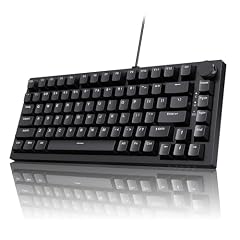
Ajazz AK820 75% Mechanical Gaming Keyboard
- Size
- 75%
- Connection
- Wired
- Switches
- Mechanical
- Hot-swappable
- Yes
$39.99 (as of 10/26/2026 22:44 PDT - Details)
The Ajazz AK820 is a wired 75% board with a gasket mount, hot-swap sockets and a volume knob, all for a very low price. It uses a five-layer sound-dampening structure to minimize echo and ping. If you want the feel of a high-end gasket board but don't need wireless, this is the pick.
Pros
- Gasket mount with five-layer sound dampening
- Hot-swap sockets for switch changes
- Includes a volume knob
- Wired connection means no latency concerns and no battery
Cons
- Wired only, no wireless option
- The stock switches are not pre-lubed (you may want to lube them)
- No OLED or display
Good fit if
- Budget builders who plan to swap switches immediately
- Office or dorm use where a cable is fine
Skip if
- If a cable annoys you, look at a wireless model
- If you want out-of-the-box silence, consider a pre-lubed switch board
Verdict: The AK820 is a smart, affordable wired entry that brings gasket mounting and hot-swap to the budget tier.
11 Best entry-level wired

MageGee 75% Mechanical Gaming Keyboard
- Size
- 75%
- Connection
- Wired
- Switches
- Mechanical
$29.99 (as of 10/26/2026 17:05 PDT - Details)
The MageGee 75% is a no-frills wired pick with a red linear switch and blue LED backlight. It is a straightforward way to try a 75% layout without a gasket mount or wireless. If you just need a compact board that works, this is it.
Pros
- Wired connection with no battery to worry about
- Red linear switches for a quiet, smooth feel
- Blue LED backlight for low-light visibility
- Very low price point
Cons
- No hot-swap sockets at all
- No wireless or Bluetooth
- ABS keycaps (not PBT) may wear faster
Good fit if
- Students or office workers who want a spare keyboard
- Anyone who wants to test a 75% layout for the first time
Skip if
- If you plan to modify switches, you'll need to solder
- If you want wireless freedom, this is a wired board
Verdict: The MageGee 75% is a no-nonsense, low-cost introduction to the layout, offering nothing more than the essentials.
12 Best with TFT screen

Redragon K724 PRO Wireless 81-Key Gasket Gaming Keyboard
- Size
- TKL (80%)
- Connection
- Wireless
$64.99 (as of 10/26/2026 18:10 PDT - Details)
The Redragon K724 PRO adds a vivid TFT color screen and a knob to a wireless 75% layout, which is unusual at this price. The screen can display system stats, custom pictures or GIFs, and it has a gasket mount for a softer typing feel. It is a feature-dense board for the money.
Pros
- 2.4GHz and USB-C wireless plus Bluetooth (tri-mode)
- TFT color display for stats and images
- Gasket mount structure
- Includes a knob
Cons
- No hot-swap sockets (switches are soldered)
- No QMK/VIA; vendor software controls the screen
- Battery capacity not stated by the seller
Good fit if
- Users who want a screen to show CPU/GPU stats while gaming
- Anyone who likes to customize the look with animated images
Skip if
- If you plan to swap switches, this model is soldered
- If you prefer a simple board with no software dependency
Verdict: The K724 PRO delivers a lot of visual flair with its TFT screen, but it falls short on hot-swap flexibility.
13 Best white wired

DIERYA DK81E 75% Mechanical Gaming Keyboard
- Size
- 75%
- Connection
- Wired
- Switches
- Mechanical
- Hot-swappable
- Yes
$39.99 (as of 10/26/2026 23:40 PDT - Details)
The DIERYA DK81E is a wired 75% board in a clean white finish, with hot-swap sockets that let you change switches without soldering. It is a simple, functional option for those who want a white keyboard to match a desk setup, and it is priced for a budget.
Pros
- Clean white colorway
- Hot-swap sockets for easy switch changes
- Wired connection for reliability
- Compact 75% layout
Cons
- No wireless option
- No QMK/VIA support
- No knob or display
Good fit if
- People with a white PC or desk theme
- Budget buyers who want to experiment with different switches
Skip if
- If you want wireless, this board is wired only
- If you need macros or layers, the software here is basic
Verdict: The DK81E is a tidy, white wired 75% keyboard that offers hot-swap at an entry price, but it won't do much else.
14 Best aluminum construction

FKZ NUT75 Aluminum Alloy Mechanical Keyboard with Metal Volume Knob
- Size
- 75%
- Connection
- Wireless
- Switches
- Mechanical
- Hot-swappable
- Yes
$125.99 (as of 10/26/2026 14:07 PDT - Details)
The FKZ NUT75 is one of the few picks with a full aluminum alloy case, which adds weight and rigidity that plastic boards lack. It is a tri-mode wireless with a metal volume knob and hot-swap sockets. At this price, it is the most affordable way to get a metal-bodied wireless 75% board in our pool.
Pros
- Aluminum alloy outer case for stiffness and longevity
- Tri-mode wireless: Bluetooth, 2.4GHz and USB-C
- Metal volume knob for a premium touch
- Hot-swap sockets included
Cons
- No QMK/VIA support; only vendor software
- Heavier than plastic boards, which may be a pro or con depending on use
- No display or RGB on this specific listing (RGB backlight is basic)
Good fit if
- Buyers who want a metal body without flagship prices
- Wireless users who prefer a sturdy feel on the desk
Skip if
- If you need to remap keys deeply, the vendor software may not allow it
- If you prefer a lighter board for travel, this is not it
Verdict: The NUT75 is the best way to get a metal wireless 75% keyboard at a middle price, with hot-swap as a bonus.
Comparison table
How this list was made
We searched the current catalog for keyboards with a 75% layout and found 81 listings. After removing duplicates and near-duplicates (for example, the same PCB sold under different brand names), we kept 15 distinct models that cover a range of price tiers, connection types and switch technologies. Every pick is chosen from the maker's published specifications and the catalog data: we compared the listed switch type, hot-swap support, connection modes, mounting structure, keycaps, display features and whether a mouse is included. Prices are shown live on this page with the time they were read, so they may have changed since the listing was captured. We have not tested any of these keyboards in person or measured their performance or acoustics.
Choosing the right one
Mechanical vs. Hall effect (magnetic) switches
The two biggest switch families in this list are traditional mechanical switches and newer Hall effect (magnetic) switches. Mechanical switches close a physical contact when you press the key, and they come in linear, tactile and clicky variants. Hall effect switches use a magnet and a sensor, which lets the keyboard detect the exact position of the keypress. That allows features like adjustable actuation point and Rapid Trigger, where a key registers the moment it starts to move and resets the moment you lift a small amount. If you want to tune how far you need to press for each key, Hall effect boards (the Keychron K2 HE, NuPhy Field75 HE V2, the GMMK 3 PRO HE, and others) give you that control. If you prefer a specific mechanical switch feel and want to swap switches later, look for a hot-swap model with standard MX-style sockets.
Wired vs. wireless: what to expect
Wireless keyboards in this pool use Bluetooth, a 2.4GHz dongle, or both, plus a USB-C wired mode. Bluetooth is the most convenient for switching between devices, but it can have slightly higher latency than a dedicated wireless dongle. A 2.4GHz dongle typically offers lower latency and a more stable connection, which is why gaming boards often include it. For competitive play, several models here also list a high polling rate (8K on some) that only works over a USB cable. Wired keyboards never run out of battery and avoid any wireless interference, but they keep a cable on your desk. If you plan to play fast-paced shooters, a wired mode or a 2.4GHz dongle is the safer choice; if you mostly type and hop between a laptop and a desktop, Bluetooth is enough.
Hot-swap sockets: do you need them?
Hot-swap sockets let you remove and replace switches without soldering, which is a huge advantage for customization and for fixing a single broken key. You can change the feel of the entire board by swapping in a different switch type, or even mix switch types for different rows. In this list, hot-swap support is common among the budget and midrange picks, but some premium boards like the ASUS ROG Azoth Extreme and the GravaStar Mercury K1 do not offer it. If you are the kind of person who likes to tinker, a hot-swap board is almost always worth the extra few dollars. If you plan to keep the stock switches and never change them, a soldered board is fine.
Gasket mount and typing sound
A gasket mount suspends the plate between two layers of gaskets instead of screwing it directly to the case. This makes the whole board flex slightly when you press a key, which can soften the bottom-out feel and change the sound from a hard clack to a deeper thock. Several picks in this list (EPOMAKER x Aula F75, RK M75, Ajazz AK820, Redragon K724 PRO) use a gasket mount with multiple layers of foam or sound dampening. If you will be typing in a shared space or office, a model with more sound-dampening layers will be quieter. If you prefer a crisp, high-pitched sound, a tray mount or a board with less foam may suit you better. This is a matter of taste, so if you can, try a friend's gasket board before committing.
Keycaps and layout details
Most 75% keyboards have 81 to 84 keys, placing the arrow keys and a function row between the main typing area and the right edge. The keycaps are almost always ABS or PBT. PBT keycaps resist shine and feel grainier, while ABS is smoother and tends to develop a glossy look over time. A few boards in the list (Keychron K3 V2, Keychron V1, ASUS ROG Azoth Extreme) include PBT caps, which is a quality marker. If you plan to replace the keycaps later, check that the board uses a standard layout and a compatible switch stem. Low-profile boards like the Keychron K3 V2 are the exception: they use a different stem shape, so only low-profile keycaps fit. If you want to put a custom keycap set on your board, avoid low-profile designs and stick to a standard-height MX-style board.
Questions
What is a 75% keyboard layout?
A 75% keyboard layout keeps the main typing area, a top function row, arrow keys, and a few navigation keys, but removes the numpad. It is a compact compromise between a full-size keyboard and the smaller 60% or 65% layouts. The name comes from the approximate percentage of a full keyboard's width it uses, though the actual number of keys varies between 81 and 84 on the boards in this list.
Is a Hall effect keyboard worth it over a mechanical one?
Hall effect keyboards use magnetic sensors to detect key travel, which enables adjustable actuation point, Rapid Trigger and a longer lifespan because there are no metal contacts to wear out. They are noticeably better for competitive gamers who want to fine-tune how a key registers. For general typing, the difference is less dramatic: a good mechanical switch feels just as fine. Hall effect boards also tend to cost more, so you are paying for that adjustability and durability.
Can I use a 75% keyboard with a Mac or Windows?
All the keyboards in this list are USB and Bluetooth, so they work with Windows and Mac at a basic level. Some boards have dip switches to swap between Windows and Mac modifier layouts (like Option and Command), while others rely on remapping software. If you switch between operating systems often, look for a keyboard that supports VIA/QMK (like the Keychron V1) so you can set your own modifier keys. Otherwise, check the product description for Mac compatibility.
What is the difference between 2.4GHz and Bluetooth on a keyboard?
A 2.4GHz wireless connection requires a small USB dongle that you plug into your computer, and it usually offers lower latency and a more stable signal than Bluetooth. Bluetooth is built into most laptops and tablets, so you can connect without a dongle, and you can pair multiple devices and switch between them quickly. For gaming, a 2.4GHz dongle is generally preferred because it avoids Bluetooth's higher input delay. Many keyboards in this list support both, plus a wired USB-C mode, which lets you choose per use case.
What changed
- : First published.