
Best GravaStar Keyboards in 2026: 7 Picks Compared by Specs
GravaStar makes a compact family of gaming keyboards that splits into two switch camps: traditional mechanical boards in the Mercury K series and magnetic Hall effect boards in the Mercury V series. The best pick for most people is the Mercury K1 Pro, a 75% wireless mechanical board with hot-swap support, the only model in this lineup whose listing states that feature. This guide compares all seven GravaStar keyboards currently in the catalogue on layout, connection type, switch type, and included extras. Prices on the page are live and read from the listings.
7 picks from 14 keyboards that match this guide with a price we can quote today. Each price below is read live and stamped with the time it was read.
The short list
| # | Pick | Keyboard | Price |
|---|---|---|---|
| 1 | Best wireless 75% mechanical | GravaStar Mercury K1 75% Wireless Mechanical Gaming Keyboard RGB Backlit | $139.95 (as of 10/27/2026 00:18 PDT - Details) |
| 2 | Best overall | GravaStar Mercury K1 Pro 75% Wireless Mechanical Gaming Keyboard | $199.95 (as of 10/27/2026 00:18 PDT - Details) |
| 3 | Best with numeric keypad | GravaStar Mercury K98 Pro 98 Keys Wireless Mechanical Gaming Keyboard | $259.95 (as of 10/27/2026 00:18 PDT - Details) |
| 4 | Best Hall effect for gaming | GravaStar Mercury V75 Hall Effect Gaming Keyboard | $169.95 (as of 10/27/2026 00:18 PDT - Details) |
| 5 | Best simplified Hall effect pick | GravaStar Mercury V75 Hall Effect Gaming Keyboard | $109.95 (as of 10/27/2026 00:18 PDT - Details) |
| 6 | Best special edition | Mercury V75 Pro Special Edition | $247.40 (as of 10/26/2026 17:07 PDT - Details) |
| 7 | Best bundled keyboard and mouse | GravaStar Mercury V60 HE Gaming Keyboard | $206.90 (as of 10/27/2026 00:18 PDT - Details) |
Who each pick suits
- For a compact wireless mechanical desk: Choose the Mercury K1 if you want GravaStar's 75% wireless design and mechanical switches without the hot-swap feature of the Pro. See pick 1
- For hot-swap customization: The Mercury K1 Pro is the only pick in this catalogue whose listing states hot-swap support, so choose it when you plan to change switches. See pick 2
- For number-pad work: The Mercury K98 Pro is the wireless mechanical pick with a 96% to 98% layout, the only GravaStar in this list with a stated numeric keypad. See pick 3
- For a keyboard and mouse in one order: The Mercury V60 HE is sold as a combo with an M1 Pro Mouse, which makes it the pick when you need both devices. See pick 7
The 7 picks, one by one
1 Best wireless 75% mechanical

GravaStar Mercury K1 75% Wireless Mechanical Gaming Keyboard RGB Backlit
- Size
- 75%
- Connection
- Wireless
- Switches
- Mechanical
- Hot-swappable
- Yes
$139.95 (as of 10/27/2026 00:18 PDT - Details)
The K1 is the straightforward 75% wireless mechanical option in the Mercury family. It shares the compact wireless format of the K1 Pro, but its listing does not state hot-swap support, so it suits buyers who want the core feature set without that extra.
Pros
- Listed as a 75% wireless mechanical keyboard
- RGB backlighting is named in the listing
- Mechanical switches are stated
Cons
- Hot-swap support is not stated by the seller
- Polling rate and actuation specs are not stated
- Compact layout has no numeric keypad
Good fit if
- Anyone who wants a wireless mechanical board in a compact 75% frame
- Users who do not need hot-swap switch replacement
Skip if
- Tinkerers who want to swap switches without soldering, who should look at the K1 Pro
- Anyone who needs a numeric keypad, who should look at the K98 Pro
Verdict: A solid compact wireless mechanical pick when you do not need the K1 Pro's hot-swap support.
2 Best overall
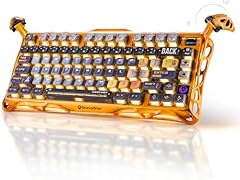
GravaStar Mercury K1 Pro 75% Wireless Mechanical Gaming Keyboard
- Size
- 75%
- Connection
- Wireless
- Switches
- Mechanical
- Hot-swappable
- Yes
$199.95 (as of 10/27/2026 00:18 PDT - Details)
The K1 Pro is the only model in this GravaStar lineup whose listing states hot-swap support, and it keeps the 75% wireless mechanical format. For most buyers, that combination of compact size, wireless convenience, and switch customization is the strongest set of features here.
Pros
- Only pick whose listing states hot-swap support
- 75% wireless mechanical layout
- Compact format fits smaller desks
Cons
- Switch details beyond mechanical are not stated
- No numeric keypad on the 75% layout
- Hot-swap support is stated but no additional switch details are given
Good fit if
- Enthusiasts who want to change switches on a wireless 75% board
- Gamers who want a smaller desktop footprint
Skip if
- Users who need a numeric keypad, who should choose the K98 Pro
- Users who prefer magnetic Hall effect switches, who should choose the V75
Verdict: The best overall GravaStar keyboard on paper because it is the only wireless 75% mechanical with stated hot-swap support.
3 Best with numeric keypad

GravaStar Mercury K98 Pro 98 Keys Wireless Mechanical Gaming Keyboard
- Size
- 96% to 98%
- Connection
- Wireless
- Switches
- Mechanical
- Hot-swappable
- Yes
$259.95 (as of 10/27/2026 00:18 PDT - Details)
The K98 Pro is the only pick in this pool with a 96% to 98% layout and one of two with conventional mechanical switches. If you need a number pad but want a wireless mechanical GravaStar, this is the model to choose.
Pros
- 96% to 98% layout includes a numeric keypad
- Wireless mechanical switch type is stated
- Largest layout in this pool
Cons
- Larger footprint than the 75% picks
- Hot-swap support is not stated by the seller
- Polling rate and switch details are not stated
Good fit if
- Users who enter numbers regularly or work with spreadsheets
- Anyone who wants a wireless mechanical board without giving up the number pad
Skip if
- Minimal-desk users who prefer a compact 75% board
- Hot-swap fans who should choose the K1 Pro
Verdict: The right GravaStar keyboard when the stated 96% to 98% layout and a number pad matter more than the smallest footprint.
4 Best Hall effect for gaming

GravaStar Mercury V75 Hall Effect Gaming Keyboard
- Size
- 75%
- Connection
- Wired
- Switches
- Magnetic (Hall effect)
$169.95 (as of 10/27/2026 00:18 PDT - Details)
The V75 is the only pick in this pool with both an 8000Hz polling rate and a 0.005mm adjustment stated, and it is a wired 75% board with magnetic Hall effect switches. These are the headline performance specs among the Hall effect models.
Pros
- 8000Hz polling rate is stated in the listing
- 0.005mm adjustment is stated
- 75% wired layout with magnetic Hall effect switches
Cons
- Wired only, so no wireless flexibility
- Compact 75% layout has no numeric keypad
- Hot-swap support is not stated by the seller
Good fit if
- Competitive gamers who want the fastest stated polling rate in this list
- Players who do not mind a cable on the desk
Skip if
- Wireless fans who should choose the K1 or K98 Pro
- Users who need a number pad, who should choose the K98 Pro
Verdict: The gaming-focused GravaStar pick on paper thanks to its stated wired Hall effect design, 8000Hz polling, and 0.005mm adjustment.
5 Best simplified Hall effect pick

GravaStar Mercury V75 Hall Effect Gaming Keyboard
- Size
- 75%
- Connection
- Wired
- Switches
- Magnetic (Hall effect)
- Hot-swappable
- Yes
$109.95 (as of 10/27/2026 00:18 PDT - Details)
The V75 Lite shares the 8000Hz polling figure named in the V75, but its listing does not state layout, connection type, or the 0.005mm adjustment. It is the simplified Hall effect model for buyers who want the switch type and polling figure without the extra listed details.
Pros
- 8000Hz polling rate is stated in the product name
- Magnetic Hall effect switches are stated
- Lite positioning is clear from the model name
Cons
- Layout is not stated by the seller
- Connection type is not stated by the seller
- Actuation adjustment is not stated, unlike the V75
Good fit if
- Buyers who want Hall effect switches and a high stated polling figure
- Users willing to confirm layout and connection from the listing before ordering
Skip if
- Users who need a stated wired connection, who should choose the V75
- Users who need a stated layout before buying
Verdict: A sensible simplified Hall effect option if the stated 8000Hz polling is what you care about and the missing layout and connection details do not bother you.
6 Best special edition

Mercury V75 Pro Special Edition
- Connection
- Wired
- Switches
- Magnetic (Hall effect)
$247.40 (as of 10/26/2026 17:07 PDT - Details)
The V75 Pro Special Edition is the only pick in this pool with Neon Graffiti styling and a coiled aviator USB cable combo in the listing name. Its spec line only states a wired connection, so choose it for the visual package rather than for detailed switch specifications.
Pros
- Neon Graffiti special edition styling is stated
- Coiled aviator USB cable combo is included
- Wired connection is stated
Cons
- Switch type is not stated by the seller
- Layout is not stated by the seller
- No polling rate or actuation spec is stated
Good fit if
- Collectors who want a distinctive Neon Graffiti look
- Users who want the coiled aviator cable combo included
Skip if
- Buyers who need Hall effect or mechanical details in the listing
- Buyers who prefer a wireless board
Verdict: The pick for GravaStar fans who want the special edition look and the listed cable combo, with the understanding that few technical specs are stated.
7 Best bundled keyboard and mouse

GravaStar Mercury V60 HE Gaming Keyboard
- Switches
- Magnetic (Hall effect)
- Mouse included
- Yes
$206.90 (as of 10/27/2026 00:18 PDT - Details)
The V60 HE is the only GravaStar pick in this pool listed as a combo with an M1 Pro Mouse in pink. If you are starting a desk setup and need both devices, this one covers the keyboard side with magnetic Hall effect switches and includes the mouse in the same order.
Pros
- M1 Pro Mouse is included, as stated in the listing
- Magnetic Hall effect switches are stated
- One order covers keyboard and mouse
Cons
- Layout is not stated by the seller
- Connection type is not stated by the seller
- Mouse is pink only, so color preference matters
Good fit if
- New setup builders who want a keyboard and mouse together
- Users who want magnetic Hall effect switches and do not already own a mouse
Skip if
- Users who already have a mouse and need a keyboard only
- Buyers who do not want a pink mouse on the desk
Verdict: The combo pick on paper, pairing a magnetic Hall effect keyboard with an M1 Pro Mouse, with layout and connection details left unstated.
Comparison table
| # | Keyboard | Size | Connection | Switches | Mouse included | Hot-swappable |
|---|---|---|---|---|---|---|
| 1 | GravaStar Mercury K1 75% Wireless Mechanical Gaming Keyboard RGB Backlit | 75% | Wireless | Mechanical | not stated | Yes |
| 2 | GravaStar Mercury K1 Pro 75% Wireless Mechanical Gaming Keyboard | 75% | Wireless | Mechanical | not stated | Yes |
| 3 | GravaStar Mercury K98 Pro 98 Keys Wireless Mechanical Gaming Keyboard | 96% to 98% | Wireless | Mechanical | not stated | Yes |
| 4 | GravaStar Mercury V75 Hall Effect Gaming Keyboard | 75% | Wired | Magnetic (Hall effect) | not stated | not stated |
| 5 | GravaStar Mercury V75 Hall Effect Gaming Keyboard | 75% | Wired | Magnetic (Hall effect) | not stated | Yes |
| 6 | Mercury V75 Pro Special Edition | not stated | Wired | Magnetic (Hall effect) | not stated | not stated |
| 7 | GravaStar Mercury V60 HE Gaming Keyboard | not stated | not stated | Magnetic (Hall effect) | Yes | not stated |
How this list was made
To build this list, we took the 7 GravaStar keyboards in the current catalogue and compared the information stated in each listing: layout, connection type, switch type, hot-swap support, polling rate, and bundled accessories. We kept every model because the pool holds fewer than 12 entries. The Mercury K1 Pro stands out as the only listing that states hot-swap support, while the V75 and V75 Lite are the only models that state 8000Hz polling. Prices shown on the page are read live from the store listing and carry the time they were read. Nobody at this site has used these keyboards, so the picks are based on specifications and seller-stated features.
Choosing the right one
Layout: 75% versus 96% to 98%
The GravaStar pool splits by layout. The Mercury K1, K1 Pro, and Mercury V75 Hall Effect are listed as 75% boards, a compact format that drops the numeric keypad. The Mercury K98 Pro is listed as 96% to 98%, which keeps a numeric keypad in a slightly shorter frame than a traditional full-size board.
The other three listings do not state a layout, so check the seller's description if the exact key arrangement matters to you.
Connection: wired or wireless
Two picks in this pool state a connection type. The Mercury V75 Hall Effect and the V75 Pro Special Edition are wired. The Mercury K1, K1 Pro, and K98 Pro are wireless, while the V75 Lite and V60 HE do not state one. Wireless keyboards remove the cable from the desk; the Bluetooth SIG overview describes the Classic and LE radio options commonly used by wireless devices. If your priority is the fastest stated polling figure, the wired V75 lists 8000Hz. If you want a cable-free desk, choose a model whose listing says Wireless.
Switch type: mechanical or magnetic Hall effect
GravaStar's current catalogue has two switch families. The K1, K1 Pro, and K98 Pro are listed as mechanical. The V75 Hall Effect, V75 Lite, and V60 HE are listed as magnetic Hall effect; the full V75 listing also adds 8000Hz polling and a 0.005mm adjustment.
Magnetic switches use a different operating method from mechanical switches. Match the switch type to your preferences rather than assuming one is always better, because the listings here do not include performance test results.
Hot-swap and customization
The Mercury K1 Pro is the only keyboard in this pool whose listing states hot-swap support. Hot-swap support means the switches can be removed and replaced without soldering, which matters if you plan to change switches later. None of the other six listings states hot-swap support, so do not assume it is available on the K1, K98 Pro, or any V-series model.
Included accessories and combos
The Mercury V60 HE is sold as a combo with an M1 Pro Mouse in pink, and the Mercury V75 Pro Special Edition includes what the listing calls a coiled aviator USB cable combo. The other picks are listed as keyboards only.
If you are outfitting a new desk, a combo can reduce the number of separate orders. If you already own peripherals, a standalone keyboard keeps the setup simpler.
Keyboard placement and comfort
The OSHA Computer Workstations eTool recommends putting the keyboard directly in front of you, keeping your shoulders relaxed and your wrists straight and in line with your forearms. That guidance applies no matter which GravaStar model you choose.
Compact 75% boards leave more room for mouse movement but move some keys closer together, so adjust keyboard height and tilt to keep your wrists neutral. A 96% to 98% board takes up more space but keeps the number pad within easy reach.
Questions
How many GravaStar keyboards are compared here?
Seven GravaStar keyboards are in the current catalogue used for this guide. They cover 75% wireless mechanical boards, a 96% to 98% wireless mechanical board, wired and Lite Hall effect models, a special edition, and one combo that includes a mouse. The page displays live prices next to each pick.
What is the difference between the Mercury K series and Mercury V series?
The K series in this list uses conventional mechanical switches and includes 75% and 96% to 98% wireless boards. The V series uses magnetic Hall effect switches; the V75 and V75 Lite state 8000Hz polling, and the V75 also states 0.005mm adjustment. If you prefer standard mechanical switch operation, choose K. If you want Hall effect, choose V.
Which GravaStar keyboard supports hot-swap switches?
The Mercury K1 Pro is the only keyboard in this pool whose listing states hot-swap support. That means the switches can be replaced without soldering. The Mercury K1, K98 Pro, and the V-series models do not state hot-swap support in the data used for this guide.
Do any GravaStar keyboards come with a mouse?
Yes. The Mercury V60 HE Gaming Keyboard is listed as a combo with an M1 Pro Mouse in pink. It also states magnetic Hall effect switches. No other keyboard in this pool includes a mouse according to its listing, though the V75 Pro Special Edition includes a coiled aviator USB cable combo.
Are GravaStar keyboards wireless?
Some are. The Mercury K1, K1 Pro, and K98 Pro are listed as wireless mechanical keyboards. The Mercury V75 Hall Effect and the V75 Pro Special Edition are listed as wired. The Mercury V75 Lite and V60 HE do not state a connection type, so verify the seller's description before ordering if wireless is required.
What does 8000Hz polling rate mean?
A polling rate of 8000Hz means the keyboard can report input to the computer up to 8000 times per second. The Mercury V75 and V75 Lite list this figure. The V75 also lists a 0.005mm actuation adjustment. Higher polling rates are one of the advertised performance specs for these Hall effect boards.
What changed
- : First published.